
niyetkhan
Known Participant
February 6, 2020
Answered

Open specific folder containing pdf files

  • February 6, 2020
  • 3 replies
  • 3311 views

I have a folder containing only pdf files. All of them are 2437 single-page pdf documents. I use Photoshop java script to open and print these files. The script opens my specific folder's Open dialog and I can select one of pdf.

But sometimes when opening, Photoshop changes size of pdf image !

So I need a script to open specific directory and open/select only documents with "*.pdf" extensions and To keep the size of pdf unchanged, with original size.


Can anyone help me?


P.S.: Now I use this script:


 var dir = Folder('F:/Personal');
var files = dir.openDlg('This is always the same folder?','',true);
if( files !=null ){
for(var f = 0;f< files.length;f++){
// really should check that the file object is an image file
// that Photoshop can open
open(files[f]);
}
}

How to change this script or to write new one?
This topic has been closed for replies.
Correct answer JJMack

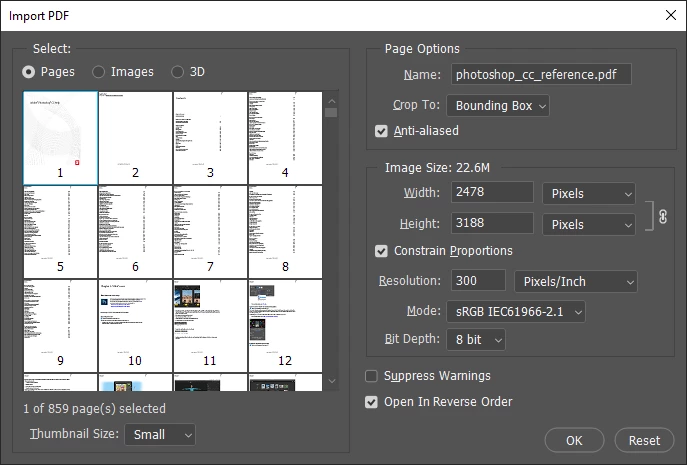
A script can filter by file type. however if you will be using a system File Open dialog there are differences between Platforms though so the file open dialog code must be coded to handle Mac and Windows systems.  I also do not process PDF files with Photoshop Scripts for there seems to be different formats of PDF files some are opened directly by photoshop's File>Open  where on other PDF files  File>Open opens a  Import PDF dialog where you can import Pages and Images into Photoshop Documents.


Paul Riggott has some PDF Processor scripts on the web you may want to look at PDF Processor script 


The File.openDialog can filters for particular image file type  however how it is done varies between Windows and Mac operating systems.  Here is a  files selection function  I use to process image file types other than PDF,


function selectFile (multi) {   
	if (multi == true) {var theString = "please select files"}   
	else {var theString = "please select one file"};   
	if ($.os.search(/windows/i) != -1) {var theFiles = File.openDialog (theString, '*.nef;*.cr2;*.crw;*.dcs;*.raf;*.arw;*.orf;*.dng;*.psd;*.tif;*.tiff;*.jpg;*.jpe;*.jpeg;*.png;*.bmp', multi)}   
	else {var theFiles = File.openDialog (theString, getFiles, multi)};   
	////// filter files  for mac //////   
	function getFiles (theFile) {   
		if (theFile.name.match(/\.(nef|cr2|crw|dcs|raf|arw|orf|dng|psd|tif|tiff|jpg|jpe|jpeg|png|bmp)$/i) || theFile.constructor.name == "Folder") {  
			return true   
			};   
	};   
	return theFiles   
};			


3 replies

Kukurykus
Legend
August 6, 2021
File(activeDocument.path).execute()
JJMack
Community Expert
JJMackCommunity ExpertCorrect answer
Community Expert
February 6, 2020

A script can filter by file type. however if you will be using a system File Open dialog there are differences between Platforms though so the file open dialog code must be coded to handle Mac and Windows systems.  I also do not process PDF files with Photoshop Scripts for there seems to be different formats of PDF files some are opened directly by photoshop's File>Open  where on other PDF files  File>Open opens a  Import PDF dialog where you can import Pages and Images into Photoshop Documents.


Paul Riggott has some PDF Processor scripts on the web you may want to look at PDF Processor script 


The File.openDialog can filters for particular image file type  however how it is done varies between Windows and Mac operating systems.  Here is a  files selection function  I use to process image file types other than PDF,


function selectFile (multi) {   
	if (multi == true) {var theString = "please select files"}   
	else {var theString = "please select one file"};   
	if ($.os.search(/windows/i) != -1) {var theFiles = File.openDialog (theString, '*.nef;*.cr2;*.crw;*.dcs;*.raf;*.arw;*.orf;*.dng;*.psd;*.tif;*.tiff;*.jpg;*.jpe;*.jpeg;*.png;*.bmp', multi)}   
	else {var theFiles = File.openDialog (theString, getFiles, multi)};   
	////// filter files  for mac //////   
	function getFiles (theFile) {   
		if (theFile.name.match(/\.(nef|cr2|crw|dcs|raf|arw|orf|dng|psd|tif|tiff|jpg|jpe|jpeg|png|bmp)$/i) || theFile.constructor.name == "Folder") {  
			return true   
			};   
	};   
	return theFiles   
};			


JJMack
niyetkhan
niyetkhanAuthor
Known Participant
February 6, 2020

Thank you.

Legend
February 6, 2020

How do you check the size of the PDF, to compare against the printed image?

Why do you rasterise your PDFs instead of printing with Acrobat?

niyetkhan
niyetkhanAuthor
Known Participant
February 6, 2020

Photoshop changes proportions, enlarges width or height. I use Photoshop because it allows me to print without margins.

PECourtejoie
Community Expert
Community Expert
February 6, 2020

HEllo, on which PDFs does it do that, when, in Ps, or just at printing?

Does it change the proportions to fit to page?