
Participating Frequently
April 26, 2017
Answered

Open the Custom HTML5 Panels on Photoshop launch

  • April 26, 2017
  • 1 reply
  • 677 views

Hi -- I am very new to adobe photoshop cc 2017 html5 panels development. I have created the panel and it is shows up in the Photoshop -> Windows -> Extensions. My requirement is to open that HTML5 panels on Photoshop startup / launch. Thanks.
This topic has been closed for replies.
Correct answer Trevor.Dennis

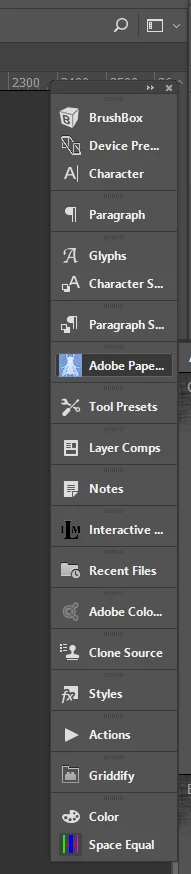
Open the extension and save as a new workspace.  What I do is park them collapsed on the right of my main screen, and click to open them.

1 reply

Trevor.Dennis
Community Expert
Trevor.DennisCommunity ExpertCorrect answer
Community Expert
April 26, 2017

Open the extension and save as a new workspace.  What I do is park them collapsed on the right of my main screen, and click to open them.

Participating Frequently
April 27, 2017

Hi Trevor.Dennis, Thanks for the solution. Is there any thing we could do it through programmatically to open the extenstion when the photoshop startup/ launch. I need to show the extension by default on Photoshop launch. Thanks for your help.