Participant
June 26, 2020
Answered

OpenCL Grayed Out with Intel Iris Plus Graphics 640

  • June 26, 2020
  • 1 reply
  • 1368 views

Hello!


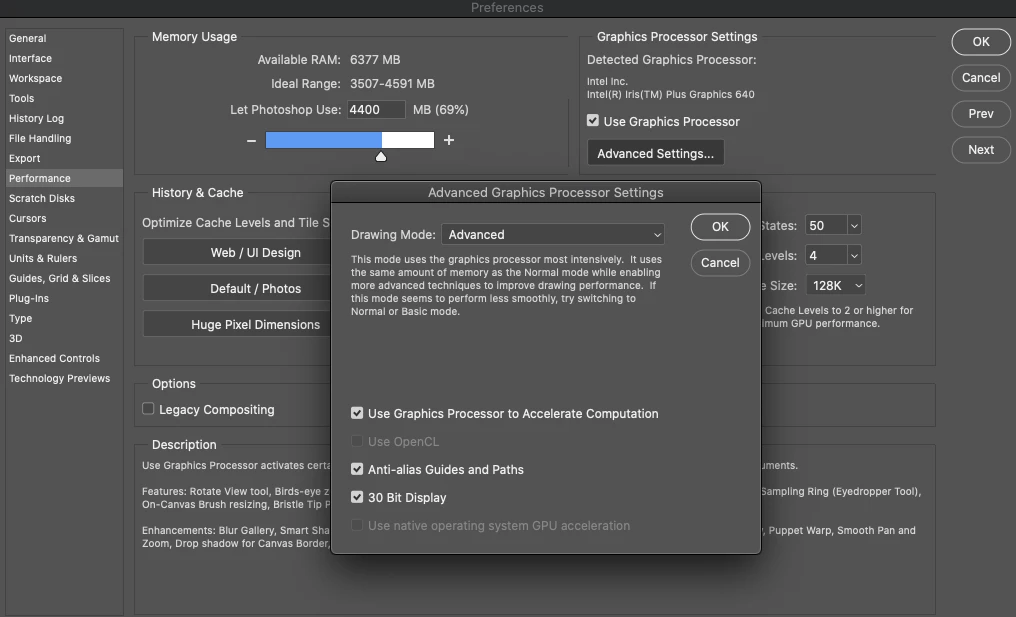
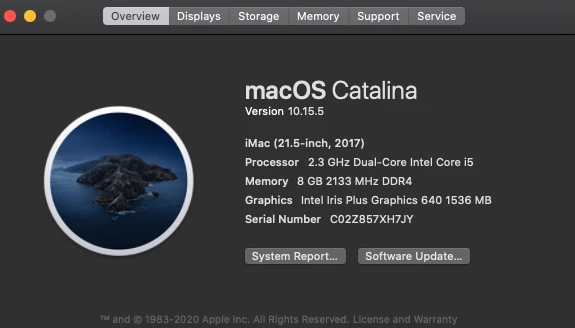
I recently bought a mac. Here are screenshots of it's specs and my problem. I thought this GPU would be capatible with photoshop's OpenCL features like Oil Paint, etc...


This topic has been closed for replies.
Correct answer D Fosse

No, I mean deleting the actual Photoshop Preferences file, which is resaved into your user account every time you quit the application. This makes it susceptible to corruption by cumulative errors. A corrupt prefs file can cause unpredictable and erratic behavior.


If you open Edit > Preferences, there is a button to "reset preferences on quit". This deletes the file so that it is rebuilt on next launch.

1 reply

D Fosse
Community Expert
Community Expert
June 26, 2020

Open CL is a component in the video driver. It could be a bug in the driver (integrated into MacOS), exposed by changed functionality in the new PS version.


But first try to reset preferences. Sometimes a corrupt preferences file can cause problems in a new version with changed code, whereas it didn't give any symptoms in the previous version.

kapakeilAuthor
Participant
June 26, 2020

Okay, so I changed the preferences by unboxing all in advanced settings, and then unboxed "use graphics processor". I then closed out PS and reopened. Tried to set back and still grayed out.

Is this process what you meant by resetting preferences?

D Fosse
Community Expert
D FosseCommunity ExpertCorrect answer
Community Expert
June 26, 2020

No, I mean deleting the actual Photoshop Preferences file, which is resaved into your user account every time you quit the application. This makes it susceptible to corruption by cumulative errors. A corrupt prefs file can cause unpredictable and erratic behavior.


If you open Edit > Preferences, there is a button to "reset preferences on quit". This deletes the file so that it is rebuilt on next launch.
