
Participant
January 31, 2022
Answered

OpenGL problems in PS 2021

  • January 31, 2022
  • 3 replies
  • 1768 views

I can't use rotate view tool, moving and zooming canvas are very laggy. When I try using rotating tool I get an error "Could not complete your request because it only works with OpenGL enabled document windows".
Everything was working just fine on friday, and when I started work today, it's just didn't work anymore. 
So one thing that came to my mind immediately, I updated my nvidia drivers on the weekend, so I tried roll back, but it didn't work. I even tried completely fresh installation with no luck. I tried installing the newest PS version too just to see if it's gonna be fixed, but unfortunately it's not.
I'm on Windows 10, my exact PS version is: Adobe Photoshop Version: 22.2.0 20210202.r.183 2021/02/02
My Nvidia drivers version: 436.15
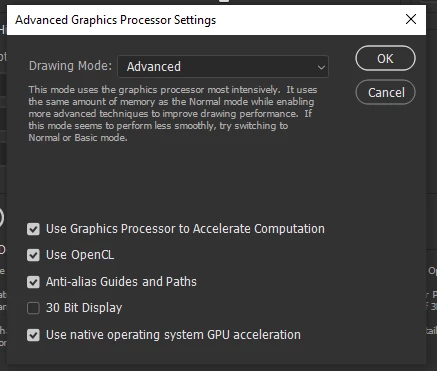
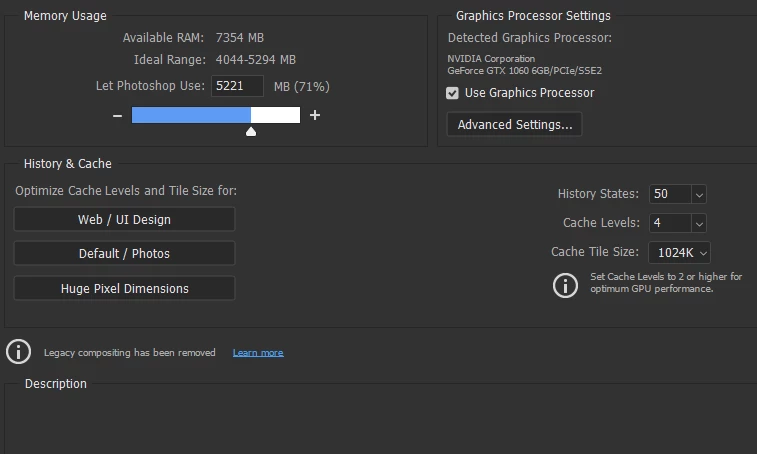
And this is what is in performance options in Photoshop:

I would be very grateful for helping with fixing this problem, it's really hard to work this way :|.

This topic has been closed for replies.
Correct answer mateuszk26262502

Thank you for your replies!

I actually managed to make it work by decreasing memory usage slider to about 4500MB and also by deselecting "Use native operating system GPU acceleration". I don't know why it works with this combination of changes, but it does. I tried changing these separately before, but it didn't have any effect, and it works in this combination for me.

3 replies

mateuszk26262502AuthorCorrect answer
Participant
January 31, 2022

Thank you for your replies!

I actually managed to make it work by decreasing memory usage slider to about 4500MB and also by deselecting "Use native operating system GPU acceleration". I don't know why it works with this combination of changes, but it does. I tried changing these separately before, but it didn't have any effect, and it works in this combination for me.

davescm
Community Expert
Community Expert
January 31, 2022

"..........I updated my nvidia drivers on the weekend,.............My Nvidia drivers version: 436.15."


The current studio driver for the GTX1060 is 472.84

https://www.nvidia.co.uk/Download/Find.aspx


If you update, choose Advanced options in the NVidia installer, then choose "clean install"


Dave

Tarun Saini
Community Manager
Community Manager
January 31, 2022

Hi there,


We're sorry about the trouble with Photoshop as you're unable to use Rotate Tool. What is the size of the document you are using? Are you using any external output device or keyboard-mouse to access Photoshop?


Would you mind updating Photoshop to 23.1.1 and try to Reset the tool by right clicking on the rotate tool icon in the Tools bar and select Reset Tool. If you choose Reset All Tools, all the Photoshop tools will get reset to their defaults.


Please go to Edit > Preferences > Technology Previews checking

Deactivate Native Canvas, restarting photoshop and see if the performance is any better.


If the above step does not help, you may also try resetting the preferences of Photoshop by: https://helpx.adobe.com/photoshop/using/preferences.html

Backup your preferences before reset by: https://helpx.adobe.com/photoshop/using/preferences.html#BackupPhotoshoppreferences


Let us know if that helps.


Regards,

Tarun