daniellerenee144
Participant
May 7, 2017
Answered

OpenGL Randomly Doesn't Work in Photoshop CC 2017

  • May 7, 2017
  • 2 replies
  • 2117 views

Hello, I'm hoping someone can help me with this strange problem I keep having. OpenGL sometimes doesn't seem to be activated randomly in Photoshop CC 2017,despite the fact that it was working less than 12 hours ago. I haven't updated any drivers or changed anything on my computer in that time. The fact that operations using OpenGL worked 12 hours ago tells me that I have everything required to get OpenGL to work. I've tried restarting Photoshop and my computer and nothing works. Here are my preferences right now.
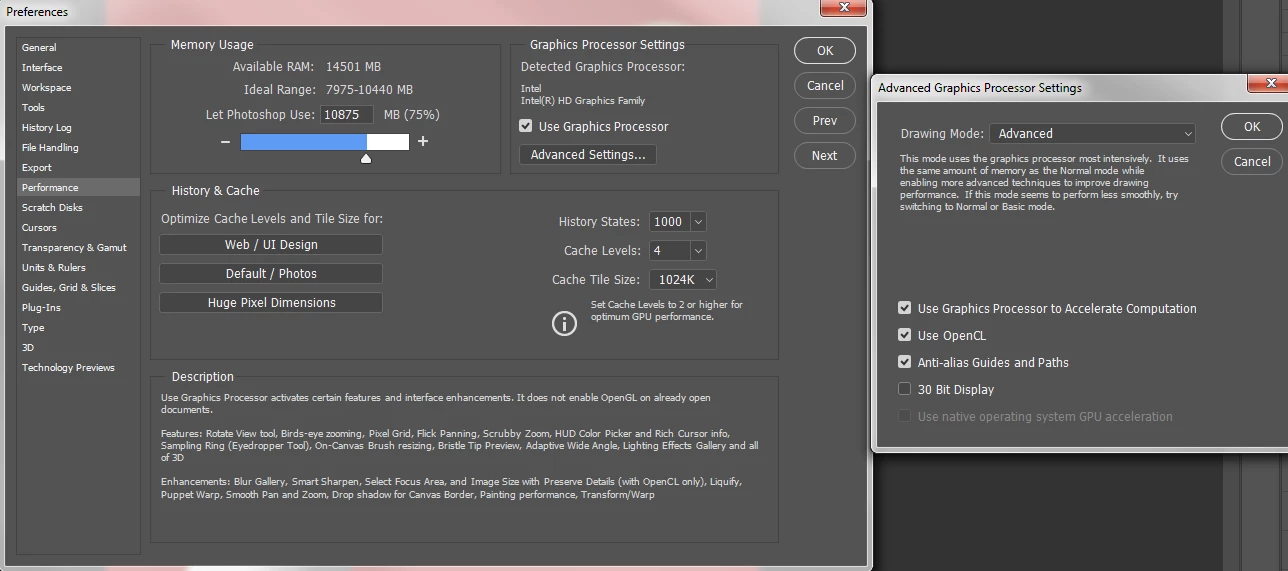
My graphics drivers are up to date too, I've updated them a few weeks ago, nothing has changed since, this problem has been happening both before and after I updated my drivers. To me this problem seems completely random without any rhyme or reason and I'm hoping someone can help me out with this. Thanks for your time

This topic has been closed for replies.
Correct answer Mohammad.Harb

Reset Photoshop Preferences to their defaults,  this video shows How

Preferences in Photoshop

2 replies

Trevor.Dennis
Community Expert
Community Expert
May 7, 2017

Hi Danielle

Is this a laptop computer?  If yes, then it is possible that the onboard Intel HD GPU is not the only GPU.  Laptops often have a dedicated video card like a GT650M and an onboard Intel HD, and switch between them using the Intel GPU to save battery power.  The fact that you have 16Gb of RAM makes me think it quite likely that you have such an arrangement.

Tell us what the make and model of your computer is, or see if you have something like an NVIDEA Control Panel.  If you do have such a control panel, then you might be able to force your system to use the more powerful GPU. 

Mohammad.Harb
Community Expert
Mohammad.HarbCommunity ExpertCorrect answer
Community Expert
May 7, 2017

Reset Photoshop Preferences to their defaults,  this video shows How

Preferences in Photoshop