Inspiring
February 5, 2019
Answered

Opening a 2019 PSD file with Photoshop CS4?

  • February 5, 2019
  • 2 replies
  • 1171 views

I saved an Adobe Illustrator logo as a layered PSD file per my client's request using Adobe Creative Cloud 2019 for the Mac. He's trying to open it with Photoshop CS4 for Windows but is getting the following error.
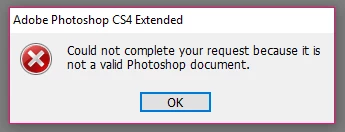
From what I understand, he's trying to create a geo filter for SnapChat, which I know absolutely nothing about. Is there anything I do on my end to facilitate him being able to open the layered PSD? Is there another file format that's better suited for his intended application?

Thanks!
This topic has been closed for replies.
Correct answer Trevor.Dennis

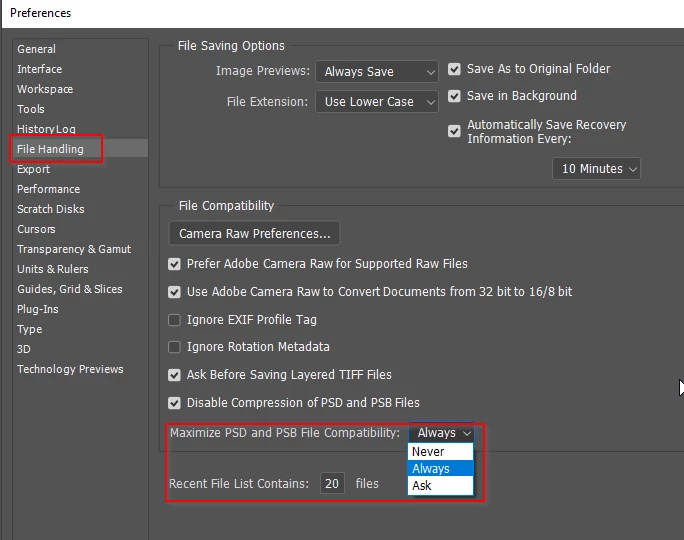
In CC2019 Preferences set Maximise PSD & PSB File Compatability to Always

2 replies

Sebastian Bleak
Community Expert
Community Expert
February 5, 2019

Would saving the file as at Tiff help?

chanaart
Community Expert
Community Expert
February 5, 2019

No need to save as a Tiff yuo just need ot indicate it in the preferences as mentioned above.

Trevor.Dennis
Community Expert
Trevor.DennisCommunity ExpertCorrect answer
Community Expert
February 5, 2019

In CC2019 Preferences set Maximise PSD & PSB File Compatability to Always

kcrossleyAuthor
Inspiring
February 5, 2019

Excellent! Thank you.