Known Participant
July 29, 2022
Answered

Opening images at 50%

  • July 29, 2022
  • 2 replies
  • 761 views

I wonder if it is possible to set the default for images opening to 50%. Photoshop 2022, Windows 10.

Many thanks in anticipation.

This topic has been closed for replies.
Correct answer Stephen Marsh

50% what?


I'm guessing view zoom size of 50% – 1:2...


An action set to view 100%, then zoom out twice (insert menu item command, not record):
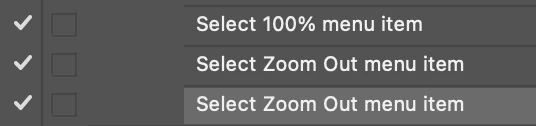


The action would be automatically run from the Script Events Manager whenever an image the open event is triggered:


https://prepression.blogspot.com/2021/10/photoshop-script-events-manager.html


Here it is in a scripted form:


/* https://community.adobe.com/t5/photoshop-ecosystem-discussions/image-view/m-p/10650951 */

setZoom(50); // as percent

function setZoom(zoom) { 
   cTID = function (s) {
      return app.charIDToTypeID(s);
   }; // from xbytor
   var docRes = activeDocument.resolution;
   activeDocument.resizeImage(undefined, undefined, 72 / (zoom / 100), ResampleMethod.NONE);
   var desc = new ActionDescriptor();
   var ref = new ActionReference();
   ref.putEnumerated(cTID("Mn  "), cTID("MnIt"), cTID('PrnS'));
   desc.putReference(cTID("null"), ref);
   executeAction(cTID("slct"), desc, DialogModes.NO);
   activeDocument.resizeImage(undefined, undefined, docRes, ResampleMethod.NONE);
}


2 replies

Stephen Marsh
Community Expert
Stephen MarshCommunity ExpertCorrect answer
Community Expert
July 29, 2022

50% what?


I'm guessing view zoom size of 50% – 1:2...


An action set to view 100%, then zoom out twice (insert menu item command, not record):


The action would be automatically run from the Script Events Manager whenever an image the open event is triggered:


https://prepression.blogspot.com/2021/10/photoshop-script-events-manager.html


Here it is in a scripted form:


/* https://community.adobe.com/t5/photoshop-ecosystem-discussions/image-view/m-p/10650951 */

setZoom(50); // as percent

function setZoom(zoom) { 
   cTID = function (s) {
      return app.charIDToTypeID(s);
   }; // from xbytor
   var docRes = activeDocument.resolution;
   activeDocument.resizeImage(undefined, undefined, 72 / (zoom / 100), ResampleMethod.NONE);
   var desc = new ActionDescriptor();
   var ref = new ActionReference();
   ref.putEnumerated(cTID("Mn  "), cTID("MnIt"), cTID('PrnS'));
   desc.putReference(cTID("null"), ref);
   executeAction(cTID("slct"), desc, DialogModes.NO);
   activeDocument.resizeImage(undefined, undefined, docRes, ResampleMethod.NONE);
}


Known Participant
July 29, 2022

Many thanks for the reply. Yes, it's the zoom size. At the moment, opening from Bridge, the images seem to come up at a default 33%. I will give this a go later but when it comes to scripting it's an alien land for me.

Stephen Marsh
Community Expert
Community Expert
July 29, 2022

@ivork49482256 wrote:

I will give this a go later but when it comes to scripting it's an alien land for me.


As shown, it can be done with a three-step action if you are more comfortable with actions than scripts.


I provided the script code above, so all you need to do is:


  1. Copy the code text to the clipboard
  2. Open a new blank file in a plain-text editor (not in a word processor)
  3. Paste the code in
  4. Save the text file as .txt
  5. Rename the file extension from .txt to .jsx
  6. Install the .jsx file to run (see below)

https://prepression.blogspot.com/2017/11/downloading-and-installing-adobe-scripts.html#Photoshop


Finally, setup the Script Events Manager as per my previous post to use the action or script on the open event.


There are numerous posts on this in the forum, it is common for some users to wish all files to open with fit on screen, or 100% or another view option as default.


c.pfaffenbichler
Community Expert
Community Expert
July 29, 2022

One can link an Action or a Script (that sets the zoom level) to the Open-Event via File > Scripts > Script Events Manager. 

Known Participant
July 29, 2022

Many thanks.