richmarkemerson
Participating Frequently
August 16, 2019
Answered

Opening Layers in Photoshop

  • August 16, 2019
  • 1 reply
  • 1689 views

I'm trying to open 3 images in Photshop from Lightroom.  I select the images in Library then go to Photo/Edit in/Open as layers in Photoshop.  This opens PS as expected and I can see PS open all 3 images.  I want to see them as layers so that I can merge them.   Layers is ticked under the Window tab but there only appears to be one image that has remained, it's as if the other 2 images have been closed.  There is only one file name at the top left of the window and when I close that with the x, there are no images left underneath.

Any ideas?
    This topic has been closed for replies.
    Correct answer mikaels71195823

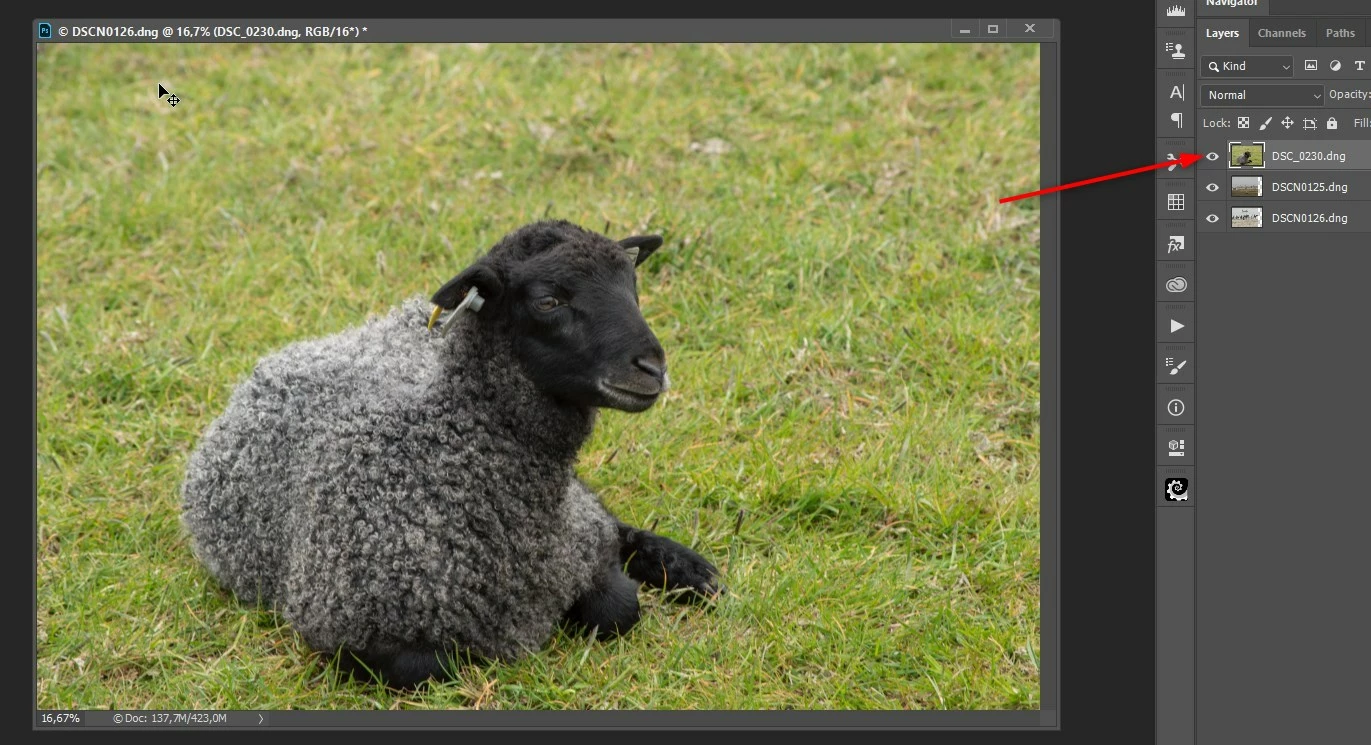
    I did like you say and I got tree images on seperate layers, the top layer is the one you see until you click on the eye symbol then you see image 2 and click on the eye and you see image 3

    1 reply

    mikaels71195823
    mikaels71195823Correct answer
    Inspiring
    August 16, 2019

    I did like you say and I got tree images on seperate layers, the top layer is the one you see until you click on the eye symbol then you see image 2 and click on the eye and you see image 3

    Best regards: Micke Seise
    richmarkemerson
    Participating Frequently
    August 16, 2019

    I dont get the panel down the right hand side though.

    c.pfaffenbichler
    Community Expert
    Community Expert
    August 16, 2019

    I dont get the panel down the right hand side though.

    Window > Layers