Participating Frequently
August 26, 2022
Question

OpenType features / horizontal possition of special character (accents, nikkud etc)

  • August 26, 2022
  • 1 reply
  • 1458 views

OpenType features / horizontal possition of special character (accents, nikkud etc)

I have an issue using a OpenType-Font (koren siddur from masterfont; bought the font from a regular distributer). It is a hebrew font and I has special characters for vowels/nikudim (sort of like accents in latin fonts, little more complex).


Now these character do place wrong horizontaly. They used to place correct in an earlier version I think (I don't use this too often). It does not seem to be an issue of the font as they do place horizontaly correct in LibreWriter. Other more simple hebrew font do work correctly as you can see with the example.
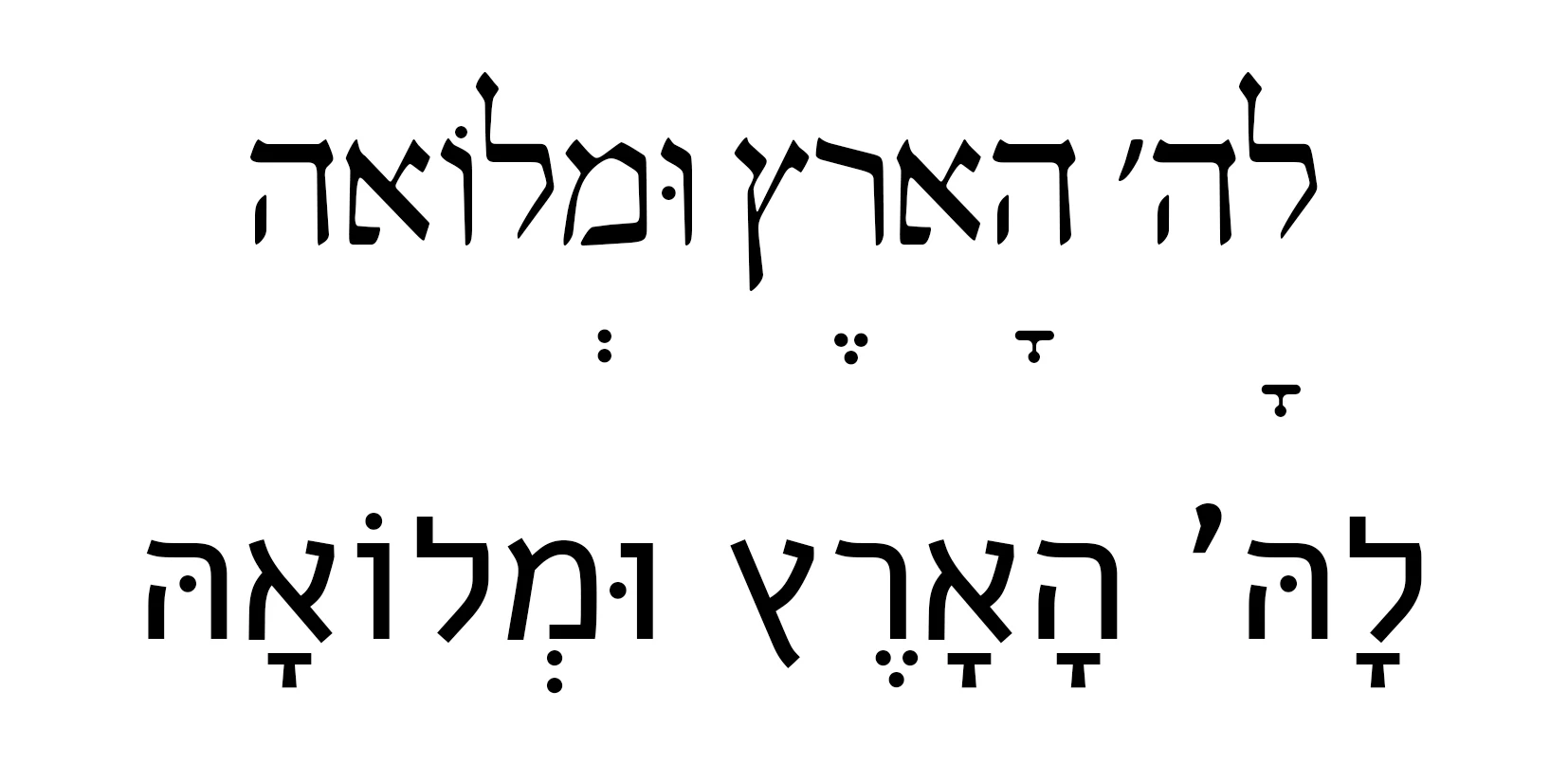
 

I tried various setting of the character or paragraph dialogue.


Anybody any hint or idea how to fix this?


I use: Adobe Photoshop Version: 23.5.0 20220809.r.669 0e07917 x64

This topic has been closed for replies.

1 reply

JB_FFMAuthor
Participating Frequently
September 5, 2022

Great "help" from @CShubert just enforcing your Community Rules and locking other Postings. One cannot edit Postings oder change the subject, e.g. to Bug from Discussion. Hence you may want to spend some of you "great" effort on those issues or my question. However all you did is not help me at all. Poor service by a company's official - sorry.

quote

OpenType features / horizontal possition of special character (accents, nikkud etc)

I have an issue using a OpenType-Font (koren siddur from masterfont; bought the font from a regular distributer). It is a hebrew font and I has special characters for vowels/nikudim (sort of like accents in latin fonts, little more complex).


Now these character do place wrong horizontaly. They used to place correct in an earlier version I think (I don't use this too often). It does not seem to be an issue of the font as they do place horizontaly correct in LibreWriter. Other more simple hebrew font do work correctly as you can see with the example.


I tried various setting of the character or paragraph dialogue.


Anybody any hint or idea how to fix this?


I use: Adobe Photoshop Version: 23.5.0 20220809.r.669 0e07917 x64


By @JB_FFM


JB_FFMAuthor
Participating Frequently
September 5, 2022

Photoshop did render this font correctly in an earlier version (I fortunately do not know which version this was). So to me this looks like a bug in Photoshop. Maybe @CShubert gonna look at this issue and not only lock any post?

Adobe Employee
September 5, 2022

Not sure this helps, but can you try setting the type layer's layout to "Latin and East Asian Layout" in the context menu of the Paragraph panel? Le me know if it makes difference. Also, if you can post the test file, it would be helpful. Thanks.