Known Participant
February 3, 2024
Answered

Option Sélection --> Modifier grisée (Photoshop)

  • February 3, 2024
  • 2 replies
  • 727 views

Bonjour,


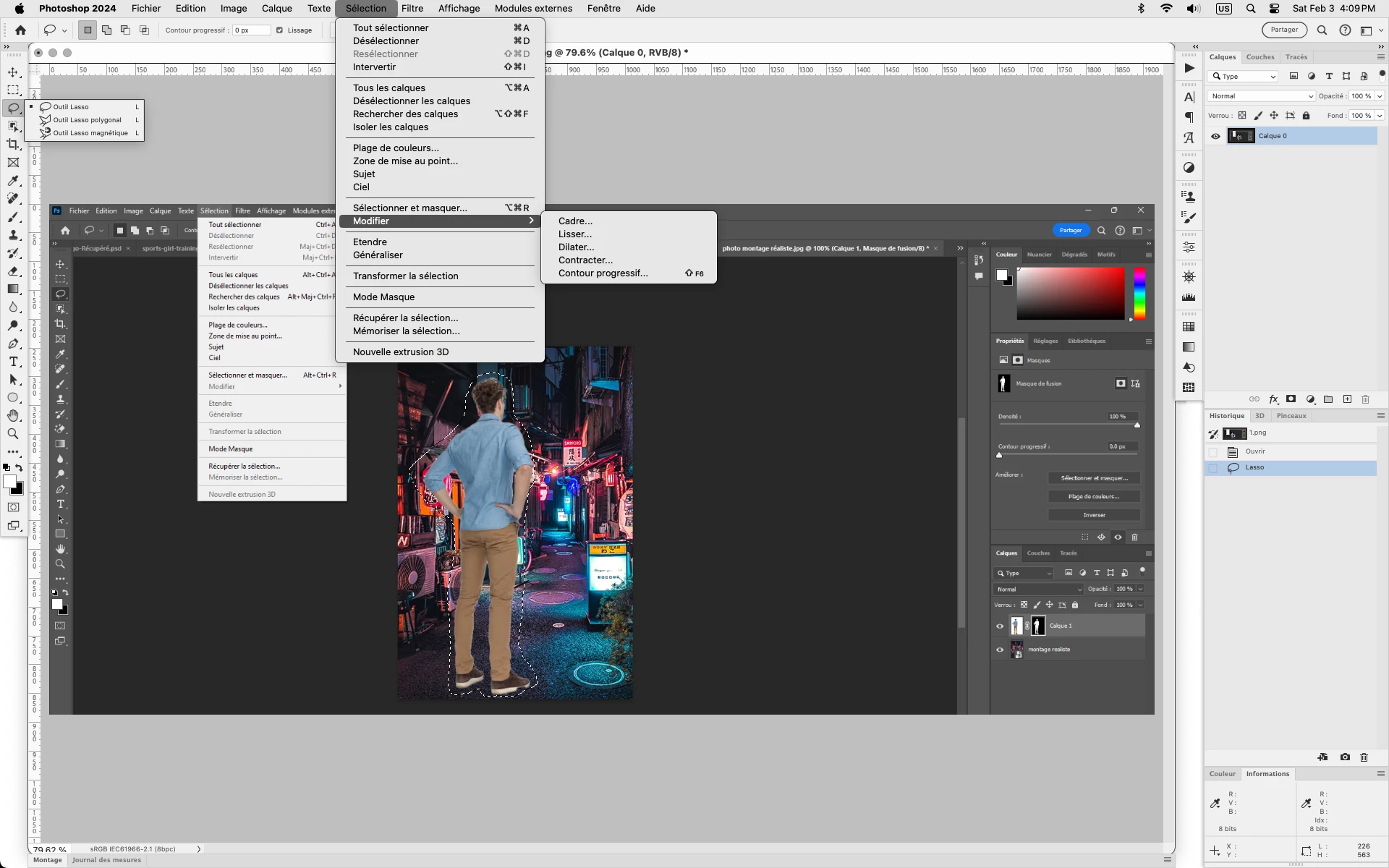
J'ai effectué une séléction de sujet sur une photo et lorsque je tente  Séléction --> Modifier, Modifer est grisé.

J'ai tenté la manipulation en mettant la photo en objet dynamique et aussi en pixels mais rien n'y fait. J'ai même tenté de séléctionner le sujet via l'outil lasso mais cela revient à la même chose. J'ai également essayé de faire CTRL + masque de calque pour être sûre que la séléction soit bien prise en compte.


J'ai regardé les divers fils de discussions à ce sujet mais aucune des propositions n'a solutionné mon problème.


Auriez-vous une idée s'il vous plaît? (Je joins une capture en pièce jointe pour que ce soit plus clair)


Merci par avance
This topic has been closed for replies.
Correct answer Jeff Arola

In your screenshot for whatever reason there is no active selection.


You can tell by looking at the Select ( Sélection) menu and seeing that Deselect (Sélection > Désélectionner) is greyed out.


Start with a simple selection by using the Lasso Tool, then Sélection>Modifier should be available.


To get a Sélection from a layer mask Ctrl left click on the layer mask thumbnail in the layers panel.


2 replies

Jeff Arola
Community Expert
Jeff ArolaCommunity ExpertCorrect answer
Community Expert
February 3, 2024

In your screenshot for whatever reason there is no active selection.


You can tell by looking at the Select ( Sélection) menu and seeing that Deselect (Sélection > Désélectionner) is greyed out.


Start with a simple selection by using the Lasso Tool, then Sélection>Modifier should be available.


To get a Sélection from a layer mask Ctrl left click on the layer mask thumbnail in the layers panel.


Known Participant
February 3, 2024

C'était exactement ça! En maintenant la touche CTRL  sur la vignette du masque la selection apparaît.

Un grand Merci :)! 

jane-e
Community Expert
Community Expert
February 3, 2024
quote

I made a subject selection on a photo and when I try  Select --> Edit, edit is grayed out.

By @Louise34539939j7qd


You don't have a selection (marching ants). Instead you have a Layer Mask. What are you trying to accomplish?


Jane


Known Participant
February 3, 2024

Merci pour votre retour, on vient de me débloquer le problème 🙂