
F23158784
Participating Frequently
December 30, 2019
Question

OTF font tails not showing

  • December 30, 2019
  • 4 replies
  • 1745 views

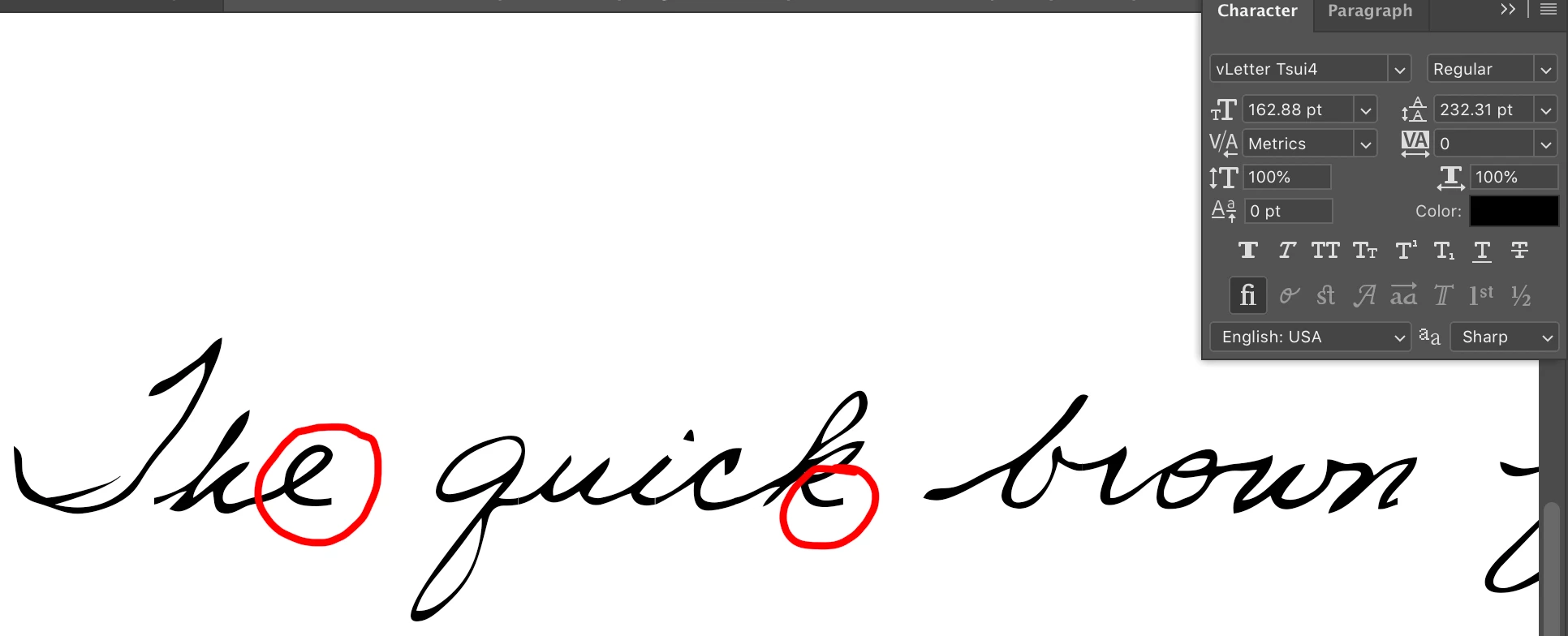
I'm having issues with OTF font tails not showing. First photo shows how the end of each word is clipped off. As you can see, "standard ligatures" option is selected.


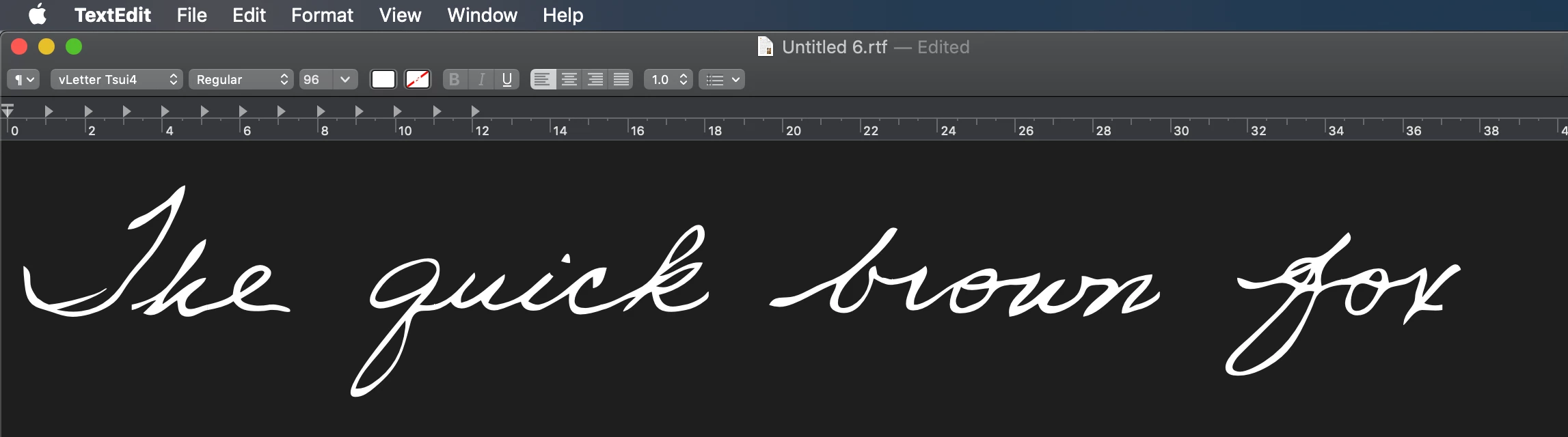
But in TextEdit or any other OTF-supporting app, the tails appear as expected, like below:


The font developer says "Adobe applications do not use the standard Mac or Windows line layout routines, and the Adobe routines have a bug that doesn't display the end of word tails automatically. Press Option-T to manually add a tail at the end of a word." I tried Option-T, but it doesn't seem to do anything.

I'm using the most recent update of Photoshop CC.

Any ideas how I can fix this?

This topic has been closed for replies.

4 replies

Jeff Arola
Community Expert
Community Expert
December 31, 2019

You might also post this question in the Type & Typography forum


If anyone at adobe would know the anwer it would be Dov Issacs


https://community.adobe.com/t5/type-typography/bd-p/type-and-typography?page=1&sort=latest_replies&filter=all

F23158784
F23158784Author
Participating Frequently
December 31, 2019

Further update:

I discovered the tails work automatically in "Middle Eastern & South Asian Layout" (and not in my default "Latin & East Asian Layout"). Switching to that is an 'OK' workaround for me, but inconvenient when changing between fonts, since it requires spacing adjustments. Hoping either the font developer or somebody here might know the cause of this issue with this new info?


Kevin Stohlmeyer
Community Expert
Community Expert
December 31, 2019

This sounds like a definite issue with the font developer not supporting non-latin layouts.

Jeff Arola
Community Expert
Community Expert
December 30, 2019

I would report the issue with the link given by kstohimeyer1 above and see what adobe says.


https://feedback.photoshop.com/photoshop_family


You would think since adobe does make it's own fonts they would know the proper

way to implement all of the different font features.

Jeff Arola
Community Expert
Community Expert
December 30, 2019

To do Optiion+T place the type cursor at the end of the word and the press Option+T to get the tail.


F23158784
F23158784Author
Participating Frequently
December 30, 2019

Thanks Jeff -- I had tried that with the font and it didn't work, but then just tried with with the same demo font you used and it does work, so must be the specific font.

Even if that does work, it'll be too much of a pain to do this after every word. Do you have any idea if this is an Adobe issue or an issue with the font itself?

Kevin Stohlmeyer
Community Expert
Community Expert
December 30, 2019

Sounds like a bug with this specific font developer and Adobe. There really isn't anything outside of their recommendation that can be done at this time, but you can file a bug report here:

https://feedback.photoshop.com/photoshop_family