

Chris  P.  Bacon
Inspiring
January 2, 2023
Question

Other tool than clone stamp for removing artifacts?
  • January 2, 2023
  • 3 replies
  • 855 views

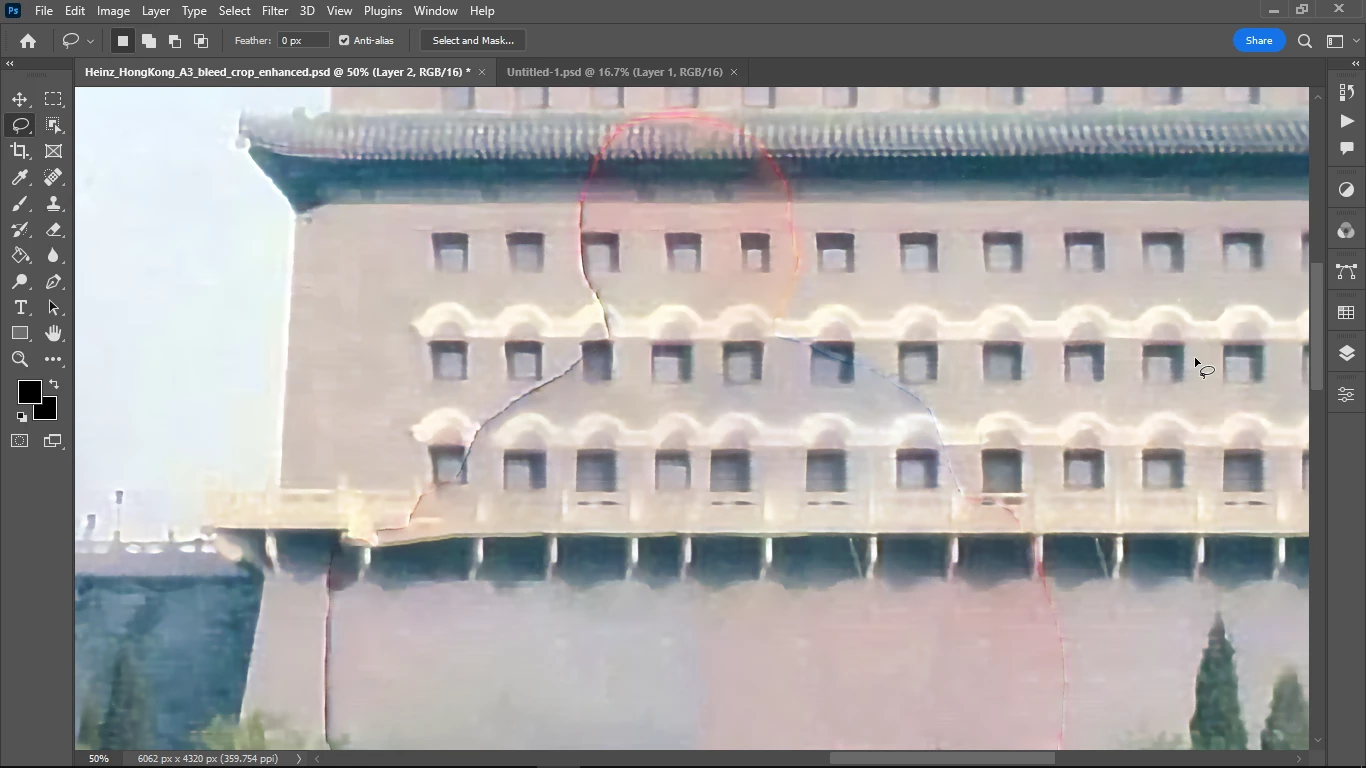
How do I remove the outlines of a person that I removed from the image?

What I am doing is I take big spread size images and I save their objects as separate files, and then I reconstruct the image as a collage.

That would allow me to add extra objects into the image, to omit some of the objects, and I do this because I am creating a collage magazine layout, meaning that there will be text chunks added.

So I will combine the objects of this image with text objects so that I will partly recreate the image, but it might be slightly differently composed, to make space for the text.

I only know the clone stamp tool for this purpose, but only using that I am afraid that I would leave artifacts, so I wonder if there is any AI or automated tool for removing "ghost" part of images, like this countour left from a removed person?

What should I Google to find some good articles? I think I am lacking the terminology here.

The person was removed by selecting it then content aware fill.


This topic has been closed for replies.

3 replies

Conrad_C
Community Expert
Community Expert
January 3, 2023

Also, if it’s a common problem to have those hard leftover outline edges, that might be because the selection is too tight. If so, when you create a selection outline of a person, see if it helps to choose Select > Modify > Expand, expand the selection by 2 or 3 pixels, and then remove the person.

Trevor.Dennis
Community Expert
Community Expert
January 3, 2023

Jesus Rameriz has some clever tricks for removing outlines and fringes.


Nancy OShea
Community Expert
Community Expert
January 2, 2023

I don't use Clone Stamp much anymore.


The Patch Tool is an effective way to replace unwanted pixels with pixels from another part of your image.  I use it often in retouching.

https://helpx.adobe.com/photoshop/using/tool-techniques/patch-tool.html


Also the Spot Healing Brush is another good tool to try.

https://helpx.adobe.com/photoshop/using/healing-examples.html


Nancy O'Shea— Product User & Community Expert
Trevor.Dennis
Community Expert
Community Expert
January 3, 2023

Absolutely a job for the Patch tool with it set to Destination in the Options Bar

Per Berntsen
Community Expert
Community Expert
January 2, 2023

The Spot healing brush tool set to Content.Aware will get you a long way.

I used it on your screenshot, and also used the Color mixer/HSL tab of the Camera Raw filter to set saturation to -100 for red, orange, purple and magenta to get rid of the red blotches.

This was quick an dirty, so the grey wall now has a colder tone, but with some fine tuning you can probably get it warmer wihtout any red blotches.