

Carly26216278mejj
Participant
August 7, 2024
Answered

Outer Glow Not Overlapping

  • August 7, 2024
  • 4 replies
  • 587 views

Hi all,


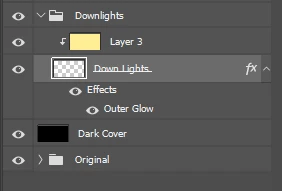
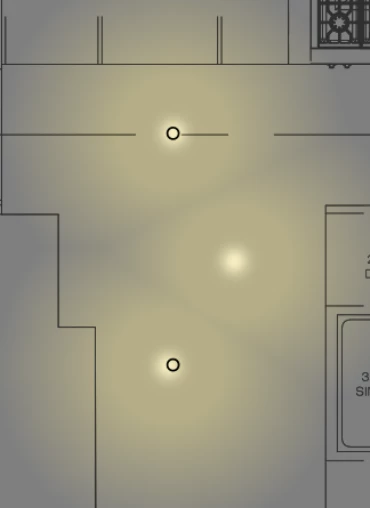
I'm having a problem with my outer glow effect not overlapping and creating harsh cutoff lines. I made a blank layer with simple brushstrokes, then applied the outer glow effect, expecting the glow to overlap, but instead, the glow cuts off before it reaches another brush stroke. Is there a way to correct this? I've tried changing the blending mode and the outer glow parameters, but nothing has worked. I know I can make individual shapes with an outer glow effect that will overlap. However, I'm trying to avoid doing that since the document size is already pretty large. Here is a snip of my problem and my layer structure.
This topic has been closed for replies.
Correct answer c.pfaffenbichler

It seems »Precise« creates the transparency similar to the Blend Mode »Lighten«, »Softer« similar to »Screen«. 

4 replies

c.pfaffenbichler
Community Expert
c.pfaffenbichlerCommunity ExpertCorrect answer
Community Expert
August 8, 2024

It seems »Precise« creates the transparency similar to the Blend Mode »Lighten«, »Softer« similar to »Screen«. 

Carly26216278mejj
Participant
August 8, 2024

Thank you so much this solved my issue!!!

c.pfaffenbichler
Community Expert
Community Expert
August 8, 2024

You’re welcome. 

I hadn’t noticed the difference myself previously … 

c.pfaffenbichler
Community Expert
Community Expert
August 8, 2024

Can you spot the difference? 

c.pfaffenbichler
Community Expert
Community Expert
August 8, 2024
quote

I know I can make individual shapes with an outer glow effect that will overlap.

So you have a solution. 


But, as I don’t seem to be able to reproduce the issue, could you provide a file with theat Layer for testing? 

Or at least post a screenshot to illustrate the Outer Glow-settings? 

Bojan Živković11378569
Community Expert
Community Expert
August 8, 2024

I am not certain about what you want to achieve. You have applied the Outer Glow effect; are you expecting it to fill the space between the strokes or something different?