Participating Frequently
February 5, 2020
Answered

Overwrite a jpg create a copy instead

  • February 5, 2020
  • 16 replies
  • 10406 views

I have just updated to PS 2020 after long time with PS CC 2018. I'm on macOS Catalina. 
I have a problem in overwriting files: when I try to save an image that already exists, Photoshop asks me if I want to overwrite the file. 

Even if I confirm, it always decides to save a "namefile_copy.jpg" of it, so I find myself with two files and I have to manually erase the old one and rename the new one without the "copy", is there something to prevent the creation of a new file? I want to overwrite my existing jpg.
Thank you! 

This topic has been closed for replies.
Correct answer daniels53766830

Hi there. I found/created a fast workaround that works perfectly for me and probably for everyone else.

I used the actions-panel to solve this problem, because there is an underestimated backdoor:
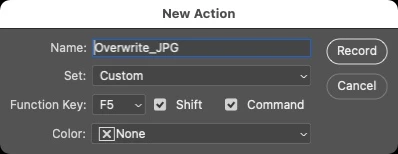
The moment you create a new action (BEFORE you start recording it), you can set a keyboard-shortcut for the action.


So what ever you will record will be "launched" by simply using the given shortcut.

I recorded the following:
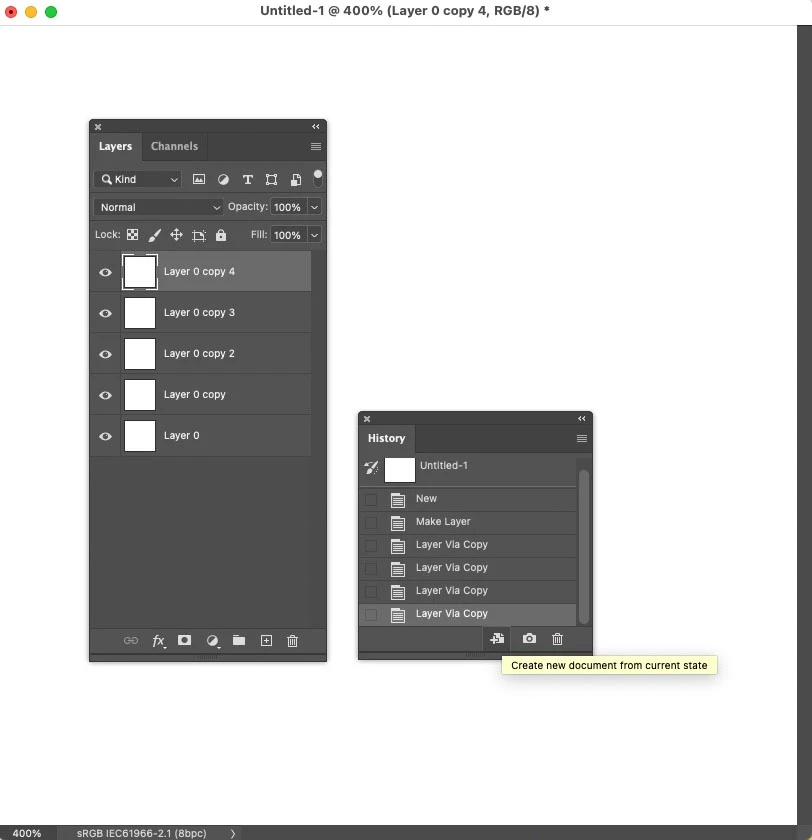
• "create new document from current state" in the history panel

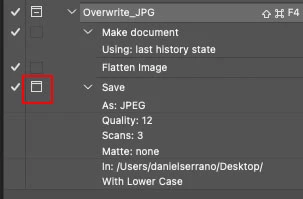
• then: Layer-> Flatten Image (most important step, as only flattend images will overwrite existing JPGs)

• then: File->Save-As (all JPG options you are chosing are not important)

• stop recording the action.

• in the recorded action click on the folder icon next to the SAVE action. This ensures that the save-as-window will pop up where you can just click on the JPG you want to overwrite and define the quality.  

And as it's a flattend file, it will overwrite the existing JPG. 


I was used to press CMD-SHIFT-S for saving as JPG (but it didn't overwrite).

Now its CMD-SHIFT-F5 that saves and overwrites the JPGs.

I will use this as long as Adobe doesn't fix the problem.

Hope it helps you too.


16 replies

Participant
March 18, 2022

I discovered that this happens when you save a jpg from the PSD with layers in it. If you combine all the layers (Command + E) and hit File->Save, it will replace the current jpg of the same name instead of creating a copy. If you save it having layers it will always create a copy if there is another file with the same name. Hope it helps.

Participant
November 3, 2021

File > Export > Quick Export as PNG solved this issue for my case. Hope this can help!

Oli_Donowitz
Participating Frequently
February 4, 2021

Coming up to a year since this posts was made!.. JJMack, you are an MVP, but the issue we are all having did not require any other step to overwrite a JPG file, other than telling PS to overwrite it. For me, any workaround to this issue is unnacceptable. If I tell PS to overwrite a file.. OVERWRITE THE FILE! don't creat a copy. I've been working with some pretty tight deadlines during this pandemic, and more than ONCE I've sent the wrong file because PS created a copy, instead of overwritting the JPG

JJMack
Community Expert
Community Expert
February 4, 2021

Please contact Adobe and have Adobe change Photoshop design for you for you want your files replaced Photoshop current design is unacceptable. This is a Photoshop user community we can not change  Photoshop operation. It does not matter if one is a MVP, ACP, Aministrator, Moderatot ect.  Adobe would need to change Photoshop Design perhaps add a overwrite option that can be set.  Adobe current Photoshop design is the way is it to protect users from accidentally overeating existing files.   Users here just try to help other user accomplish what they want to do.  If you find workaround unacceptable you need to work with  Adobe to have Photoshop changed. Abobe may find adding a force overwrit is unacceptable. You need Adobe assistance with your issue.

JJMack
Oli_Donowitz
Participating Frequently
February 4, 2021

The point I was trying to make, is that you pointed out workarounds, and my point, and I guess most people's point, is that it should not require any sort of workaround, or extra steps. As far as I remember (first PS I had was 6 when I was in middle school), when PS asked if I was sure I wanted to overwrite the JPG, and I clicked Yes, thats exactly what it did, not create a copy. I am very aware this is a User Community, still one created by Adobe. I'm not saying that I expect Adobe employees to be lurking around the threads or forums, and taking notes. But I'd be surprised if someone wasn't. Then again I have waisted LONG hours with Adobe Customer support, a problem with Dynamic Links between Pr and Ae.. I had to almost do the entire project again, because the support tech, even after granting him remote control of my Mac, was not able to fix the issue. That bug is also a few years old.


I had to uninstall and basically purge my computer of everything Adobe because the Tech support guy moved/erased/copied so many Library and Preferences files that everytime I started any Adobe app, I'd get a warning message about Color Space or something.

Participant
February 3, 2021

I have the same problem on my Mac Pro with Catalina AND my iMac on Big Sur. 

This is a very annoying bug. Thanks Adobe to fix it ASAP.

JJMack
Community Expert
Community Expert
February 3, 2021

Your not addressing Adobe here. This is a Adobe Photoshop user community.  Copy is not a bugs is is done so a an automated process like a Batched Action  will not inadvertently overwrite a file.  If you use Photoshop menu file save As interactively and set into the dialog a file that exist interactively Photoshop will  asks if you want to overwrite the file which will be an option.  In an automated process like a batched Action  interactivity would stop the batch processing so Photoshop adds copy to the file name and save so] it will not overwrite your asset.

JJMack
Participant
February 4, 2021

I'm not speaking about a batched action, just a single action. To overwrite only one JPEG file who already exist.

EX.: I create a PSD file and save it as a JPEG to send it to my leader. My leader has some corrections. I make the corrections on the PSD file and then, I want to replace the JPEG file to send it back to my leader. Photoshop won't replace the JPEG file, it will create another file named JPEG_copy even if I ask him to replace the existing file.

And this is definitly a new thing with Photoshop. A very anoying thing.

Participant
February 1, 2021

Very fustrating bug. You can overwrite the file with 'copy' in the filename but you can't overwrite on the first attempt.

JJMack
Community Expert
Community Expert
February 1, 2021

Have you tried the sequence menu Layer>Flatten Image menu File>Save that seems to work on Windows. If you don't flatten Photoshop will switch to Save As to give you a chance to save your layer in a PSD file. If you switch the file type to jpeg Photoshop will add copy the the document name. or check the dialog as copy option.

JJMack
davidg9502748
Participating Frequently
February 1, 2021

True that this method works for a single PSD file, but it's not practical when most of the PSDs I'm needing to save out with the EXACT SAME NAME are part of a huge layered file with multiple stages for a Web site to do a batch replace. 

There are 2 problems with this method: 1)—You run the risk of destroying the overwriting and destroying the layered master file in the process. 2)—It takes a lot more time for larger files to flatten and restore using the history palette, which means everything takes longer so for business professionals, we're losing money.


 PLEASE STOP CALLING IT A BUG. IT'S A MAJOR APPLICATION FLAW that needs to be fixed.
Adobe Engineers have been aware of the problem since before CC2020 released and they should never have released CC2021 without repairing it. We're paying the subscription for an applicaiton that should do everything that previous versions did with extra benefits. 

davidg9502748
Participating Frequently
January 19, 2021

Experiencing the same thing and getting extremely frustrated with the annual updates and all their issues. While everyone's 'helpful' suggestions are good if you're doing 1 image at a time, they are not practical for a PSD with a back of 150 images where you are updating 30 bio photos, or text titles and need to overwrite the existing files EXACTLY as named to replace them on a Web site. Flattening the PSD each time is time consuming and risks the chance of destroying a Master PSD file. There's also the time loss of either using history to restore the layers back or reopening the original file. That's just not a practical solution for daily batch operations, when it worked flawlessly in past versions.

In another forum, a Tech Support 'Expert' offered a suggestion of going into the computer and changing the

'Library > Application Support > Adobe' permission settings to the main user. I tried it and that didn't work either.

So I've wasted now 2 hours reading and researching how to fix a problem that I never created.


I was certified to teach Photoshop back in CS6 and early CC, but with all these changes, I can't keep up and personally, I don't see the need.  I'm getting increasingly frustrated with something like this not being tested before release. To me, this is a critical flaw in the application, not a bug. During my business day, I don't have those few extra seconds per file to rig something up to make it function. Seconds become minutes and hours of lost time on projects that are now taking longer, not due to complexity, but due to an inferior product.

We should be telling them to fix the issue, not working around it. It's why we're now paying a subscription fee. They OWE it to the end user to fix their product.


Participating Frequently
December 28, 2020

It's almost a yea since I've opened this issue 😞 

What I'm doing now, if that can help someone, is asking PS to save my file and from the saving window I directly delete the old file, that way I can save it with the same name and PS doesn't ask me to replace (as it doesn't exist anymore)

But yeah, if PS asks me if I want to REPLACE the file and I, indeed, confirm that I want to REPLACE it, it should replace it, not create a copy -_- 

Pierre Gohin
Participant
December 28, 2020

Just checking in to say it still hasn't been fixed, same as you guys, it's been driving me nuts for more than a year. Come on Adobe folks please do something 😞

Participating Frequently
December 14, 2020

Still having the same problem, it's crazy that no one is taking care of this

davidzuercher
Participant
November 23, 2020

Jeez. Your post ist from February. It's End of November and I still have the same issue. Adobe, fix this!

Known Participant
December 13, 2020

At first I was just dumbfounded into believing I did something wrong, but after carefully reading what photoshops aske me and confirming that indeed(!) I want to replace the existing file it still creates a copy. And now I also discover that almost one entire year has passes since this has been reported. 


Fix it, please! For me it is very important to have this kind of funcionality, can't bother myself to retype file names or fix things, dyslexia can be quite a problem in this cases. And this is where I rely on computers, to do the precise thing instead of me. I mean, might as well use pen and paper to write.