
Inspiring
February 23, 2026
Question

P: Photoshop 27.4 (GA) Export As says "An unknown error occurred."

  • February 23, 2026
  • 12 replies
  • 185 views

New realease 27.4 - Can't Exports Artboards as JPG and others formats (ctrl+alt+shift+W) 

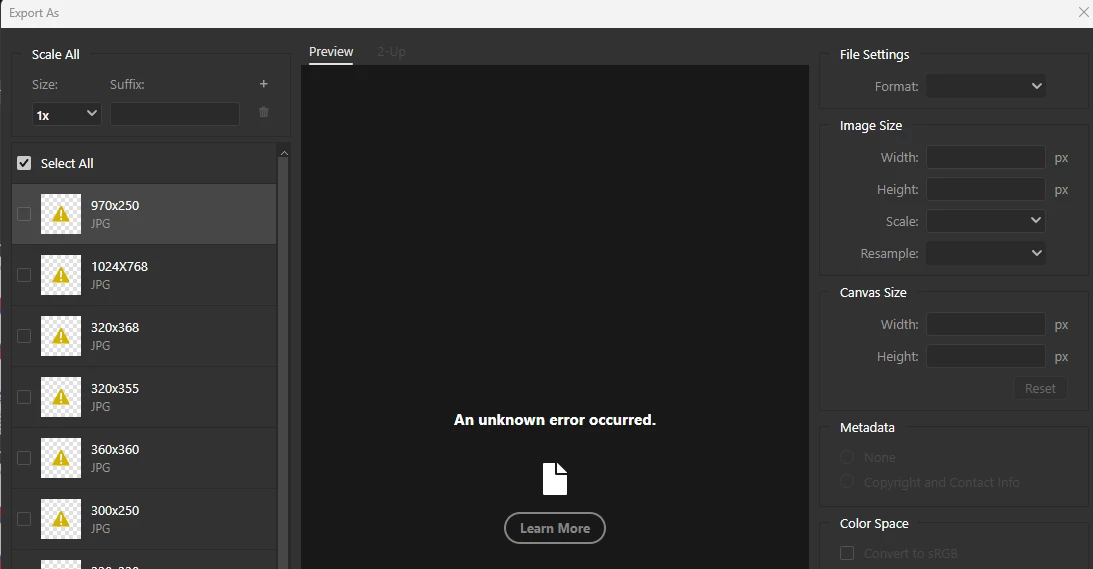
Whenever you try to export artboards with 'Exports As' and choose JPG, it shows unknown error in all of them. Doesn't matter which way you try to do this or format - the window export is freezed (grey) - not JPG or PNG or others.
*it's also happen in the beta version.
 
Photoshop Ver: 27.4.0
Beta Ver: 27.5.0
 
We'll be glad for a quick reply asap.


    12 replies

    Participant
    February 25, 2026

    For me it was the same, I just rolled 2 updates back to 27.3 and it works fine, the 27.3.1 update and 27.4 this feature does not work no matter what I did, and if you turn off legacy export you wont get the same options as here, even the quality preview is terrible. If you insist using the export in 27.4 then from preferences export turn off legacy export and you will get and export screen similar to this one.
    Hope this helps:)

    Participant
    February 25, 2026

    suddenly I have the same problem with "export as". What should I do?

    Participant
    February 25, 2026

    I am experiencing the same problem after Photoshop upgraded to 27.4.0. If I change the format to PNG, SVG or BMP immediately after the “Export As” popup opens, the export works successfully. If the export format defaults to JPG and left unchanged, or is changed to JPG, the screen turns dark gray and the message “An unknown error occurred.” is displayed. The problem occurs every time I try to export an image as JPG. I tried to export several images and the problem always occurs. Saving the image as a JPG via “Save A Copy” works as expected though. Exported files are normally saved to the system drive, however, the process does not even get close to the point of saving anything. The system was restarted and the problem persisted across system restarts. The problem did not occur earlier during the day before the update was applied.

    scotsios
    Participant
    February 24, 2026

    i have the same problem after update to 27.4.0

    Srishti Bali
    Community Manager
    Community Manager
    February 23, 2026

    Hi ​@markusk96044643 


    Sorry to hear about your experience. I tried replicating the issue on the English version of Photoshop on a Windows machine, and it worked as expected.

    To investigate this further, could you please share the following details:

    • System Info from Photoshop (Help > System Info > Copy-paste details here)

    • A full-screen screen recording of the issue, including the options you are selecting.

    • Whether the issue occurs with a specific file or with multiple files, including newly created ones.

    • The location where the exported files are being saved (e.g., external HDD, network location, or company server).

    Once we have this information, we’ll be able to assist you further.


    Regards,

    Srishti

    Inspiring
    February 23, 2026

    @Srishti Bali 
    Thanks for having a look.
    Here’s my system paste:
    https://pastebin.com/jURnq8q0
    Screen-Recording is hard to upload somewhere, however I’m using:
    File > Export > Export as - then the following modal:
     

    Now when trying to change to jpeg (or any other value) in the dropdown it errors out:
     

    I can’t even save the exported file - so I assume you mean where the file is located and well it actually does not make a difference if the file is stored on my harddrive or I’m accessing it from the network server.

    Inspiring
    February 23, 2026

    Since updating to the last version (including Camera Raw) Photoshop’s legacy export as function stopped working.
    The default fast export option (e.g. png) seems to work, however when swichting to jpeg it errors out with an unknown error.
    The button leads to a 404 page with the following URL:
    https://www.adobe.com/404.html?gourl=extract_assets_tips_en


    Sameer K
    Community Manager
    Community Manager
    February 23, 2026

    Hey, ​@Shay_HCL. Welcome to the Photoshop Community. I’ll help you figure this out. Please share a video of the issue and the system info from Photoshop Help > System info. Copy and paste it into a text document, then upload and attach it here.


    Does this happen with any document with fewer artboards? By looking at the screenshots, you’re working on a few active Artboards. Where is the original document stored? Have you saved the document at least once while working? 


    Let me know how it goes. Thanks!

    Thanks!
    Sameer K 

    (Type '@' and type my name to mention me when you reply)

    D Fosse
    Community Expert
    Community Expert
    February 22, 2026

    If it were an isolated thing that affected only one or two people that would be different


    Well, it sort of is, I haven’t heard of this happening more than perhaps a couple of times in later years.


    It sounds to me like corrupt preferences. Moving the whole Adobe Photoshop 2026 Settings folder to your desktop is the safest and most effective ways to do a complete reset. This will return the application to clean out-of-the-box factory state. Make sure to save out all your custom actions, brushes etc first; they will be wiped.


    Corrupt preferences can cause inexplicable behavior that usually looks like application bugs. Preferences contain a lot more than your own user settings, it’s the whole application configuration. They are vulnerable to corruption because they are rewritten on every application exit, so small errors accumulate, especially if you migrate from previous versions, and irregular shutdowns can corrupt them.


    The path to the settings folder is (system) > users > your name > appdata > roaming > Adobe > Adobe Photoshop 2026.

    joeh87907460
    Inspiring
    February 23, 2026

    No, it’s not corrupt preferences. And it’s been happening a lot for this current “update”. This is the response I got from adobe’s own AI generated search results, specifically stating “Well it looks like you’re not alone~”:


    It’s not only the current version of Photoshop, it’s also the latest update for Photoshop Beta also. Thanks for the tip on the preferences. I haven’t ever had very good luck resetting them before. 


    I keep a couple of older versions just in case this happens so I just went back to 26.11.3. I hope they fix this soon.

    joeh87907460
    Inspiring
    February 22, 2026

    I updated photoshop to 27.4.0 last night before going to bed. This morning I attempted to use photoshop. I need to export a file as a jpg. I click on quick export as jpg, it opens the save dialog like usual, and everything seems normal, EXCEPT, there is no jpg exported. I try it again and again and get the same result. So I try export as, the dialog comes up and it defaults to png, I change it to jpg in the dropdown menu, the little busy icon shows briefly and then the dialog options all go blank and an error message pops up. I try it again, same results. I close photoshop and open it again and the same results. 


    My question(s) are: When is this going to be fixed? And how do I get a refund for the time that this program is not usable because of the sloppy work by adobe’s so called “engineers”???


    Why can’t these people test this stuff out and ensure that everything works? If it were an isolated thing that affected only one or two people that would be different, but every time it’s always the same, the BUGS affect virtually every user. Adobe should be forced by law to have to pay for it, then they would stop putting out half baked junk that doesn’t work correctly. 
     

    KR Seals
    Community Expert
    Community Expert
    February 22, 2026

    I tried this in PS 27.4 and I worked ok. In your screen capture, it appears that there is no image/data in the Source panel on the Left. The error message agrees with that: “No Valid Asset...” In other words, blank.

    Ken Seals - Nikon Z 9, Z 8, 14mm-800mm. Computer Win 11 Pro, I7-14700K, 64GB, RTX3070TI. Travel machine: 2021 MacBook Pro M1 MAX 64GB. All Adobe apps.