Participating Frequently
July 26, 2022
Question

Paint brush / paint bucket problem

  • July 26, 2022
  • 2 replies
  • 1150 views

I'm having this odd problem painting in certain patches where even the paint bucket tool wont fill. I have no active selections and the problem persists even if I move the layer and try to fill in the spots in a different spot on the screen. It seemed to be a pattern so I created a super large composition and saw that it in fact creates a leaf pattern. I'm attaching a screenshot where I duplicated the layer and moved it to show that it's not an issue with my monitor. I'm also attaching the project file in case that is needed for some reason.
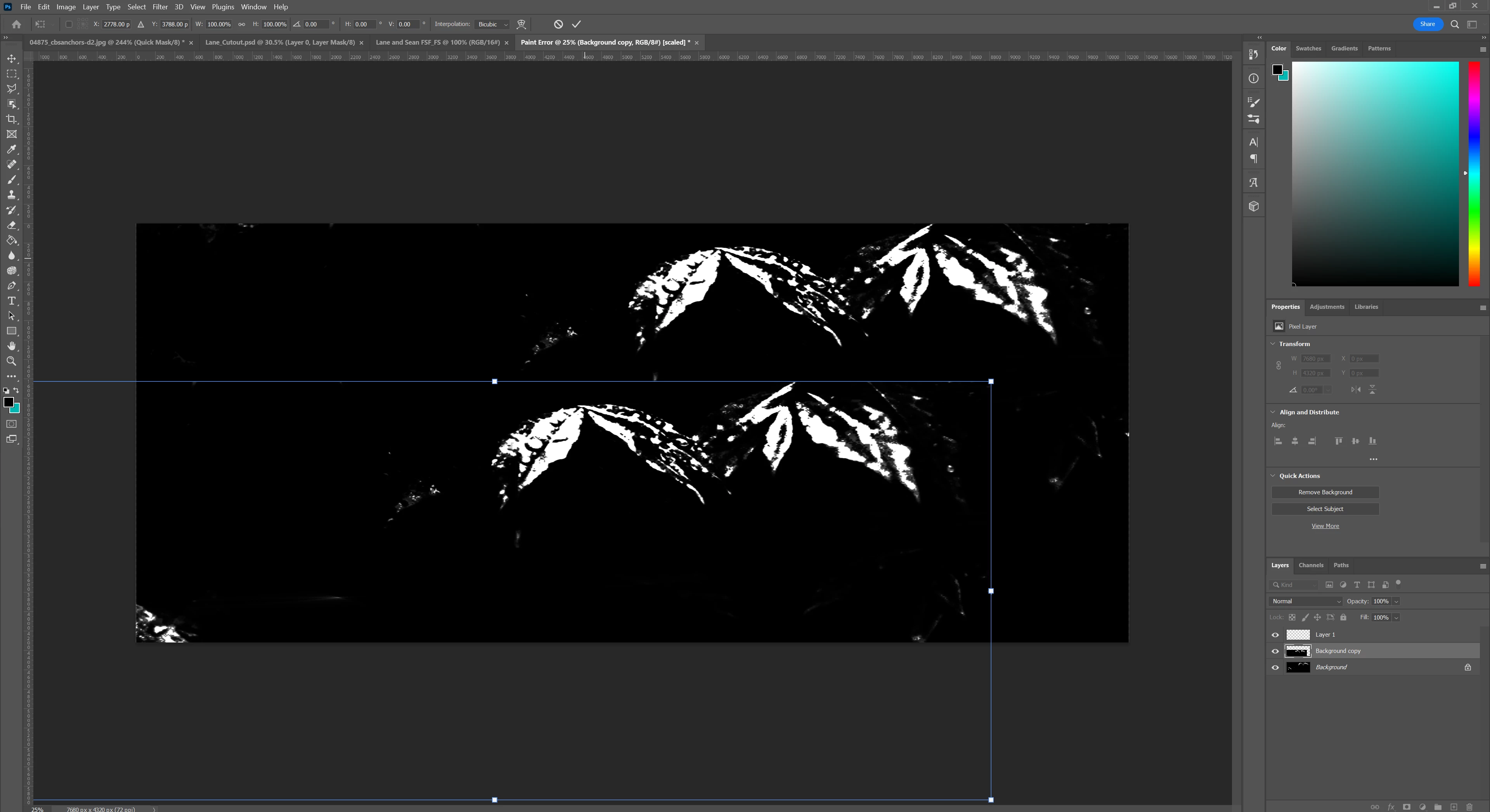
 

Any ideas as to what is causing this?

This topic has been closed for replies.

2 replies

melissapiccone
Community Expert
Community Expert
July 26, 2022

I have no idea what you are trying to do from your explanation and screenshot. Paint bucket is worthless... you might have it set to fill with a pattern - hence the leaf pattern?

What exactly are you trying to do with your image? Your screenshot shows not tools selected and transform handles turned on, so you sort of have that part of the image selected. Your title says brush but you didn't mention using or trying the paint brush. 

Melissa Piccone | Adobe Trainer | Online Courses Author | Fine Artist
Kaci TAuthor
Participating Frequently
July 26, 2022

They wanted to see the options bar for the paint brush tool and the paint bucket tool. They are both clearly selected and active and the options bar is at the top with all the pertinent information. In said options bar for the paint bucket tool the mode is foreground and not pattern. If you need smaller up close screenshots I can do that as well. Also, it doesn't matter what I'm trying to do with this particular image. This project is just a plain white background that I tried to fill in black with the paint brush and paint bucket tool to showcase what problem I'm having. On projects that this problem is actually effecting, I'm trying to paint in quick mask mode and there are patches it just wont let me paint. I need soft edges on some parts and making a selection, selecting and masking, and then filling is not ergonomic nor does it get me the organic shapes I want. It just doesn't make sense that there are patches where I can't paint.

melissapiccone
Community Expert
Community Expert
July 26, 2022

OK - this started life as a new file, plain white background - 100% sure there was absolutely nothing in there but pure white - 100% white pixels? I agree if that is the case that it makes no sense you can't fill in areas. Anyway you can share the file with me? Feel free to pm me. I am happy to take a look at it and see if I can figure it out. 

Melissa Piccone | Adobe Trainer | Online Courses Author | Fine Artist
c.pfaffenbichler
Community Expert
Community Expert
July 26, 2022

I consider the Paintbucket Tool close to worthless and would recommend a Selection-based approach.  


What are the Painbucket Tool’s settings (see Options Bar)?  

On which Layer did you apply it? 

Kaci TAuthor
Participating Frequently
July 26, 2022

Even when I do make a selection and try to paint in the affected areas, it still does not work. It also doesn't matter what layer I am painting on. It will do this on EVERY layer and in new projects.


[Email tagline removed by moderator]


Kaci TAuthor
Participating Frequently
July 26, 2022

Sorry for that tagline at the end. Responding from my email put that on there without my knowledge.