Inspiring
August 13, 2019
Answered

panorama stitching problem

  • August 13, 2019
  • 2 replies
  • 1498 views

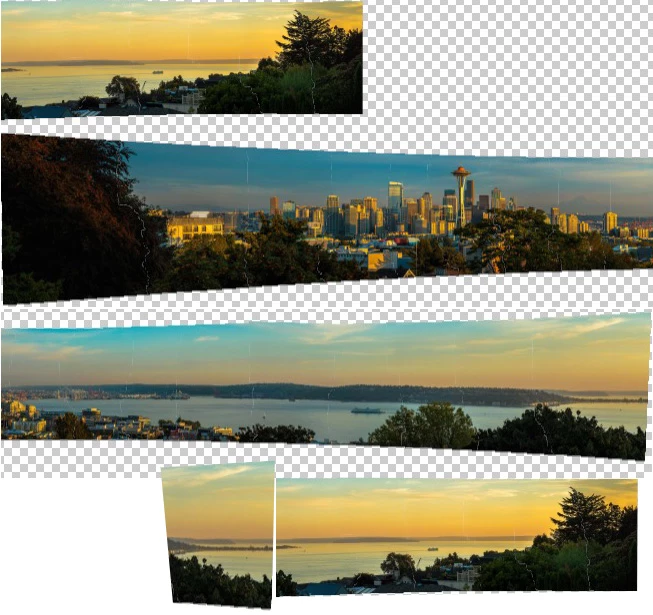
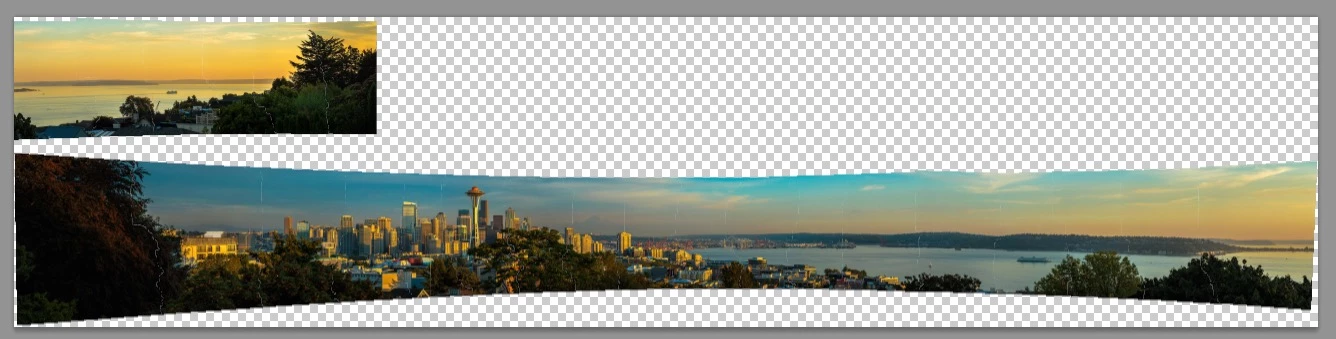
I am using photoshop CS6.  I am using downloaded images in a Photoshop 101 class with Ben Willmore.  I followed the steps to create the panorama using his images, and though he gets a fully stitched panorama, this is what i get.  it's broken into 2 parts.  Ben is using an older version of CC (class is older).  I have no way to ask Ben myself, so I'm hoping someone here can tell me why this is happening?  is it because Photoshop CS6 has limited ability?  could it be that there are too many images?  i've already created one panorma and it worked, but there were fewer photos.  this one has 24 images, whereas the first one i did successfully only had 8.  Thanks.
    This topic has been closed for replies.
    Correct answer JJMack

    To me it look like  the top section should go on the right side of the panorama.  It was not stitched because the overlap required between image does not exists. Alignment was not possible. Perhaps you have the missing image somewhere.

    2 replies

    rojas66Author
    Inspiring
    August 14, 2019

    this question is marked answered, but as far as i am concerned it is not answered.  in any event, thank you JJMack for your effort.  if i end up finding an answer, i will post it here.

    JJMack
    Community Expert
    JJMackCommunity ExpertCorrect answer
    Community Expert
    August 13, 2019

    To me it look like  the top section should go on the right side of the panorama.  It was not stitched because the overlap required between image does not exists. Alignment was not possible. Perhaps you have the missing image somewhere.

    JJMack
    rojas66Author
    Inspiring
    August 13, 2019

    that shouldn't be the issue.  the the image numbers are in perfect sequence, nothing is missing.  you are correct, the top image belongs on the right side.

    JJMack
    Community Expert
    Community Expert
    August 13, 2019

    So you see overlap where I do not IMO it is an issue

    I see no overlap there that software can use to align the images. Its requites overlap not a sequence of file names.

    JJMack