
Known Participant
August 22, 2024
Question

Paper Strip Effect.

  • August 22, 2024
  • 2 replies
  • 222 views

Hello all,


I wish to duplicate the effect that appears on the attached image and would like to find a simple way to do it in Photoshop or another Adobe application. The drop shadow is irregular to give the impression the paper strip is curved on top of its background.


Does anyone know of a simple way or a plugin that can do this?
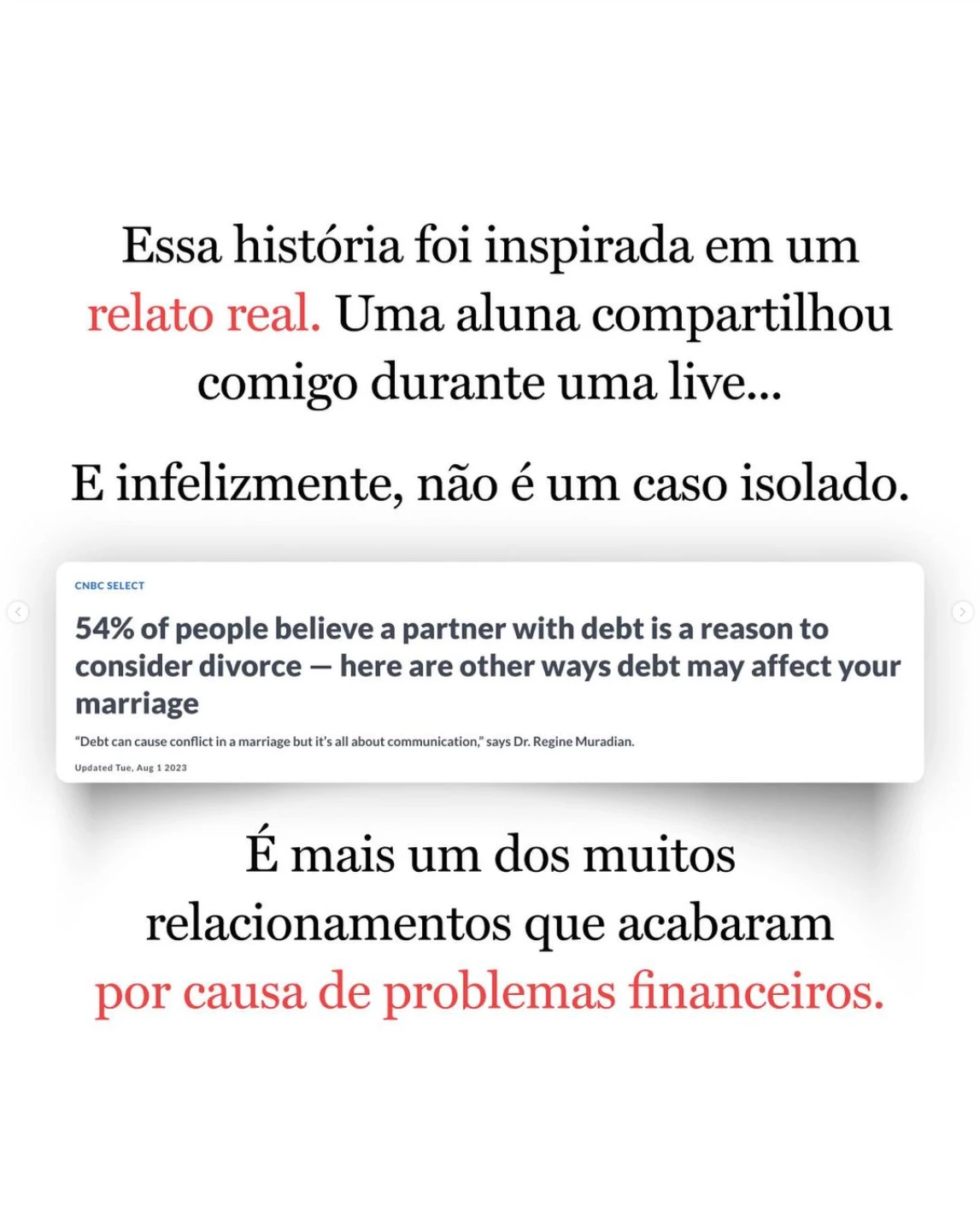
Thank you in advance.

This topic has been closed for replies.

2 replies

Bojan Živković11378569
Community Expert
Community Expert
August 22, 2024

Create a drop shadow as you normally would. You can use the layer effect and then right-click on "Drop Shadow" to choose "Create Layer."


To distort the drop shadow on its own layer, use Free Transform and select "Warp."

lambiloon
Community Expert
Community Expert
August 22, 2024

Hi simple way which I think is to make a grey pixels layer then do Gausian blur to match that blur then put layer below the ur image and erase from that center area like the sample....regards

Ali Sajjad / Graphic Design Trainer / Freelancer / Adobe Certified Professional