
Answered
Part of my gradient tool options are missing in PS CC 2017. Any ideas?
Hi,
I'm looking for a way to turn on the bottom portion of the gradient picker. Any idea how to turn it on? I've tried many things.
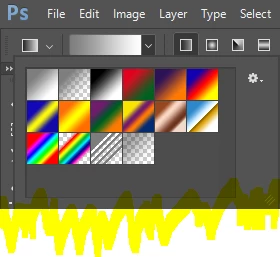
Thanks

Hi,
I'm looking for a way to turn on the bottom portion of the gradient picker. Any idea how to turn it on? I've tried many things.
Thanks
Are you clicking on the arrow or the gradient itself? That looks like what you get when you click on the arrow next to the gradient, rather than within the gradient itself. If you click in the gradient, you get the full menu that you are thinking of.
Already have an account? Login
Enter your E-mail address. We'll send you an e-mail with instructions to reset your password.
 AdChoices