


Participant
October 18, 2018
Question

Parts of images/text missing on frames

  • October 18, 2018
  • 3 replies
  • 3566 views

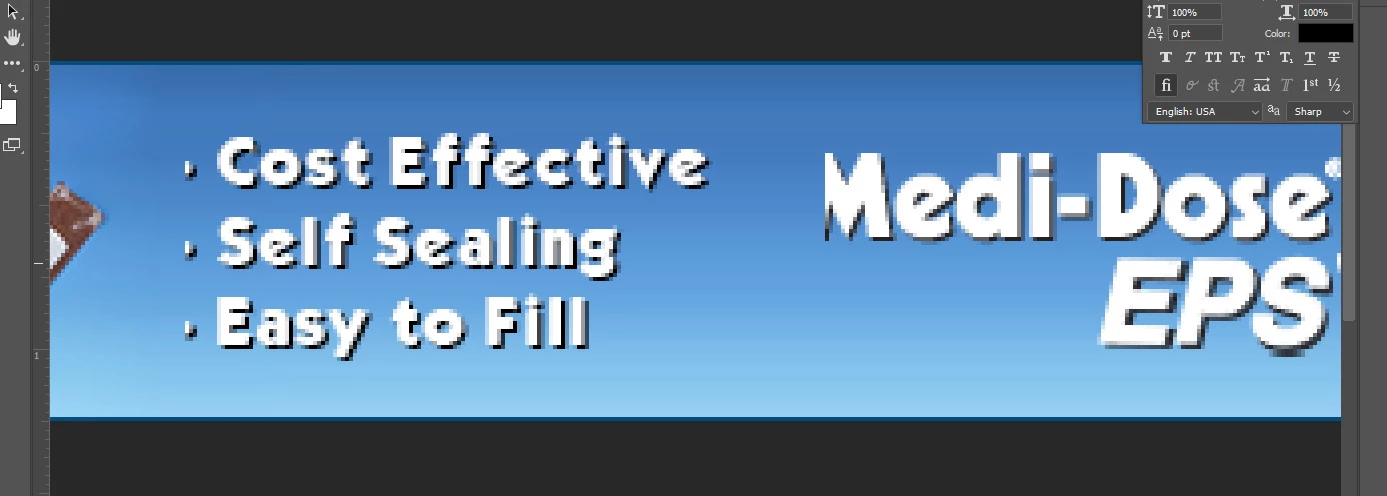
With the new update I have being getting the issue as I add frames parts of my images or text look like they were cropped or cut off. When I move the layer it comes back in full but once I change frames it gets cut off again! What is going on? Even when I save the file the image or text still appears cut off. HELP!
    This topic has been closed for replies.

    3 replies

    Participant
    October 18, 2018

    Hi everyone, to solve the issue I uninstalled the newest Photoshop update and went back to the 2018 version. I will wait for the bugs to be fixed.

    JJMack
    Community Expert
    Community Expert
    October 18, 2018

    That did not solve anything what you saw is not a bug in CC 2018 the problem is the same.  You can not change an images aspect ratio without corpping or distorting the image.  You can add borders and not lose content but you gain boarders.

    JJMack
    Participant
    October 18, 2018

    I know it didn't solve anything with the 2019 update. I am not changing the aspect ration to any images or texts. They have been placed to size on their own layer and the problem is when I have everything in place on the first frame of the gif then start adding frames to animate the banner that is when the issue is created. I will go to the next frame and half my logo is missing or part of my text is missing. So to make a quick fix to this issue I just reverted back to the last version of Photoshop as I do not have the to trouble shoot the new bugs from the update.

    Muqqarib Hassan
    Inspiring
    October 18, 2018

    Hi, please try deselecting "Use Graphics Processor" located in Photoshop's Preferences > Performance, then restart Photoshop.

    Thanks.

    JJMack
    Community Expert
    Community Expert
    October 18, 2018

    Why that will not change any aspect ratio mismatch

    JJMack
    Muqqarib Hassan
    Inspiring
    October 18, 2018

    Hi, Its just a hack, Through this may he problem will be solve.

    Thanks.

    JJMack
    Community Expert
    Community Expert
    October 18, 2018

    With the partial screen capture you posted I can not tell what I'm looking at.  I can not even see the layer palette to see if you using Photoshop CC 2019 frame feature.  I have had issues where image were not scaled correctly and yes frame are like layer mask and when the frame and the image do not have the same aspect ratio you can expect to loose some image content  Frame should scale the Image to fill the area without distorting the image.  The frame aspect ratio must be the same aspect ratio as your image if you do not want to lose any image content. You can transform the image and distort its content to get your missing content. There is no magic if the aspect ratios are not the same the image in the frame should look like a centered aspect ratio cropped image.

    JJMack
    Participant
    October 19, 2018

    I am having the same issue.. So when trying to make a gif in photoshop, I place the type/ logo, etc texts in the first viewing frame. When i add another frame, duplicating the first, the texts remains in the same place but it appears half cut off and missing... Ive been moving the texts back and forth in its place for it to reappear but once i add a new frame the same thing happens. If you look at that Screen capture another previous user had posted, the M is half cut off and missing... I will show you a before and after with the work im doing so you can have a comparison.

    JJMack
    Community Expert
    Community Expert
    October 19, 2018

    You do not show your layers palette, image window or frame animation panel.  How do you expect us to tell you what you are doing wrong.

    Here I creaded  A background layer and a text layer.  I create 8 identical frames with these later visible. Then I added a ninth frame but I moved the text layer.  Then used Photoshop Tween to generate 10 frans between  frames 8 and 9.

    I do not see any problem in CC 2019 no text is missing.

    JJMack