Known Participant
July 17, 2019
Answered

Paste elements from a PSD to specifics coordinates

  • July 17, 2019
  • 4 replies
  • 1525 views

Greetings everyone,

I've a quite complexe challenge and my only hope would be through a JavaScript.

I don't know javascript yet and I'm trying to figure out how to do it.

I've got PSD documents with various objects on it (text, images ...) and some of those images represent numbers (see the Yellow dots).
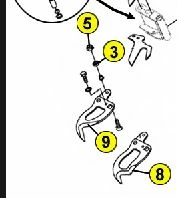
My challenge is to transform those dots (images) onto a text box, at the exact same place and filed with the name of the object (each object is named "01", "02" ...).

My guess is to use the coordinates of each dot's layer, save them as variables, paste a text boxfrom another document on the page and then assign the saved coordinates to this new text box. I've no clue for pasting the object name into this text box though ...

By the same time, I would need a script that can past the title of the document to a specific place on the document.

Any help from you guys would be greatly appreciated

Many thanks in advance

This topic has been closed for replies.
Correct answer Chuck Uebele

If the dots are on different layers, then it should be relatively easy, but how will you know which dot goes with what text? Basically, to paste into a spot would be easiest to just paste into the file, then move the text layer to the dot's location. That involves getting both the location of your text and the dot, then figuring out the delta change between the two:

var doc = activeDocument;

var dotLayer = doc.layers.getByName('dot layer');

var textLayer = doc.layers.getByName('text layer');

var dotLayerCenterX = (dotLayer.bounds[0] + dotLayer.bounds[2])/2;

var dotLayerCenterY = (textLayer.bounds[1] + textLayer.bounds[3])/2;

var textLayerCenterX = (textLayer.bounds[0] + textLayer.bounds[2])/2;

var textLayerCenterY = (textLayer.bounds[1] + textLayer.bounds[3])/2;

//move text layer

textLayer.translate(dotLayerCenterX-textLayerCenterX, dotLayerCenterY-textLayerCenterY);

4 replies

Known Participant
July 19, 2019

Well, Chucj, thanks to your help, I managed to write a correct script that actually go trought my Layer Set and attribute the good name to the text box

My last problem is the misalignement with the original Dot. Any idea?

My final code

  1. var doc = app.activeDocument; 
  2. var dotGp = doc.layers.getByName('PUCES');
  3. var j = 0
  4. // Create the Layer set "Text"
  5. var setName = 'Text'; 
  6. try{doc.activeDocument = doc.layerSets.getByName (setName)} 
  7. catch(e){ 
  8.         doc.layerSets.add(); 
  9.         doc.activeLayer.name = setName 
  10.     }
  11. // Set the Left() function
  12. String.prototype.left = function(n) {
  13.     return this.substring(0, n);
  14. }
  15.     for(var i=0;i<dotGp.layers.length;i++){ 
  16.     
  17. var TextBox = doc.layerSets.Text
  18. //Management of the active Layer
  19. var dotLayer = doc.layerSets.PUCES.layers
  20. var dotLayerName = dotLayer.name
  21. var dotLayerNameShort = dotLayerName.left(2);
  22. // Function to create the text box
  23. createText("Arial-BoldMT", 29, 255,255,255, dotLayerNameShort, 100, 50)
  24. activeDocument.activeLayer.name = dotLayerNameShort
  25. activeDocument.activeLayer.textItem.justification = Justification.CENTER
  26.     function createText(fface, size, colR, colG, colB, content, tX, tY){
  27.      
  28.   // Add a new layer in the new document
  29.   var artLayerRef = doc.artLayers.add()
  30.   // move the layer to the layer set Text
  31.   artLayerRef.move(TextBox, ElementPlacement.INSIDE)
  32.  
  33.   // Specify that the layer is a text layer
  34.   artLayerRef.kind = LayerKind.TEXT
  35.   //This section defines the color of the hello world text
  36.   textColor = new SolidColor();
  37.   textColor.rgb.red = colR;
  38.   textColor.rgb.green = colG;
  39.   textColor.rgb.blue = colB;
  40.   //Get a reference to the text item so that we can add the text and format it a bit
  41.   textItemRef = artLayerRef.textItem
  42.   textItemRef.font = fface;
  43.   textItemRef.contents = content;
  44.   textItemRef.color = textColor;
  45.   textItemRef.size = size
  46.   textItemRef.position = new Array(tX, tY) //pixels from the left, pixels from the top
  47.  
  48.   var dotLayerCenterX = (dotLayer.bounds[0] + dotLayer.bounds[2])/2; 
  49.   var dotLayerCenterY = (dotLayer.bounds[1] + dotLayer.bounds[3])/2; 
  50.   var textLayerCenterX = (artLayerRef.bounds[0] + artLayerRef.bounds[2])/2; 
  51.   var textLayerCenterY = (artLayerRef.bounds[1] + artLayerRef.bounds[3])/2;
  52. //displace text layer 
  53. artLayerRef.translate(dotLayerCenterX-textLayerCenterX, dotLayerCenterY-textLayerCenterY)
  54. j=j+1
  55.      }; 
Chuck Uebele
Community Expert
Community Expert
July 19, 2019

I'm not sure why you're getting the offset, unless there is something more in the dot layers than just the dot circle. Can you post a screen shot of just one of the dot layers? Do a ctrl/cmd-T on the layer to show a transform box around the layer so we can see exactly how big the layer is.

Also, While you figured out how to navigate to the next layer in the group, there is a better way. You use the var i instead of j. It's defined while creating the loop, so it changes each time the loop is run. The i++ advances it one number. if you wanted to subtract a number each time, you would use i--. To advance a different amount, other than 1, you could use i+=3, to advance 3 numbers each time.

Chuck Uebele
Community Expert
Community Expert
July 18, 2019

Ok, if you want to see if a layer has the word text in it you can use:

var doc = activeDocument

var lay = doc.activeLayer

if(lay.name.toLowerCase().indexOf('text')!=-1){alert(true)}

Chuck Uebele
Community Expert
Chuck UebeleCommunity ExpertCorrect answer
Community Expert
July 17, 2019

If the dots are on different layers, then it should be relatively easy, but how will you know which dot goes with what text? Basically, to paste into a spot would be easiest to just paste into the file, then move the text layer to the dot's location. That involves getting both the location of your text and the dot, then figuring out the delta change between the two:

var doc = activeDocument;

var dotLayer = doc.layers.getByName('dot layer');

var textLayer = doc.layers.getByName('text layer');

var dotLayerCenterX = (dotLayer.bounds[0] + dotLayer.bounds[2])/2;

var dotLayerCenterY = (textLayer.bounds[1] + textLayer.bounds[3])/2;

var textLayerCenterX = (textLayer.bounds[0] + textLayer.bounds[2])/2;

var textLayerCenterY = (textLayer.bounds[1] + textLayer.bounds[3])/2;

//move text layer

textLayer.translate(dotLayerCenterX-textLayerCenterX, dotLayerCenterY-textLayerCenterY);

Known Participant
July 18, 2019

Hello Chuck,

Thank you for you quick answer and the lines.

as you said, if I was able to at least copy-paste a text box on the coordinates of the Dots, that would be a great improvement

Sahil.Chawla
Adobe Employee
Adobe Employee
July 17, 2019