
brettp30322963
Participating Frequently
September 4, 2018
Answered

Pasting 300dpi image into PS becomes 72?

  • September 4, 2018
  • 3 replies
  • 2128 views

Seem like this should be simple but...

I am simply copying/pasting 300 dpi images and putting them into a 'new' PS image.

The 'New' dialog always says it will be imported/placed at 72 dpi. Which it then does.

(At this point I have to change the image back to 300 dpi, and the size back to 100%)

Is there a way I can paste into a new ps file at 300 dpi, and avoid having to change those

values?

THANKS!!
    This topic has been closed for replies.
    Correct answer barbara_a7746676

    Instead of copying the image from InDesign,, in Photoshop choose File > Open and open it directly in Photoshop.

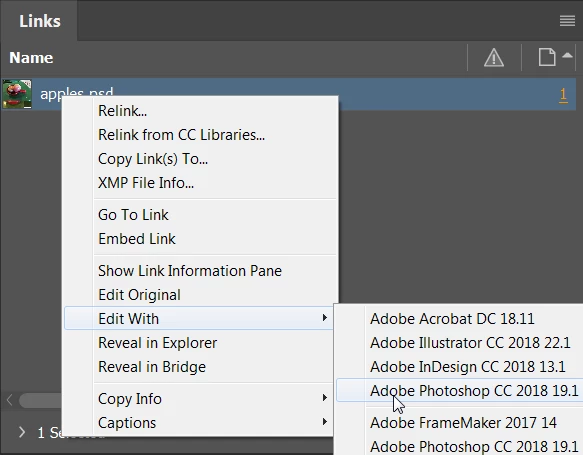
    Alternatively, in InDesign, in the Links panel, choose Edit With or Edit Original.

    OR, when your image comes in 4 times larger, you could choose Image > Reveal All.

    3 replies

    dejaliyah
    Participating Frequently
    June 28, 2024

    I have the same issue copying from illustrator. All my PS files are 300 dpi. Importing ai files is not an option as I don't want the entire file but only certain elements. I swear in past versions it always pasted in 300 dpi.

    macpawel
    Participating Frequently
    September 4, 2018

    Your destination file is target file

    Just prepare your document with 300ppi and then paste your image

    You can also adjust document resolution using Image Size (CTRL+Alt+I) command

    Pawel

    barbara_a7746676
    Community Expert
    Community Expert
    September 4, 2018

    A Photoshop file can have only one resolution. If the new image is 72 ppi, then any images you paste into it will be 72 ppi. If the new image is 300 ppi, then any images you paste into it will be 300 ppi.

    brettp30322963
    Participating Frequently
    September 4, 2018

    Hi Barbara,

    Thank you for the reply. That is my problem however: I am copying a 300dpi image (from Indesign) and pasting it into a 'new' in Photoshop, where my only option in the 'new' dialog is 72dpi.

    If I make a 'new' file at 300 dpi and then paste, the image comes in 4x larger than the new artboard.

    Hope that makes sense.

    barbara_a7746676
    Community Expert
    barbara_a7746676Community ExpertCorrect answer
    Community Expert
    September 4, 2018

    Instead of copying the image from InDesign,, in Photoshop choose File > Open and open it directly in Photoshop.

    Alternatively, in InDesign, in the Links panel, choose Edit With or Edit Original.

    OR, when your image comes in 4 times larger, you could choose Image > Reveal All.