
Participant
July 28, 2022
Question

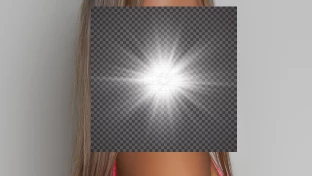
Pasting a transparent image over photo but black/white boxes where should be transparent

  • July 28, 2022
  • 3 replies
  • 603 views

Hi


I've downloaded from the adobe stock images that says is transparent.  When I drag it over the photo I see black & white boxes around what should be transparent bits.  I'm using a starburst so only want the star not the surrounding box to appear.


What am I doing wrong to accomplish this?


This topic has been closed for replies.

3 replies

jane-e
Community Expert
Community Expert
July 28, 2022

@Cameron25423603axh5 

  • Open the ai/eps download in Illustrator or another vector application
  • Hide the checkerboard pattern object in the Layers panel
     (no one has said this step yet)  as @c.pfaffenbichler said in his first post 
  • Bring the image into Photoshop with drag & drop or copy & right-click to paste (5 options for paste)


Note that there is a dark checkerboard background. This indicates that the Illustrator effects that have been applied for the glow will only work against a dark background.


Bringing the file into PS directly will give you a flattened image.


EDITED


Jane


c.pfaffenbichler
Community Expert
Community Expert
July 28, 2022

Hide the checkerboard pattern object in the Layers panel (no one has said this step yet)

I thought I had indicated as much with:

»If it is ai or eps did you open the image in Illustrator to hide the background?«

jane-e
Community Expert
Community Expert
July 28, 2022

Apologies, @c.pfaffenbichler , I read too fast early this morning and have edited my post! 😊


Jane


didiermazier
Community Expert
Community Expert
July 28, 2022

According to the grey squares, this looks like a screenshot and not a transparent image.

c.pfaffenbichler
Community Expert
Community Expert
July 28, 2022

Please provide meaningful information. 

What is the file format of the image? 


If it is ai or eps did you open the image in Illustrator to hide the background? 

Participant
July 28, 2022

I tried AI directly into photoshop with place embedded over the top of where I wanted the image to appear.  I also tried file > New > background = transparent and then pasted the AI file in and same with the original image

Participant
July 28, 2022

Image itself I'm trying to paste over is a tiff, for the transparent one tried AI and jpg embed option and also a copy/paste