
Participating Frequently
November 2, 2016
Question

Pasting graphics from Illustrator to PS not working

  • November 2, 2016
  • 1 reply
  • 358 views

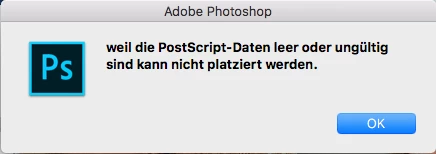
No matter whatever I try to copy from Illustrator 20.1.0 to PhotoShop 2015.5.1 via clipboard, I get the error message (translated) "The PostScript file is empty or invalid and cannot be placed". Importing as an AI file works fine.

Any ideas?

Thanks, Tom
    This topic has been closed for replies.

    1 reply

    JJMack
    Community Expert
    Community Expert
    November 2, 2016

    Use menu File>Place and place in a vector smart object that should be the best method to use.

    JJMack
    Tomer1cAuthor
    Participating Frequently
    November 2, 2016

    Hm... I'm more the "easygoing" type
    In my case we are talking about (mostly simple) icons for interface-design. So in my opinion copy & paste would probably be the obvious and most effective way.

    Nancy OShea
    Community Expert
    Community Expert
    November 2, 2016

    Illustrator is a vector graphics app.  Photoshop is a raster image app.  So you're tying to mix apples and oranges.  

    Nancy O'Shea— Product User & Community Expert