

Patch Tool Duplicates Instead Of Erases
Bizarre problem: Instead of erasing an unwanted object or flaw, the Patch Tool duplicates it in a new location.
Details: I open any image fresh. I select an object in the image by drawing a circle around it with the Patch Tool (or I select it with the Lasso Tool and then switch to the Patch Tool). Now I drag the selected area (and thus the object or flaw inside it) over to a plain area in the image to erase the object inside the original selected area. The selected object should disappear inside inside the original selected area as I drag. Instead, the selected object goes along with the selection outline as I drag over to the plain area. When I stop dragging, the selected object (the original selected area) is now cloned in the new location. The original selected object / selected area is totally unchanged.
Also, the Patch Tool should leave the dotted outline (marching ants) around the original selected area as the selection is dragged (with a new outline) to a new area. But now, no original outline is left behind as I drag to the new area.
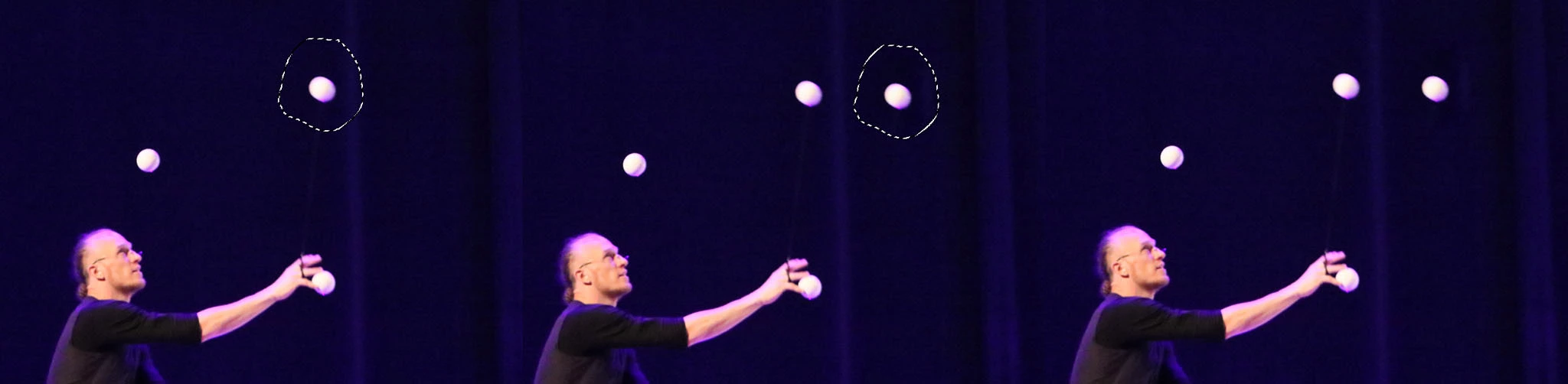
Briefly - Circle anything with the Patch Tool, drag to a new location, and now there's a a perfect duplicate of what I circled in the new location. Zero effect on the original selected area. See photo below.
This happens with both jpg and psd files. The problem arose suddenly, and now happens every time I try to use the Patch Tool. This is not a layers problem - it happens even with a freshly opened single-layer image that has not had anything done to it.
This is happening on a brand new (two week old) MacBook Air with the latest OS version installed. Fresh installation of Photoshop 2023. The Patch Tool worked perfectly for two weeks, with frequent use, then suddenly started doing this.
I have force-quit Photoshop, restarted the computer, relaunched Photoshop, quit Photoshop, and relaunched it again, and the problem persists.
Any help would be GREATLY appreciated, as I am in the middle of editing a large number of images for a non-profit organization that I volunteer for.
Here's an image with three screen shots combined illustrating the problem - The Patch Tool duplicates a juggler's ball instead of erasing it.
 AdChoices