
Participant
April 19, 2018
Question

Pen pressure

  • April 19, 2018
  • 3 replies
  • 370 views

Hi everyone.

I have a big problem which I was not able to fix for a full week now, making me unable to paint digitally. So the thing is Photoshop doesnt react to pen pressure, while it does work on other programs like Paint tool Sai. I've tried a lot with settings, reinstalling, drivers and such, but nothing seemed to work. However, what i noticed is that in the preview of the brush it does show that it doesnt react to it, even though opacity, thickness and all that stuff is or isnt turned on. As in :
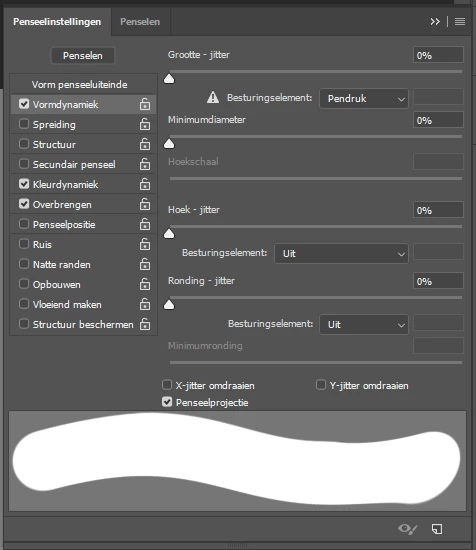
I would really appreciate the help, since I cannot practise or work on requests at the moment.

Yours,
Yari

This topic has been closed for replies.

3 replies

Participant
October 17, 2018

I am having the same exact issue with my Wacom Intuos Pro and I am using a MacBook Pro 2017 laptop.

JJMack
Community Expert
Community Expert
October 17, 2018

I know nothing about pen support on Mac.....

Windows Ink and WinTab are the two interfaces user on Window.

JJMack
JJMack
Community Expert
Community Expert
April 19, 2018

I see a triangle warning in your screen capture. It look like Photoshop is not seeing you have a  pen.  Have you configured Photoshop and your tablet to use the same APIs either WinTab or INK?

Should look like this

JJMack
gener7
Community Expert
Community Expert
April 19, 2018

This could be related to a recent Windows 10 update causing problems with pen tablets. Have a look at this thread.

Photoshop - Wacom - Latest Update Bug