Participant
January 20, 2017
Answered

Pen-Pressure hickups

  • January 20, 2017
  • 1 reply
  • 488 views

Hello,

I have an issue with Photoshop for a very long time now and it is at a point where I really get annoyed by that.

Very often I get this very weird pen-pressure sensitivity problem where it seems to turn of and on again resulting in messy brush strokes.

Like this:

8dde6d87d3.jpg

You can see where the pen-pressure just stop working.

I've found an very old article about this issue and I tested that method by installing a Wacom-Driver with pre-settings but my tablet (WACOM Intuos 4) doesn't react anymore after that.
I've had this issue since Windows 7 and still on Windows 10. I installed the latest Wacom driver and the latest Photoshop.

I am using Lazy Nezumi Pro for stabilisation but even when I turn it off or the times where I didn't used Lazy Nezumi I got this issue.
Also it is worth mentioning, that it happens to all tablets I used (Wacom DRAW, Wacom Bamboo) 

My System:
CPU: i7 3770
GPU: Radeon R9 270x

RAM: 16 GB

Thank you in advance,

R!
This topic has been closed for replies.
Correct answer davescm

Hi

I use a Wacom Intuos Pro and have not see this.

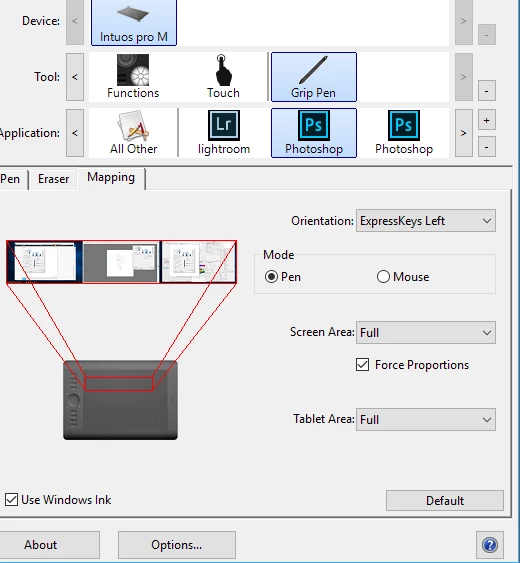
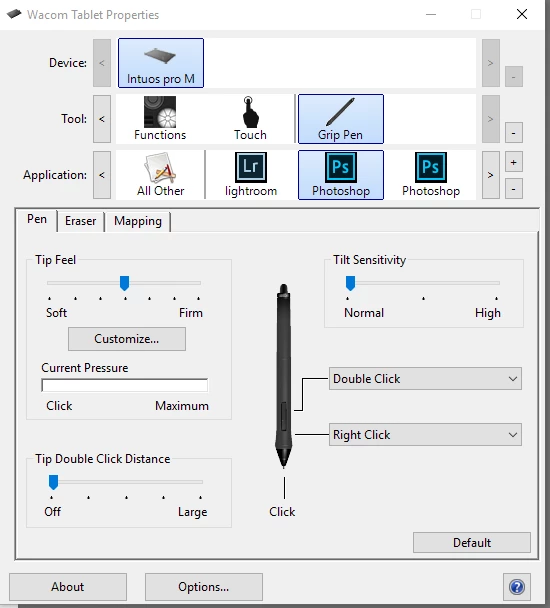
Not much help in itself, but I have shared my settings below which may help you.

Driver version 6.3.17-3

Pen settings :

Note - above Windows ink is "on" for Photoshop

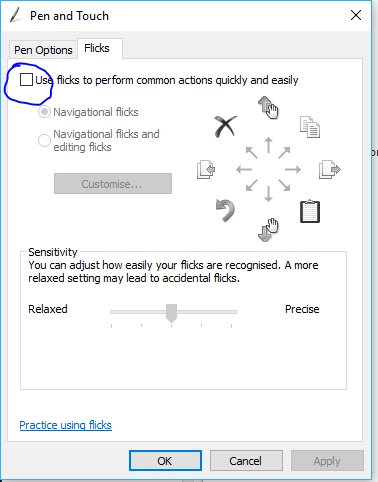
In Windows Control Panel - Pen and Touch  flicks are "off"

One other thought - do you get this when wireless, if so have you tried a wired connection?

Dave

1 reply

davescm
Community Expert
davescmCommunity ExpertCorrect answer
Community Expert
January 20, 2017

Hi

I use a Wacom Intuos Pro and have not see this.

Not much help in itself, but I have shared my settings below which may help you.

Driver version 6.3.17-3

Pen settings :

Note - above Windows ink is "on" for Photoshop

In Windows Control Panel - Pen and Touch  flicks are "off"

One other thought - do you get this when wireless, if so have you tried a wired connection?

Dave