
Answered
Pen tool - cannot select make new layer (Photoshop CC2018)
Hello there,
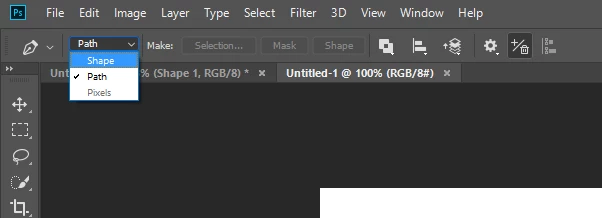
Suddenly when using the Pen tool, it refuses to make a new layer. When i go the drowdown menu to select "New layer", it is greyed out. I can select any of the other options - Combine // Subtract // Interset etc - bit not New Layer. If I make a new layer in the Layers panel and then start drawing, it just makes a path, not a shape.
How can i return to the glory days of being able to draw a shape with the Pen tool, please?
I'm not sure if this is related, or an additional bizarreness, but recently, sometimes PS refuses to let me select points in a shape to drag them - i can only select all points or none at all.
Any help will be greatly appreciated - thank you.
 AdChoices