silverdrake
Participant
July 24, 2017
Answered

Pen Tool - Cant Find Stroke Setting

  • July 24, 2017
  • 6 replies
  • 32305 views

Ok, im trying to use the pen tool to draw lines in photoshop and a few months ago I was fine... but fir some reason, the stroke setting I need is nowhere to be found...
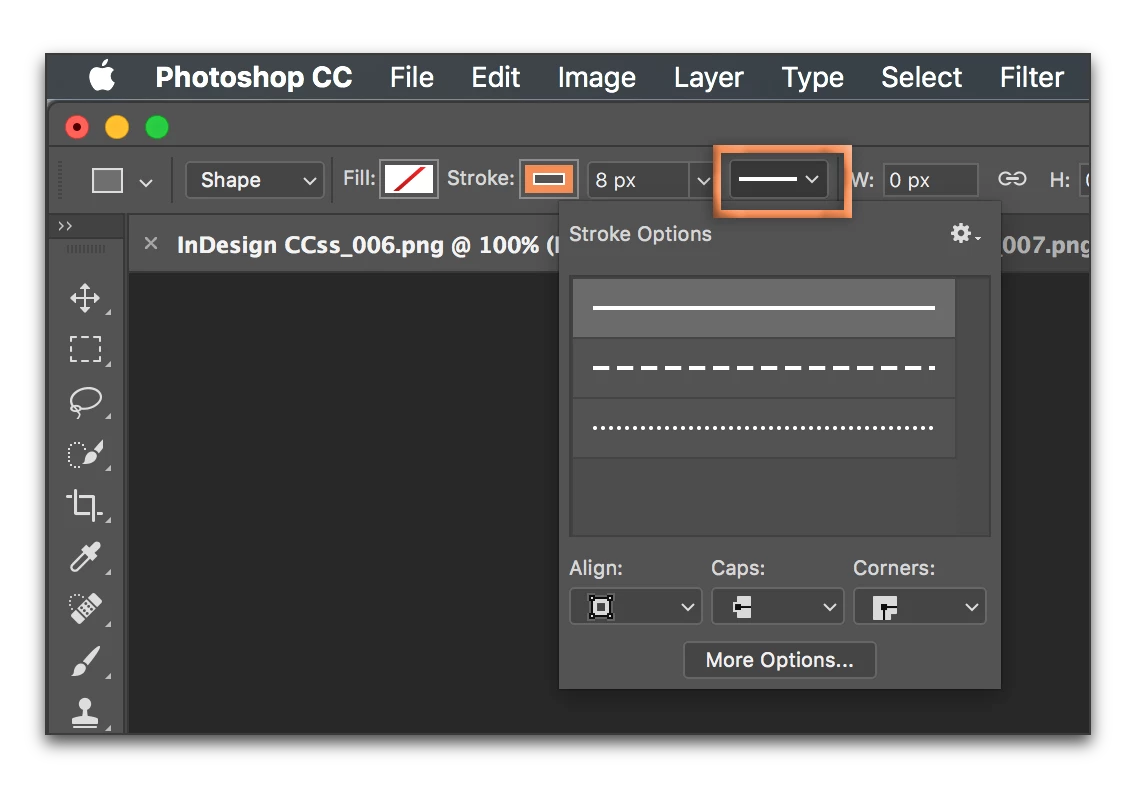
Here is a picture of the setting I need...
3585ao1.png

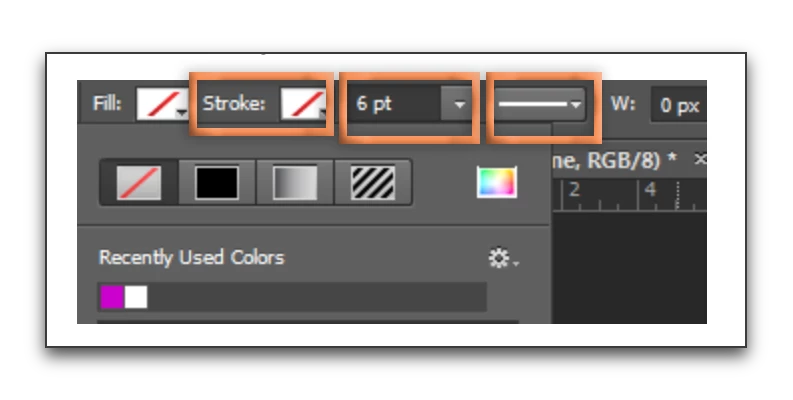
But when I try to use it i cant find it...
mwy49l.png
If anyone can figure out where it is, that would be awesome! Ive been googling for ages but cant find any info on it... of even what it's called...
    This topic has been closed for replies.
    Correct answer Barb Binder

    what stroke type/width should i select? I cant find the stroke type where the picture is a small black rectangle like the one in your picture...

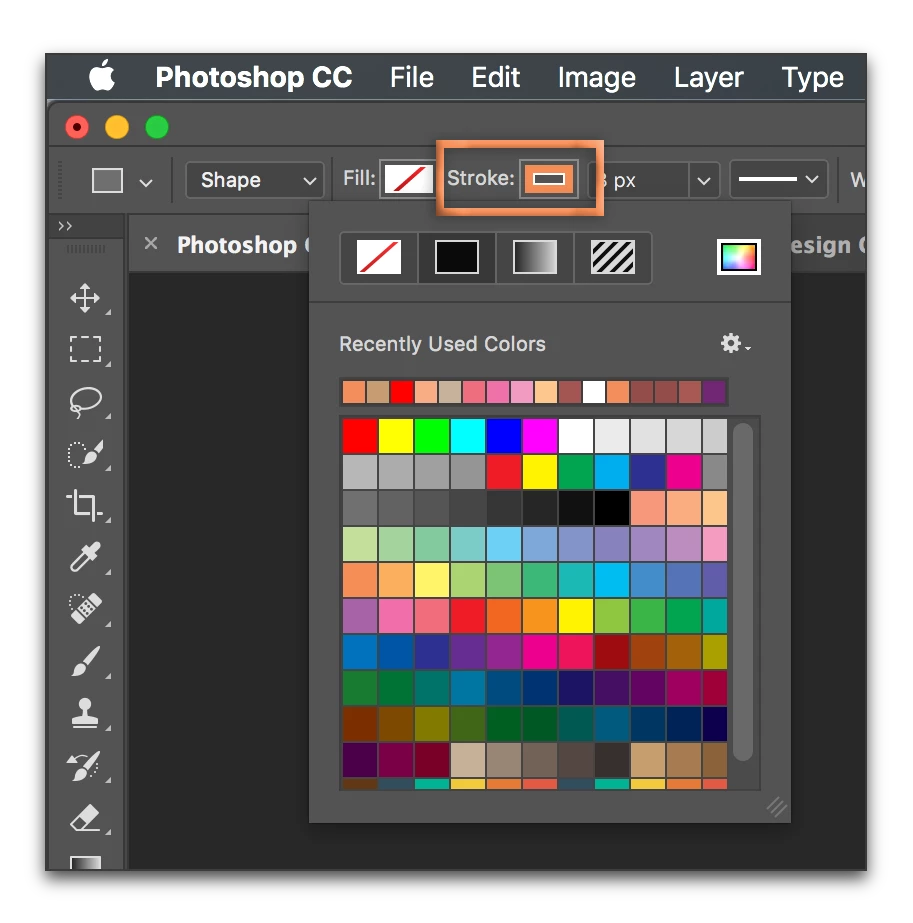
    Click on the menu to the right of the word Stroke to pick your color:

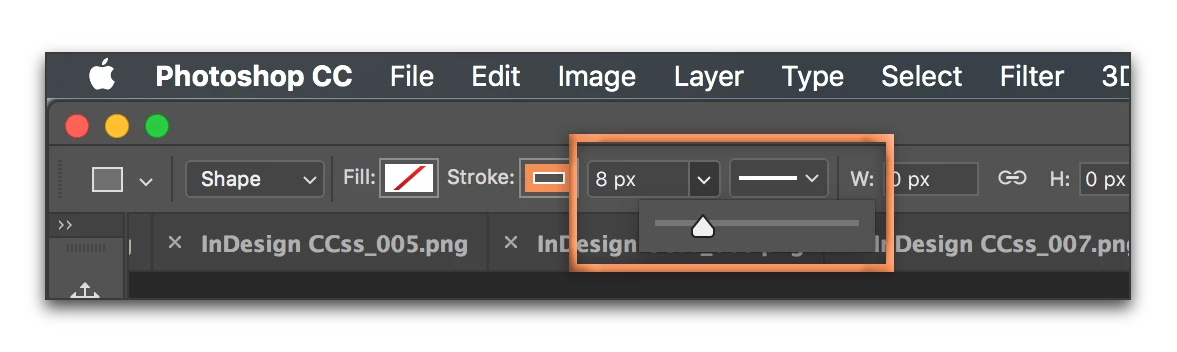
    Click on the current width (your screen shot shows 6 pt, mine shows 8 px) and pick your width.

    Optionally set Stroke type:

    All three of these are on your screen:

    what do you mean by draw away?

    The Pen tool is a drawing tool. Once you set up your color and width, I mean go ahead and draw your shape.

    6 replies

    davescm
    Community Expert
    Community Expert
    July 24, 2017

    Hi

    Click here :

    Then here :

    Then on a colour (e.g. Blue)

    Your options bar will change from the red slash to the stroke colour

    Dave

    Barb Binder
    Community Expert
    Community Expert
    July 24, 2017

    By the way: you did not mention what version of Photoshop you are using. I am showing you screen shots for the current version. The Stroke menu you are showing was solid in older versions, it was a solid box, and now it is a hollow box, but it works the exact same way. Is that the issue here?

    ~Barb at Rocky Mountain Training
    Barb Binder
    Community Expert
    Barb BinderCommunity ExpertCorrect answer
    Community Expert
    July 24, 2017

    what stroke type/width should i select? I cant find the stroke type where the picture is a small black rectangle like the one in your picture...

    Click on the menu to the right of the word Stroke to pick your color:

    Click on the current width (your screen shot shows 6 pt, mine shows 8 px) and pick your width.

    Optionally set Stroke type:

    All three of these are on your screen:

    what do you mean by draw away?

    The Pen tool is a drawing tool. Once you set up your color and width, I mean go ahead and draw your shape.

    ~Barb at Rocky Mountain Training
    silverdrake
    Participant
    July 24, 2017

    yeah... i think it was just me messing up... thanks for the help everyone!
    I just confused myself but i got it working now!

    Barb Binder
    Community Expert
    Community Expert
    July 24, 2017

    For so many of my students, paths, shape layers and the Pen tool are the most confusing part of Photoshop. You are in good company. 

    ~Barb at Rocky Mountain Training
    Barb Binder
    Community Expert
    Community Expert
    July 24, 2017

    The typical steps are:

    • Select the Pen Tool
    • Select Shape Layer
    • Select the Stroke Type and Stroke Width
    • Draw away

    Are you doing something different, or is something not working?

    ~Barb at Rocky Mountain Training
    silverdrake
    Participant
    July 24, 2017

    what stroke type/width should i select? I cant find the stroke type where the picture is a small black rectangle like the one in your picture... what do you mean by draw away? If you mean, "you are done" well its not working because my problem is, as i showed in my second screenshot, the stroke type simply isnt there...

    c.pfaffenbichler
    Community Expert
    Community Expert
    July 24, 2017

    Please post a meaningful screenshot.

    c.pfaffenbichler
    Community Expert
    Community Expert
    July 24, 2017

    Maybe I misunderstood …

    What exactly are you missing?

    c.pfaffenbichler
    Community Expert
    Community Expert
    July 24, 2017

    Good day!

    Please post a meaningful screenshot, that means one that includes the Canvas, the Toolbox, the Layers Panel, the Paths Panel etc.

    Regards,

    Pfaffenbichler