Participant
May 14, 2018
Answered

Pen Tool not making selection from all paths

  • May 14, 2018
  • 1 reply
  • 8451 views

This is a problem I've started having after upgrading to CC 2018.  I've been cutting out lots of stuff using the pen tool and for some reason when I try to make the selection it only grabs part of the the masks.  Looking at the picture you can see some of the objects are grey (not selected) and white (selected).  I've just started using a Mac so I'm probably hitting shortcuts by accident.  The only thing I can think of is that it's making shapes??   Thanks!

    This topic has been closed for replies.
    Correct answer davescm

    Hi

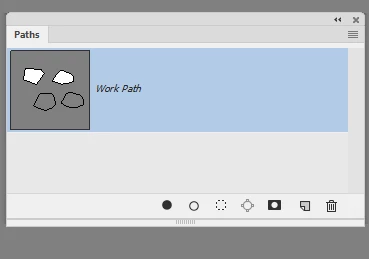
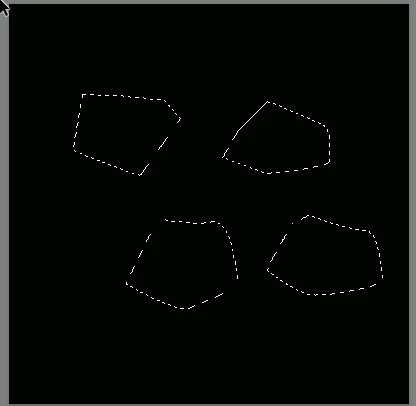
    Here is a path with four sub-paths.

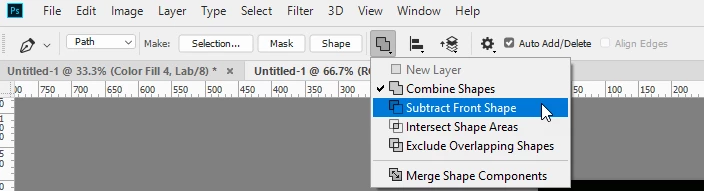
    The top two were drawn with the path options set to "combine shapes"

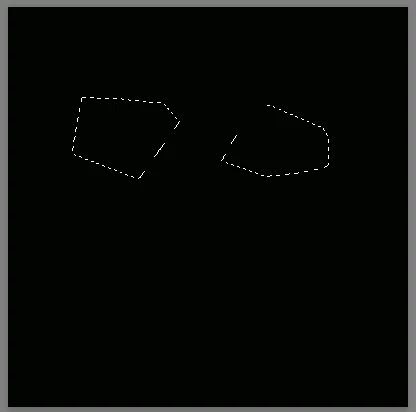
    The bottom two were drawn with path options set to subtract front shape. That is usually used to cut a hole in the shape, but in this case there is no surrounding path to cut a hole out of so making a selection from this workpath only selects the top two sub paths

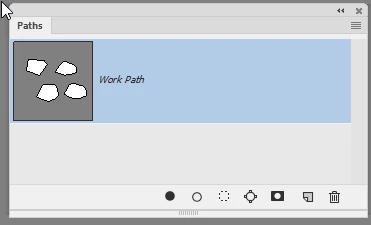
    If I use the direct selection tool (black arrow) to select the bottom two sub-paths and set path options for them to combine shapes I get this:

    Now making a selection from the workpath does this

    I hope that helps

    Dave

    1 reply

    davescm
    Community Expert
    davescmCommunity ExpertCorrect answer
    Community Expert
    May 14, 2018

    Hi

    Here is a path with four sub-paths.

    The top two were drawn with the path options set to "combine shapes"

    The bottom two were drawn with path options set to subtract front shape. That is usually used to cut a hole in the shape, but in this case there is no surrounding path to cut a hole out of so making a selection from this workpath only selects the top two sub paths

    If I use the direct selection tool (black arrow) to select the bottom two sub-paths and set path options for them to combine shapes I get this:

    Now making a selection from the workpath does this

    I hope that helps

    Dave

    Participant
    May 14, 2018

    Yes!   Changing that setting fixed it.  Thanks for your response and the pictures!

    davescm
    Community Expert
    Community Expert
    May 14, 2018

    You're welcome

    Dave