
SlamBamActionman
Participating Frequently
December 31, 2016
Pregunta

Pencil Tool pen pressure behaves oddly? [2016]

  • December 31, 2016
  • 5 respuestas
  • 3844 visualizaciones

Hi!


(To preface, I'm using a Monoprice tablet and CS6.)


I really like the pencil tool but the one thing keeping me from using it consistently is that the pen pressure doesn't work as it should with it. Whenever I use a shape larger than 1 pixel in size and attempt to draw as light on my tablet as possible it will either not show that it registered me pressing or make the line too thick. Well I know that Photoshop does register me lightly dragging my stylus across the tablet despite nothing being drawn since it adds to the Undo function. This is despite me using a 0% Minimum Diameter in the Brush settings.


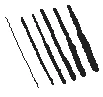
Here's an image of the first 6 widths of lines, with me pressing harder the lower I get. As you can see there is a noticable jump between the first and second line, and none but the 1 pixel lines go smaller. Again, this is me barely gracing the surface of the tablet.
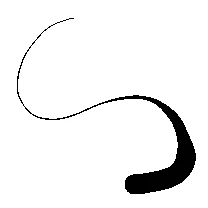
To give an example of how I wish it'd look, here's a similar line drawn in SAI with a 20px pencil. As you can see the thin end is still 1 pixel wide, despite the pencil's size being way thicker.

My hypothesis is that Photoshop "notices" that I am dragging the stylus very lightly along the tablet but decides for whatever reason not to draw the line until I press hard enough. Mind  that this is only a problem for the pencil tool and not the regular brush tool; Photoshop handles that perfectly. Is there any way to fix this, or should I just accept my losses?

5 respuestas

Participant
October 8, 2022

Create a new brush preset based on a selection area of exactly 1 pixel of completely black colour. This will allow photoshop to draw the single-pixel stroke size.


From what I observed, pencil tool duplicates the behaviour of the brush tool while keeping the same opacity for all pixels of the brush stroke, including the pixels used for a smooth look on a brush. This means the stroke will always be about 2 pixels extra thick.

Participant
June 7, 2020

hey! i noticed this thread is a bit old, so idk if you ever figured the issue out, but i was having the same problem. eventually though i came to the discovery that checking the "Brush Projection" bax in brush settings on the pencil tool makes it behave as OP is wanting 🙂 i didnt find this issue brought up anywhere else on the internet, so if someone else down the line needs to fix this i hope they find my reply :3

Participant
January 27, 2021

thanks for the reply. i was in the same boat as the op and this is exactly what i was looking for. just like him i'm looking to use the pencil tool to make pixelated-style art and the pencil pressure seemed to act more like a toggle between base brush size/one size larger rather than a smooth gradient size like a regular brush. selecting "Brush Projection" did the trick

Participant
January 27, 2021

actually, after some more playing around with settings unfortunately this still gives the same behavior as the op is noticing. if i use a 2px or 3px pencil i can't ever get photoshop to let me get a 1px line even with almost no pressure on the pen

Trevor.Dennis
Community Expert
Community Expert
December 31, 2016

Just a thought here, but why are you using the pencil tool?  It's horrible.

A fully hard brush is way better for line work, and infinitely more addaptable

and customizable.

SlamBamActionman
Participating Frequently
December 31, 2016

Short answer: Hard edges.

Longer answer: I'm using it for my artstyle since the hard edges gives the images a unique pixelated look. Previously I have been using SAI but Photoshop ultimately has the better tools and layout, which is why I really want to switch over. The only thing that's keeping me from doing it is this one odd behavior that I can't find a solution to.

Trevor.Dennis
Community Expert
Community Expert
December 31, 2016

Use the Brush tool and finish with a Levels Adjustment layer to reduce everything to full black, and full white.  Or use Threshold

JJMack
Community Expert
Community Expert
December 31, 2016

IMO what your seeing is not uncommon particlarly  if your trying to carfullu draw slowly.  There is a plugin that I do not have for I'm not an artiest trying for smooth lines. I just do a log of masking and want soft blured strokes.  The plug-in you may want to look into is Lazy Nezumi Pro

.

JJMack
SlamBamActionman
Participating Frequently
December 31, 2016

The speed of my strokes have no impact on the thickness of the line, shown here with 9px pencils:

The leftmost lines are me pressing just enough to make a lin appear, while the right is the full pressure. I think this might simply be a limitation in the way that Photoshop CS6 handles tablet input? This is me doing the exact same in SAI Paint tool (note that I did not have to press as hard to make the thin line show):

JJMack
Community Expert
Community Expert
December 31, 2016

JJMack
Benjamin Root
Legend
December 31, 2016

Did you try a tool reset?

SlamBamActionman
Participating Frequently
December 31, 2016

Yes, unfortunately did this nothing to solve the issue.