Participant
September 24, 2018
Answered

Pencil Tool Swapping Between Foreground and Background Colour

  • September 24, 2018
  • 7 replies
  • 2519 views

I'm having an issue in which when I am using the pencil tool on Photoshop, it keeps switching between the foreground and background colour every time that I click if I'm essentially colouring something in, it will go from the foreground colour and then if I click again straight after the pencil colour will change colour to the background colour. How am I am able to change it so that it will just say in the same colour every time I click? Thanks.
    This topic has been closed for replies.
    Correct answer

    Hi

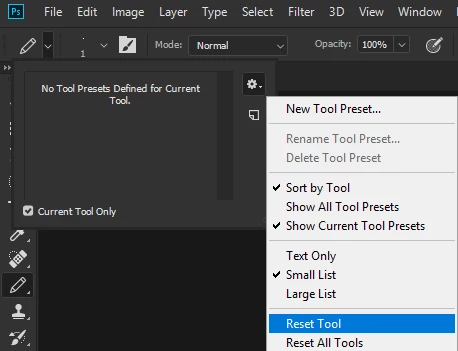
    Have you tried resetting the tool

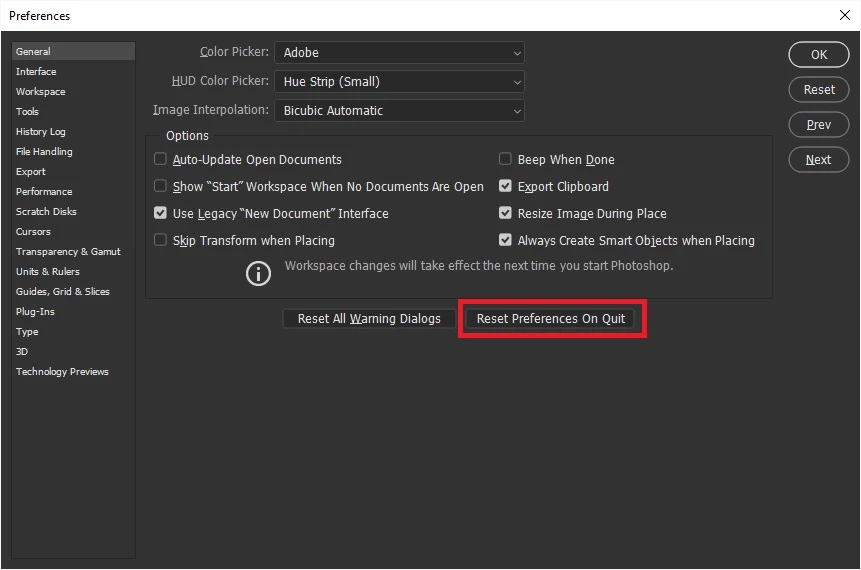
    If that doesn't help try resetting Photoshop preferences

    7 replies

    happie_97
    Community Expert
    Community Expert
    September 25, 2018

    There were some really good suggestions to solve your issue, did any of them reaolve your issues? If so, please let Us know so that we can troubleshoot further.

    joanH
    Inspiring
    September 25, 2018

    Just wondering if anyone thought to switch the color squares (lower left)  between background and foreground with the change of tool - pencil to brush. Each tool will go back to the color setting last selected. Good chat. Regards, JH

    mglush
    Community Expert
    Community Expert
    September 25, 2018

    Are you using a mouse or a stylus like the Wacom tablet? Can you show us a picture of your workspace?

    Thanks!

    Michelle

    Jeff Arola
    Community Expert
    Community Expert
    September 24, 2018

    Most likely you have Auto Erase checked in the tool options bar.

    If so uncheck Auto Erase.

    Community Expert
    September 24, 2018

    As others have said,  reset the settings.  However, we'd be able to help you more if you show us your current brush settings.  We could se where something may be going awry

    barbara_a7746676
    Community Expert
    Community Expert
    September 24, 2018

    In the Brushes panel, it may be that Foreground/Background Jitter is more than zero percent.

    lambiloon
    Community Expert
    Community Expert
    September 24, 2018

    Hi yes reset settings can help try that hope issue will be fixed....Thanks.

    Ali Sajjad / Graphic Design Trainer / Freelancer / Adobe Certified Professional
    Correct answer
    September 24, 2018

    Hi

    Have you tried resetting the tool

    If that doesn't help try resetting Photoshop preferences

    Participant
    September 25, 2018

    This really helped - thank you!