


Participant
March 20, 2015
Question

Perspective Transform in Javascript

  • March 20, 2015
  • 4 replies
  • 3350 views

Hej everyone,

I'm working on a script, which should do an automatic perspective correction. Unfortunately the only way I found out until now is some code, generated with the ScriptListener Plugin - and I am having a hard time figuring out what the values / maths are doing. For better understanding what I'm trying to achieve, here is an image:
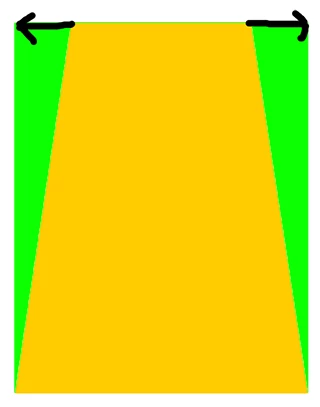
The yellow colored area is the original image. Green is the image I'm trying to get. I need to do an perspective correction on the top anchor points. Doing it manually it works fine. However, when I look at the script, the scriptListener is generating, I don't have any clue what the values in there are meaning. Perhaps there is some kind of math I don't get. I can't get any match regarding the values by doing it manually, and the ones the listener writes.

Anyone an idea? Is there anywhere an angle or distance of how the anchor points are being moved?

var idTrnf = charIDToTypeID( "Trnf" );

    var desc48 = new ActionDescriptor();

    var idnull = charIDToTypeID( "null" );

        var ref21 = new ActionReference();

        var idLyr = charIDToTypeID( "Lyr " );

        var idOrdn = charIDToTypeID( "Ordn" );

        var idTrgt = charIDToTypeID( "Trgt" );

        ref21.putEnumerated( idLyr, idOrdn, idTrgt );

    desc48.putReference( idnull, ref21 );

    var idFTcs = charIDToTypeID( "FTcs" );

    var idQCSt = charIDToTypeID( "QCSt" );

    var idQcsa = charIDToTypeID( "Qcsa" );

    desc48.putEnumerated( idFTcs, idQCSt, idQcsa );

    var idOfst = charIDToTypeID( "Ofst" );

        var desc49 = new ActionDescriptor();

        var idHrzn = charIDToTypeID( "Hrzn" );

        var idPxl = charIDToTypeID( "#Pxl" );

        desc49.putUnitDouble( idHrzn, idPxl, -16.066570 );

        var idVrtc = charIDToTypeID( "Vrtc" );

        var idPxl = charIDToTypeID( "#Pxl" );

        desc49.putUnitDouble( idVrtc, idPxl, 16.381048 );

    var idOfst = charIDToTypeID( "Ofst" );

    desc48.putObject( idOfst, idOfst, desc49 );

    var idWdth = charIDToTypeID( "Wdth" );

    var idPrc = charIDToTypeID( "#Prc" );

    desc48.putUnitDouble( idWdth, idPrc, 134.475806 );

    var idSkew = charIDToTypeID( "Skew" );

        var desc50 = new ActionDescriptor();

        var idHrzn = charIDToTypeID( "Hrzn" );

        var idAng = charIDToTypeID( "#Ang" );

        desc50.putUnitDouble( idHrzn, idAng, 19.127500 );

        var idVrtc = charIDToTypeID( "Vrtc" );

        var idAng = charIDToTypeID( "#Ang" );

        desc50.putUnitDouble( idVrtc, idAng, 0.000000 );

    var idPnt = charIDToTypeID( "Pnt " );

    desc48.putObject( idSkew, idPnt, desc50 );

    var idUsng = charIDToTypeID( "Usng" );

        var desc51 = new ActionDescriptor();

        var idHrzn = charIDToTypeID( "Hrzn" );

        var idPrc = charIDToTypeID( "#Prc" );

        desc51.putUnitDouble( idHrzn, idPrc, -0.000000 );

        var idVrtc = charIDToTypeID( "Vrtc" );

        var idPrc = charIDToTypeID( "#Prc" );

        desc51.putUnitDouble( idVrtc, idPrc, 0.655242 );

    var idPnt = charIDToTypeID( "Pnt " );

    desc48.putObject( idUsng, idPnt, desc51 );

    var idIntr = charIDToTypeID( "Intr" );

    var idIntp = charIDToTypeID( "Intp" );

    var idbicubicAutomatic = stringIDToTypeID( "bicubicAutomatic" );

    desc48.putEnumerated( idIntr, idIntp, idbicubicAutomatic );

executeAction( idTrnf, desc48, DialogModes.NO );

This topic has been closed for replies.

4 replies

Inspiring
January 16, 2019

I took lots and lots of measurements Take a 200x200 square, shrink one side by 10 pixels, look at the values found in the ScriptListener output... then try again shrinking by 20 pixels, by 30 pixels... try again with a 200x100 rectangle, with a 100x200 rectangle, and so on... Put all the data points on a graph, and then just try and guess a formula that would fit the data... I got close with a parabola, but then I remembered it's a perspective transform, so something involving 1/x would make more sense... and I just kept nudging the terms until the line went through the points, then rounded the numbers and it fit even better... then just cancelled out as many terms as I could.... (although I just realised, there's still some redundant numbers in the formula for A; it could just be A = -(1/(frac+1)-0.5)*layerW couldn't it!) It was kind of exhausting and it really did take me all day, but it was fun, I love a good puzzle

Inspiring
January 16, 2019

I wasn't able to make much sense of any of the answers in this thread, but after a day of taking measurements and finding formulas that fit them, I eventually came up with a function that is able to do a centered, one-axis transform that just changes one side of a shape by the desired amount. Posting it here in case it helps anyone else.

var initialLayer = app.activeDocument.activeLayer;
var selectedLayerBounds = initialLayer.boundsNoEffects;
var layerW = selectedLayerBounds[2].as("px") - selectedLayerBounds[0].as("px");
var layerH = selectedLayerBounds[3].as("px") - selectedLayerBounds[1].as("px");


function selectionFromLayerOpacity(){
     
     var ref1 = new ActionReference();
     ref1.putProperty( charIDToTypeID( "Chnl" ), charIDToTypeID( "fsel" ) );
     
     var ref2 = new ActionReference();
     ref2.putEnumerated( charIDToTypeID( "Chnl" ), charIDToTypeID( "Chnl" ), charIDToTypeID( "Trsp" ) );
     //ref2.putName( charIDToTypeID( "Lyr " ), "Layer 1" );//omitting this causes it to act upon whatever layer is already selected instead
     
     var desc3 = new ActionDescriptor();
     desc3.putReference( charIDToTypeID( "null" ), ref1 );
     desc3.putReference( charIDToTypeID( "T   " ), ref2 );
     
     executeAction( charIDToTypeID( "setd" ), desc3, DialogModes.NO );
     
}


function doPerspective(frac){
     
     
     var A = -100*(1/(frac+1)-0.5)*(layerW/100);
     var B = 100 + A*(2/(layerW/100));
     var C = -4*(1/(frac+1)-0.5)*(100/layerW);
     
     
     var desc1 = new ActionDescriptor();
     var ref = new ActionReference();
     ref.putEnumerated( charIDToTypeID( "Lyr " ), charIDToTypeID( "Ordn" ), charIDToTypeID( "Trgt" ) );
     desc1.putReference( charIDToTypeID( "null" ), ref );
     desc1.putEnumerated( charIDToTypeID( "FTcs" ), charIDToTypeID( "QCSt" ), charIDToTypeID( "Qcsa" ) );
     
     var desc2 = new ActionDescriptor();
     desc2.putUnitDouble( charIDToTypeID( "Hrzn" ), charIDToTypeID( "#Pxl" ), A );
     desc2.putUnitDouble( charIDToTypeID( "Vrtc" ), charIDToTypeID( "#Pxl" ), 0 );
     
     desc1.putObject( charIDToTypeID( "Ofst" ), charIDToTypeID( "Ofst" ), desc2 );
     desc1.putUnitDouble( charIDToTypeID( "Hght" ), charIDToTypeID( "#Prc" ), B );
     
     var desc3 = new ActionDescriptor();
     desc3.putUnitDouble( charIDToTypeID( "Hrzn" ), charIDToTypeID( "#Prc" ), C );
     desc3.putUnitDouble( charIDToTypeID( "Vrtc" ), charIDToTypeID( "#Prc" ), 0 );
     
     desc1.putObject( charIDToTypeID( "Usng" ), charIDToTypeID( "Pnt " ), desc3 );
     desc1.putBoolean( charIDToTypeID( "Lnkd" ), true );
     desc1.putEnumerated( charIDToTypeID( "Intr" ), charIDToTypeID( "Intp" ), charIDToTypeID( "Bcbc" ) );
     
     executeAction( charIDToTypeID( "Trnf" ), desc1, DialogModes.NO );
     
     
}


selectionFromLayerOpacity();
doPerspective(0.5);
Legend
January 16, 2019

Could you explain the actual meaning of the frac argument in doPerspective function?

Inspiring
January 16, 2019

How large the left side will end up relative to its initial size.

If it's performed on a square that's 200px per side, a frac of 0.5 will make the left side end up 100px tall.

Lummox_JR
Participant
March 1, 2018

I'm late to this party, but I wanted to share that I figured out the solution to the numbers for the "Using" command.

The units of the numbers don't appear to matter at all. The number is used for a Z-perspective transform, relative to whatever point is your anchor. If you pass in numbers H and V, this is the formula for how points will be transformed:

z = 1/3 + xH/width + yV/height

x' = x / 3z

y' = y / 3z

Basically, the focal plane is at z = 1/3. Or you can go with a simpler formula:

z = 1 + 3(xH/width + yV/height)

x' = x / z

y' = y / z

Take for instance a square. Anchor it to Qcs6 (bottom middle). Now apply the Using command with H=0 and V=-1/3. You'll have a trapezoid that's just as wide at the bottom as it ever was, but it will be half as high and the top will be half as wide.

The top right corner of the square starts at x=width/2 and y=-height relative to the origin. It transforms like so:

z = 1 + 3(x/width)(0) + 3(y/height)(-1/3) = 1 + 3(1/2)(0) + 3(-1)(-1/3) = 2

x' = x / 2 = width/4

y' = y / 2 = -height/2

I hope that's helpful, if not to the OP anymore then maybe to others. I racked my brain trying to figure this out. Happy scripting!

c.pfaffenbichler
Community Expert
Community Expert
March 20, 2015

Seems a Skew and the Offset of a point are registered.

Some time ago I used elements from stack support.jsx to achieve something similar.

Re: scripting support for perspective transformations?

FjardarAuthor
Participant
March 20, 2015

I know of this thread. but it didn't gave me any insight.

To make it a little bit easier:

Yellow: Box with 100x100 px dimensions. Doing a perspective transform (manually and listening with scriptListener) of 45°.Top Right Handle. The only values that have changed are die width (from 100% to 300%) and the angle (45°).

Now, this is what the listener gets:

var idTrnf = charIDToTypeID( "Trnf" );

    var desc6 = new ActionDescriptor();

    var idnull = charIDToTypeID( "null" );

        var ref4 = new ActionReference();

        var idLyr = charIDToTypeID( "Lyr " );

        var idOrdn = charIDToTypeID( "Ordn" );

        var idTrgt = charIDToTypeID( "Trgt" );

        ref4.putEnumerated( idLyr, idOrdn, idTrgt );

    desc6.putReference( idnull, ref4 );

    var idFTcs = charIDToTypeID( "FTcs" );

    var idQCSt = charIDToTypeID( "QCSt" );

    var idQcsa = charIDToTypeID( "Qcsa" );

    desc6.putEnumerated( idFTcs, idQCSt, idQcsa );

    var idOfst = charIDToTypeID( "Ofst" );

        var desc7 = new ActionDescriptor();

        var idHrzn = charIDToTypeID( "Hrzn" );

        var idPxl = charIDToTypeID( "#Pxl" );

        desc7.putUnitDouble( idHrzn, idPxl, 0.000000 );

        var idVrtc = charIDToTypeID( "Vrtc" );

        var idPxl = charIDToTypeID( "#Pxl" );

        desc7.putUnitDouble( idVrtc, idPxl, 25.000000 );

    var idOfst = charIDToTypeID( "Ofst" );

    desc6.putObject( idOfst, idOfst, desc7 );

    var idWdth = charIDToTypeID( "Wdth" );

    var idPrc = charIDToTypeID( "#Prc" );

    desc6.putUnitDouble( idWdth, idPrc, 150.000000 );

    var idUsng = charIDToTypeID( "Usng" );

        var desc8 = new ActionDescriptor();

        var idHrzn = charIDToTypeID( "Hrzn" );

        var idPrc = charIDToTypeID( "#Prc" );

        desc8.putUnitDouble( idHrzn, idPrc, -0.000000 );

        var idVrtc = charIDToTypeID( "Vrtc" );

        var idPrc = charIDToTypeID( "#Prc" );

        desc8.putUnitDouble( idVrtc, idPrc, 1.000000 );

    var idPnt = charIDToTypeID( "Pnt " );

    desc6.putObject( idUsng, idPnt, desc8 );

    var idIntr = charIDToTypeID( "Intr" );

    var idIntp = charIDToTypeID( "Intp" );

    var idbicubicAutomatic = stringIDToTypeID( "bicubicAutomatic" );

    desc6.putEnumerated( idIntr, idIntp, idbicubicAutomatic );

executeAction( idTrnf, desc6, DialogModes.NO );

Where are the values, that I've used manually? And how can I use this Script to do something like 20°, for instance?

c.pfaffenbichler
Community Expert
Community Expert
March 28, 2015

Why do you want to use this particular code when the intended result can be achieved with different code (and more easily it seems to me)?

As far as I can figure it out

• The descriptor with idOfst refers to the center (the intersection of the diagonals). It it is 0 the centre is fixed.

• The descriptor with idWdth to the width at the horizontal intersection at the height of the center. If it is 100 the width at the centre stays fixed.

• The descriptor with idUsng is a bit difficult to interpret for me … starting with a square changing the UnitDouble idVrtc

– -0,025 results in 1,333 times the width and 1,066 times the height

– -0,05 results in 2 times the width and 1,333 the height

– -0,075 in 4 times the original width and 2,2855 times the height

In this example the results for -0,025, -0,05, -0,075 and -0,09 are overlaid:

Now that is a long way off from being useful, but I’m not good at Math anymore and the functions and the trigonometry that would be necessary here seem fairly fancy to me …