Participant
November 27, 2022
Question

perspective wrap - view error

  • November 27, 2022
  • 2 replies
  • 1079 views

Hi! I have a problem when using perspective wrap, when I wrap the smart object the image looks like it is cropped, sometimes will be normal if I restart the app and do a hide-unhide perspective wrap effect but it will return cropped if I change the image inside the smart object.
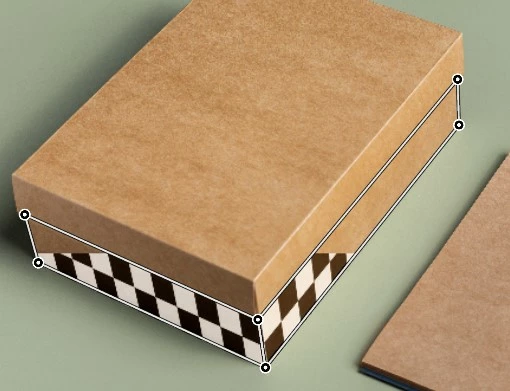
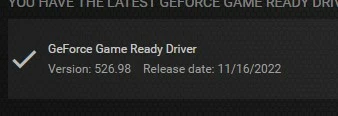
I have tried using old PS version (ver 23.0) to latest (24.0) and it's still same error. and so my graphics card is the latest version
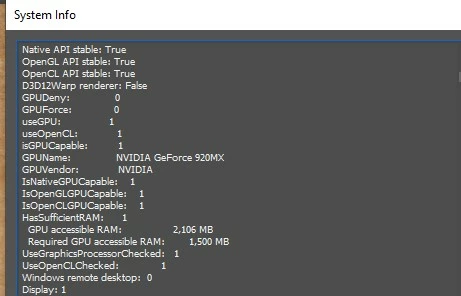
Thank you

This topic has been closed for replies.

2 replies

Earth Oliver
Legend
November 27, 2022

Perspective Warp has had multiple bugs and UX for years now and Adobe can't/won't fix them.

J E L
Community Expert
Community Expert
November 27, 2022

I guess it depends on your system and what you are doing, @Earth Oliver. Following these guidelines, the Perspective Warp tool works for me, as it has with versions going back at least two years. (Windows 10, Photoshop 24.0.1 Release). https://helpx.adobe.com/photoshop/using/perspective-warp.html

J E L
Community Expert
Community Expert
November 27, 2022

Hi @ImranAM On your driver, it looks like you're running the Game Ready Driver. Photoshop is known to run better with the Studio Driver. Can you possibly test that out to see if it makes a difference? Log into your GeForce Experience account to download the latest version. Let us know what happens.

ImranAMAuthor
Participant
November 28, 2022

Hi @J E L I have searched but Nvidia studio is not supported for 920mx series, is there any other solution?

thanks for replying