Participant
May 14, 2017
Answered

Photo captions for newspapers

  • May 14, 2017
  • 5 replies
  • 456 views

I used to be able to type my photo captions into file info and they would automatically appear in the pdf. This doesn't happen and I now have to create a text box under my photo as a separate identity. I don't want to caption into the photo itself. Is there an answer to this please?
This topic has been closed for replies.
Correct answer barbara_a7746676

Maybe this workaround will help you. It does not involve File Info.

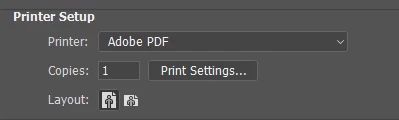
Instead of saving as Photoshop PDF, choose File > Print.

In the Print dialog, choose Adobe PDF as your printer.

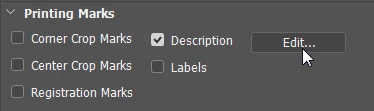
You may need to scroll down to see Printer Marks.

Put a check on Description and click the Edit button. Type in the label that you want to appear in the PDF.

Then go ahead and print to PDF.

When you open the PDF, you should see the Description that you typed in the Print dialog box.

5 replies

Stephen Marsh
Community Expert
Community Expert
May 15, 2017

Scribe_au11  It would help if you could show the forum exactly which metadata field by a screenshot and how you are viewing the file’s metadata (in Acrobat etc). A download link to the file would also be helpful. There are many metadata fields/formats, both current and legacy etc.

barbara_a7746676
Community Expert
Community Expert
May 15, 2017

You should be able to type the description into File Info, instead of doing it in the Print dialog, but it acted a little buggy when I tried to do that on my computer. It might work on yours.

Turning on Labels should put the file name into the PDF.

barbara_a7746676
Community Expert
barbara_a7746676Community ExpertCorrect answer
Community Expert
May 15, 2017

Maybe this workaround will help you. It does not involve File Info.

Instead of saving as Photoshop PDF, choose File > Print.

In the Print dialog, choose Adobe PDF as your printer.

You may need to scroll down to see Printer Marks.

Put a check on Description and click the Edit button. Type in the label that you want to appear in the PDF.

Then go ahead and print to PDF.

When you open the PDF, you should see the Description that you typed in the Print dialog box.

barbara_a7746676
Community Expert
Community Expert
May 14, 2017

Photoshop can create digital captions in FIle Info, but can not create visible captions that show in the PDF. Visible captions need to be done manually.

c.pfaffenbichler
Community Expert
Community Expert
May 14, 2017

How do you create the pdf exactly?

Why pdf anyway?