chrissydetroit
Known Participant
September 20, 2018
Answered

Photo Filter

  • September 20, 2018
  • 1 reply
  • 417 views

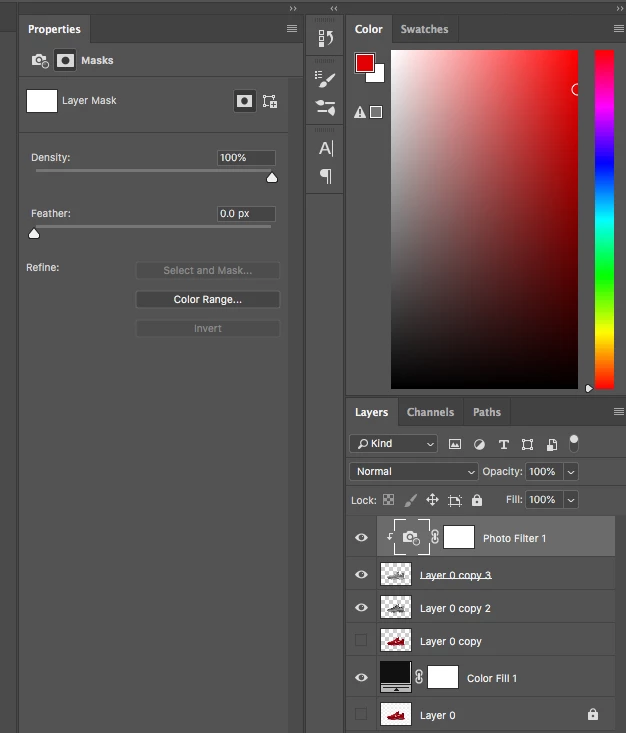
I'm watching a tutorial on Youtube on how to turn tennis shoes gold and at the 2:59 mark in the video, I'm missing, Cyan, Magenta and Yellow. I posted a screenshot of what I'm looking at in Photoshop. I posted the link to the YouTube video also. Thanks in advance.

[Photoshop Tutorials] How to create a Gold Effect in Photoshop easily - YouTube
    This topic has been closed for replies.
    Correct answer

    Hi

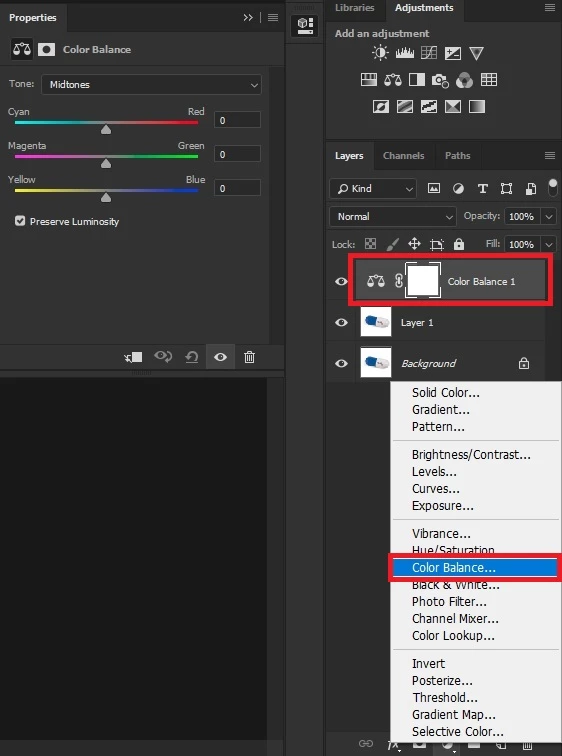
    The tutorial shows a color balance adjustment layer been added not a photo filter

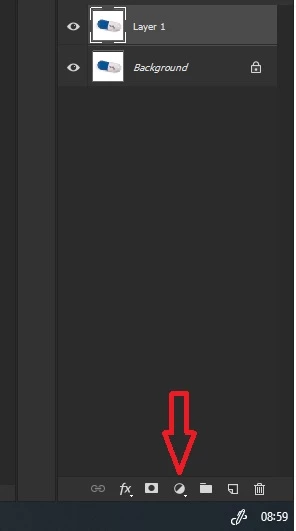
    Click on the Create new fill or adjustment layer icon

    Then add a Color Balance adjustment layer

    1 reply

    Correct answer
    September 20, 2018

    Hi

    The tutorial shows a color balance adjustment layer been added not a photo filter

    Click on the Create new fill or adjustment layer icon

    Then add a Color Balance adjustment layer