Participating Frequently
June 25, 2017
Answered

Photo Merge - Templates/Apply same stitch to adjusted images for a composite

  • June 25, 2017
  • 1 reply
  • 1496 views

Hi,

When using photo merge, all things being the same except some some exposure changes to the same set of images in LR, the panoramic images are not aligned the same.

I'm trying to create a composite where I need to adjust the image files and end up with two images stitched/aligned the same.

Any ideas on how this maybe possible using PS?
This topic has been closed for replies.
Correct answer JJMack

Photo Merge says it cant merge smart objects. Is that what you meant?


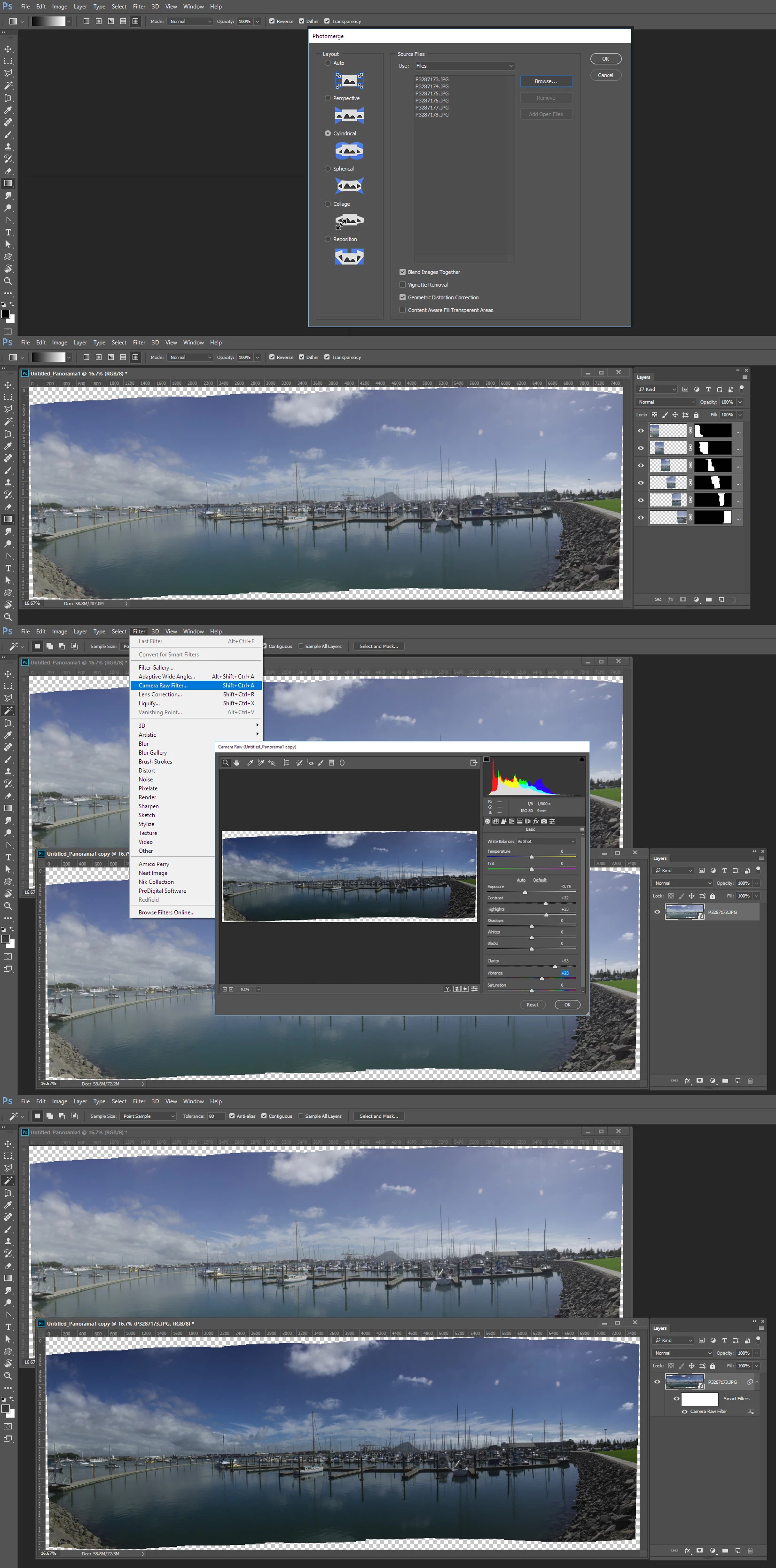
No.  You use Photomerge to stitch your un- adjusted image files into as stitch panorama document and save your panorama document.  Panorama document you duplicate into a new document and target the two layer and convert them into a smart object layer.  Your un-adjusted panorama is now a single smart object layer.  You the use menu Filter>Camera Raw Filter and adjust the exposure of the panorama.  You do not stitch twice you adjust the exposure of the stitched panorama.

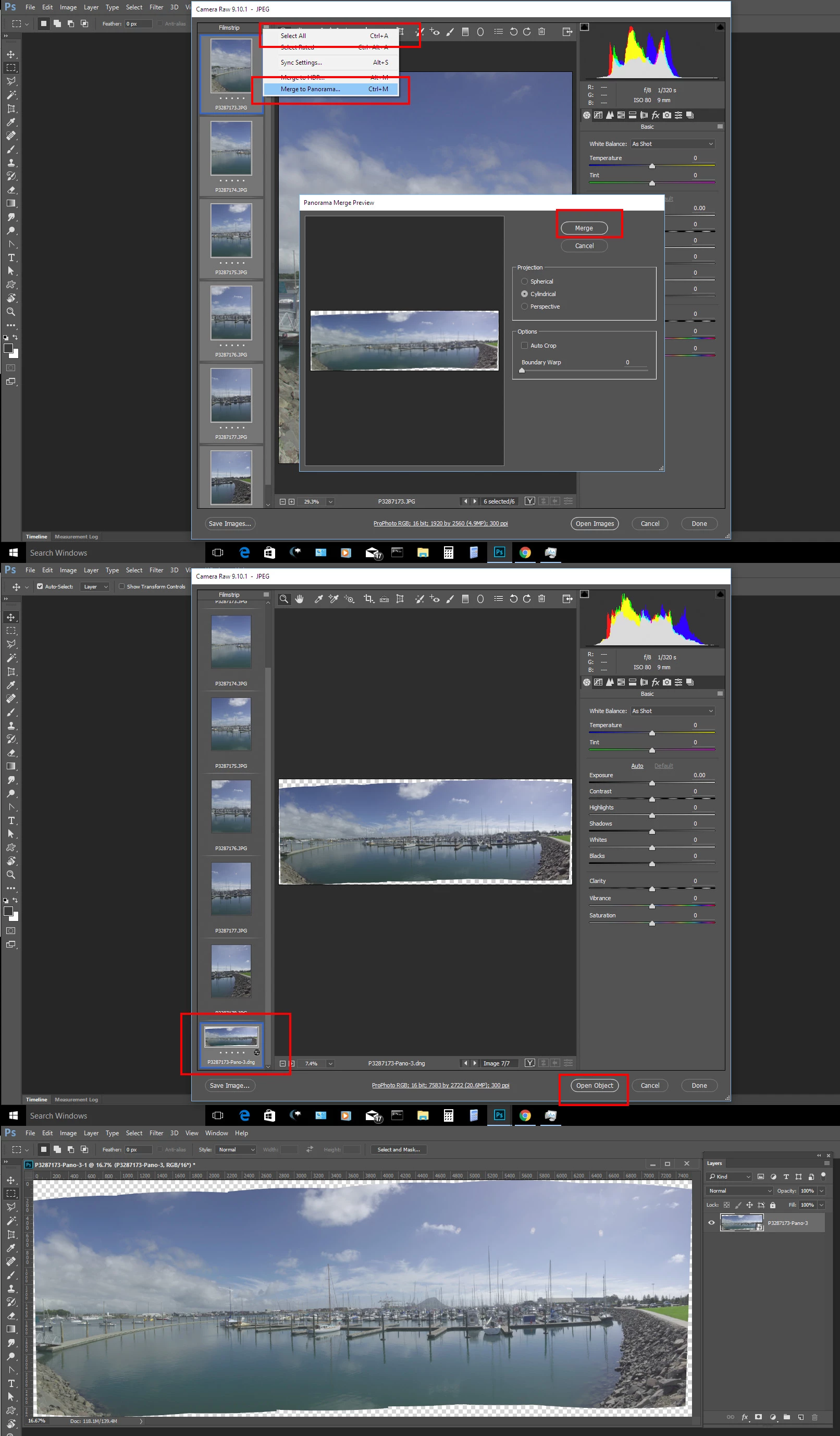
I do not use lightroom but withe Photoshop I can open  all the image to be stitched inot Photoshop Plug-in ACR and select all the thumbnails in ACR dialog and hasb ACR stitch the images int a DNG file I can open as a smart object layer.

1 reply

JJMack
Community Expert
Community Expert
June 25, 2017

I do not use lightroom but if you use lightroon  and change image exposure from one to to an others  that seem like it destroys the whole practice of keeping all image the same so they can be stitched together the best they can so the seam will have great detail and look seamless.

I also do not believe what you see in Photomerge dialog are templates they are more like  what type of Panoramic projection to create. Where Auto most like looks at the number of images,  their overlap layout and the Len used to choose which type would be best Perspective, Cylindrical or Spherical.  I never understood what Collage is its lcon looks just like the Cylindrical's icon without the blue background. Perhaps that is what you should use the missing blue in the icon may mean Photomerge will not try to adjust the image it will just to stitch them. When overlap is not good you try Reposition. There are additional option in the Photomerge for using additional image adjustments.

IMO When you use Photomerge you should not adjust the images used you should let Photomerge do its thing.

With two image you may want to use Cylindrical all the time with Auto either  Perspective or Cylindrical will be used depend what the field of vile works out to be above  120 degrees Perspective will introduce to much distortion .

JJMack
RP2A03Author
Participating Frequently
June 25, 2017

Thank you.

Im not individually changing exposure on single images. What I was trying to do is have the same output in alignment, of the same set of images with different exposures if possible.

JJMack
Community Expert
Community Expert
June 25, 2017

In that case why not simply stitch once dupe the stitched image, Make the two layers into a smart object layer  and adjust the smart object layer with Photoshop's  ACR filter. as a smart filter.

JJMack