Participant
November 8, 2020
Question

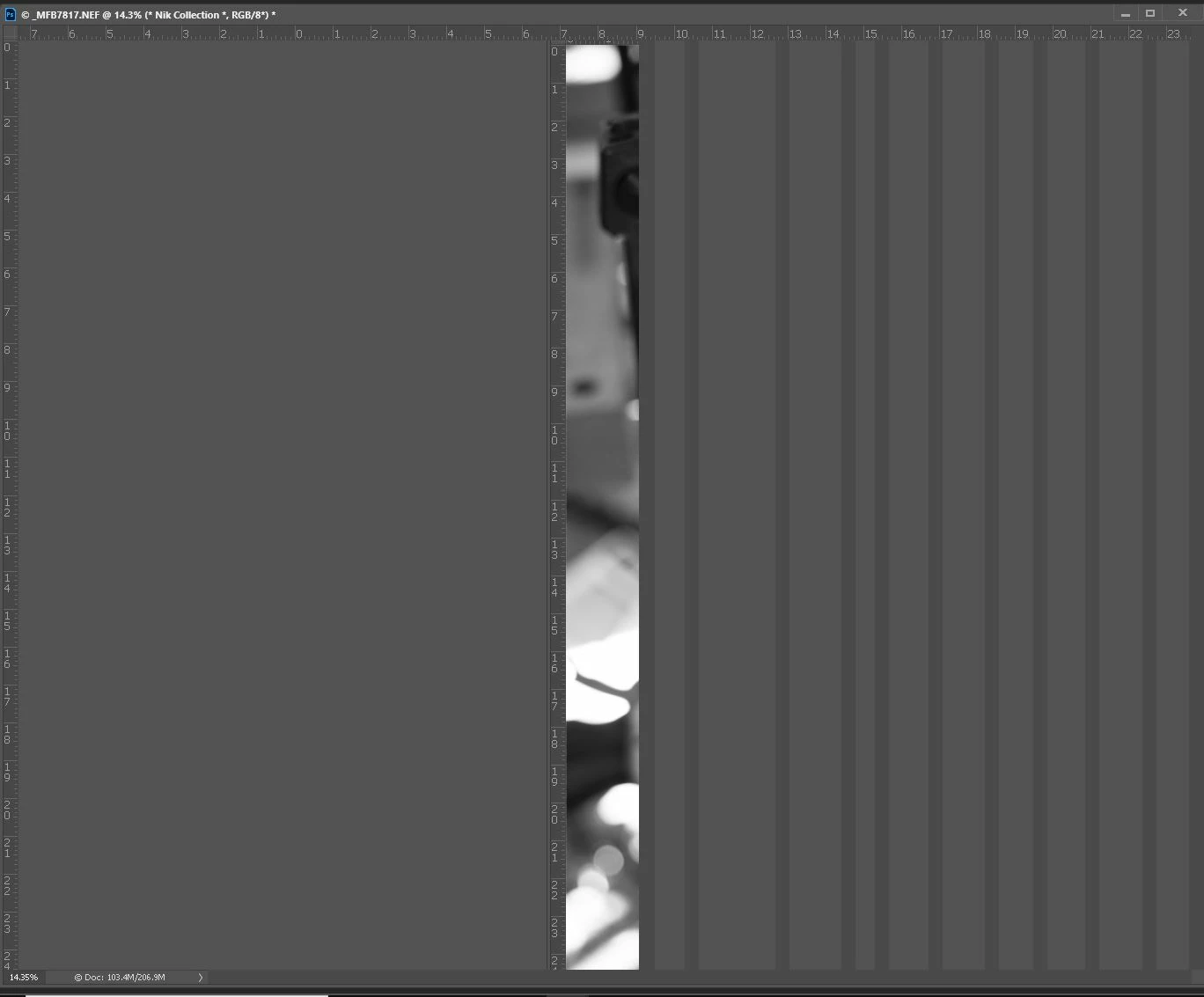
Photographs become a sliver after zooming to 100%

  • November 8, 2020
  • 1 reply
  • 150 views
I have found that after using Silver FX on a photograph if I zoom in all the way and then zoom back out Photoshop stops drawing the full image.. If I save the file it is all there. If I reopen the file after saving it is all there.I should not have to do that.
I'm running an i7 8700 with 32 Gb of RAM and a RTX 2070 GPU SSD for a boot drive and another SSD for a scratch disk. Latest version of Win 10 Pro.
I'm really getting tired of Beta testing for Adobe
This topic has been closed for replies.

1 reply

Mylenium
Legend
November 8, 2020

Simple compatibility issues with your super fancy graphics hardware. Not trying to beat a dead horse and nothing personal, but trhere used to be a time when the pro tip of the day was to give the developers time to get a handle on these issues and not buy the latest hardware out of the gate, especially in a day and age where there seems to be a new gadget every weak. And that is pretty much the point: You need to delve into your graphics driver settings and play around with the settings - perhaps enforcing an older OpenGL level will do, perhaps restricting the available GPU memory, perhaps rolling back to an older driver or installing a newer one, perhaps simply changing the hardware accel mode in the PS prefs will do. There's no standard answer to this and I'm pretty sure some developer responsible for this stuff is just as frustrated about these things as you are. So give it a whirl and methodically try to figure out what may improve behavior.


Mylenium

Participant
November 16, 2020

My GPU is not the latest hardware it was released in 2018.

If it was my super fancy GPU then why did the previous version of Photoshop work just fine with the same super fancy GPU?

Perhaps said developer should spend a little more time testing? And perhaps Adobe should stop pushing out updates with so many bugs?

I do appreciate you taking the time to respond

D Fosse
Community Expert
Community Expert
November 16, 2020

It's most likey a video driver bug. Yes, it could be a Photoshop bug, but the rest of us aren't seeing this.


Video driver bugs has been the scourge of Photoshop ever since it all began with OpenGL in CS4. The main reason is that video drivers aren't made for Photoshop, but mostly games and other similar applications that aren't too picky about standards and specifications. Corners are cut, just to get it to work in the market segment where the big money is. It improved somewhat when Nvidia introduced their "studio" line of drivers - but if you want a really reliable card, get a Quadro. These drivers are made for Photoshop, and CAD/3D/graphics in general.


New Photoshop versions always place new demands on the driver/GPU, as more and more GPU-resident functions are added. And there's a lot of new ones this time. That exposes latent bugs that were probably there the whole time.