Participating Frequently
March 15, 2020
Question

Photohop no abre normal

  • March 15, 2020
  • 1 reply
  • 404 views

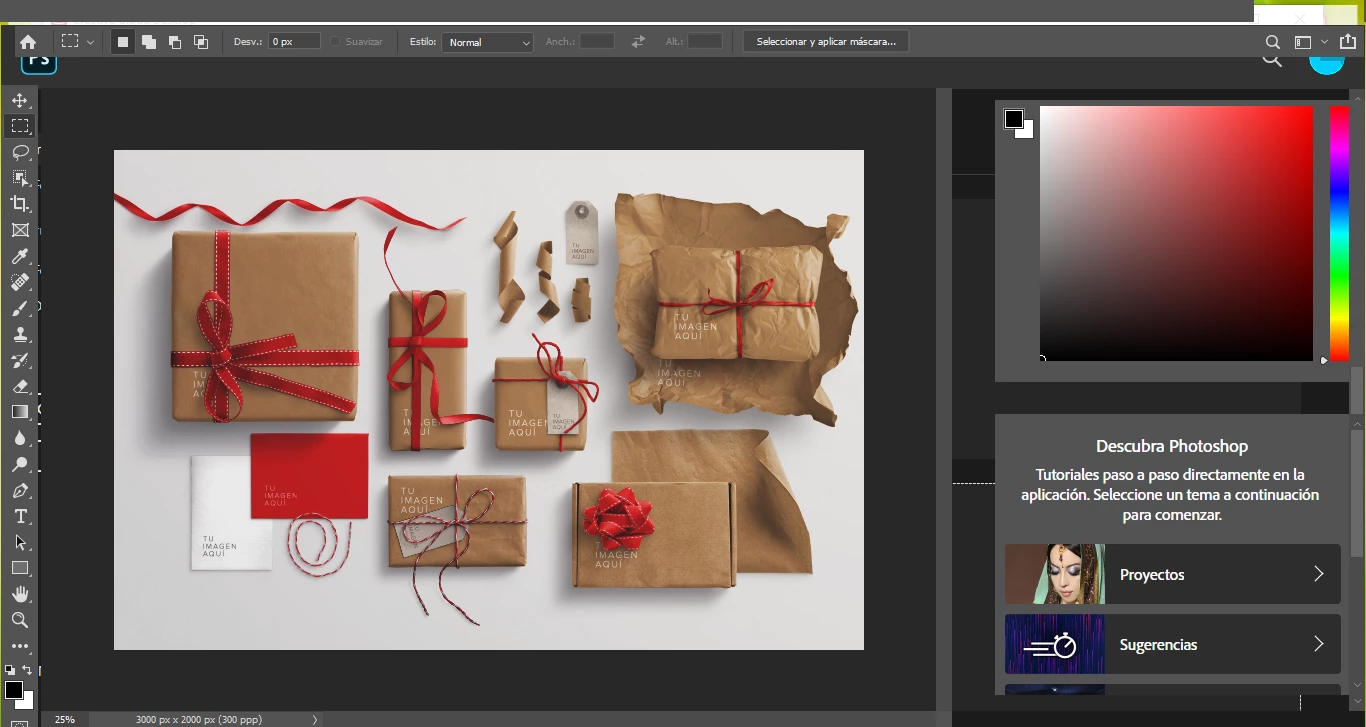
instalé Photoshop 2020 y no abre bien la aplicación, le quedan faltando cosas como el menú superior, y abren cosas a medias. Adjunto imagen. Lo desintalé y lo volví a instalar y sigue igual. Que hago?. 

No se puede poner full screen, las herramientas no se puede mover el panel
 

This topic has been closed for replies.

1 reply

Akash Sharma
Legend
March 17, 2020

Hi there,


Sorry that Photoshop opens up with a glitch in the user interface. 


Could you please try resetting the preferences of Photoshop and let us know if it helps?
To restore preferences quickly using a keyboard shortcut: Press and hold Alt+Control+Shift (Windows) or Option+Command+Shift (Mac OS) as you start Photoshop. You are prompted to delete the current settings. The new preferences files are created the next time you start Photoshop.

Also, make sure that you back up all your custom presets, brushes & actions before restoring Photoshop's preferences. https://helpx.adobe.com/in/photoshop/using/preset-migration.html


Thanks,

Akash

Participating Frequently
March 17, 2020

I did what you say but didn´t work. Looks the same