AncientGuidance
Participant
August 10, 2017
Answered

Photomerge Problem!

  • August 10, 2017
  • 2 replies
  • 260 views

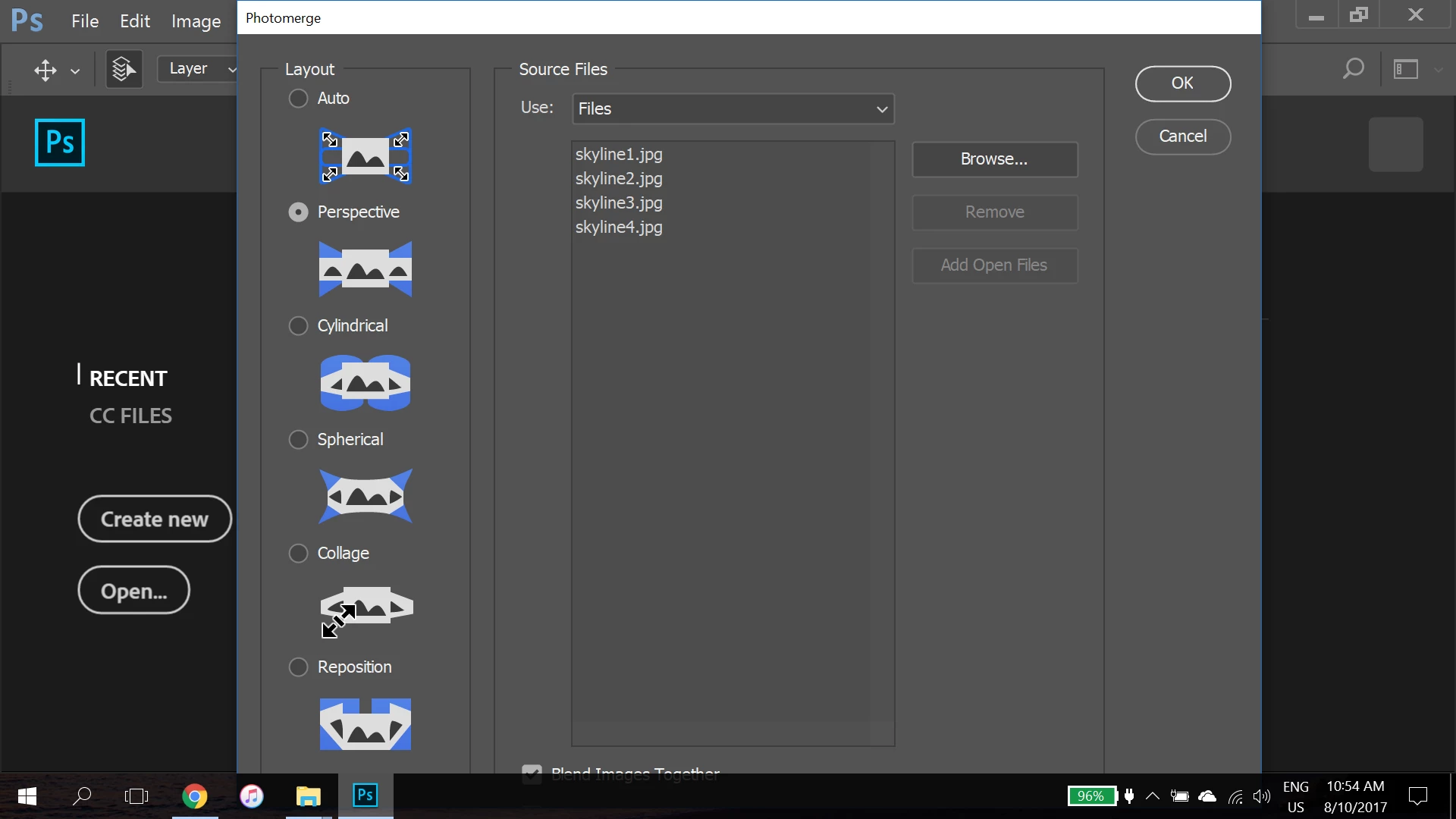
My Photomerge window is too large, and the lower menu bar covers the other checkboxes for Vignette Removal, Geometric Distortion Correction and Content Aware Fill Transparent Areas. I can't move this window above. How should I fix this?

I'm using windows 10, intel iris graphics with an i7 core, laptop computer.
This topic has been closed for replies.
Correct answer Chuck Uebele

Unfortunately, the only thing you can do is change the scaling of Photoshop to 100% instead of 200% or auto. At least do that when you have to use that UI. You do have to restart PS, which is a royal pain, and then everything else is too small to see.

2 replies

AncientGuidance
Participant
August 10, 2017

Thank you for your suggestion!

Chuck Uebele
Community Expert
Chuck UebeleCommunity ExpertCorrect answer
Community Expert
August 10, 2017

Unfortunately, the only thing you can do is change the scaling of Photoshop to 100% instead of 200% or auto. At least do that when you have to use that UI. You do have to restart PS, which is a royal pain, and then everything else is too small to see.