Participant
March 25, 2013
Answered

Photos printing darker than monitor

  • March 25, 2013
  • 2 replies
  • 40815 views

I have CS4 and have battled with this issue for a long time now.  I am so tired of it.  Before I throw out my Epson Pro Stylus 3800 and PS4 software I thought I would ask one more time.  I calibrate my monitor, I have taken photoshop classes, been on webinars for calibrating my monitor, etc.  And no matter what I do, my photos print several shades darker than what I see on my monitor. I use no color adjustment in my ps print settings as well as my printer settings and I really love photography but this really gets just too frustrating.  Is there anyone that can help me with this issue before i pull my hair out.

Thank you!

This topic has been closed for replies.
Correct answer gator soup

download Whacked RGB

http://www.gballard.net/photoshop/pdi_download/#downloads

delete printer

Download latest Epson driver and install

add printer back

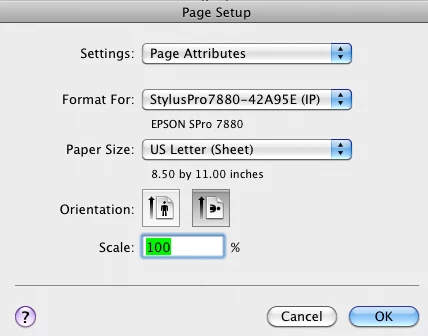
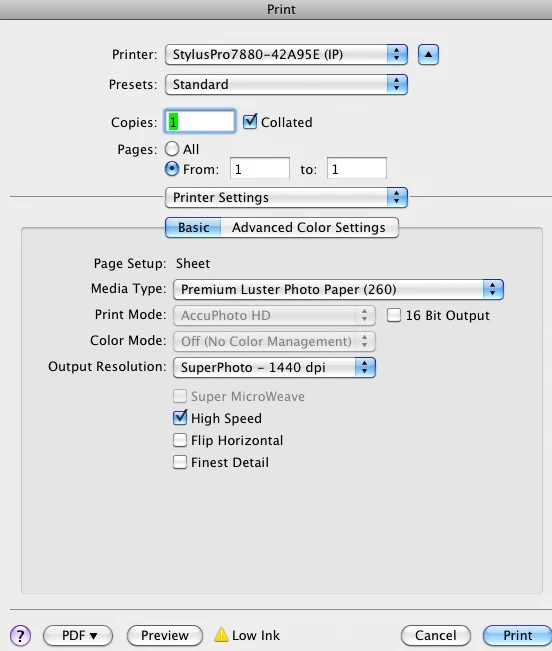
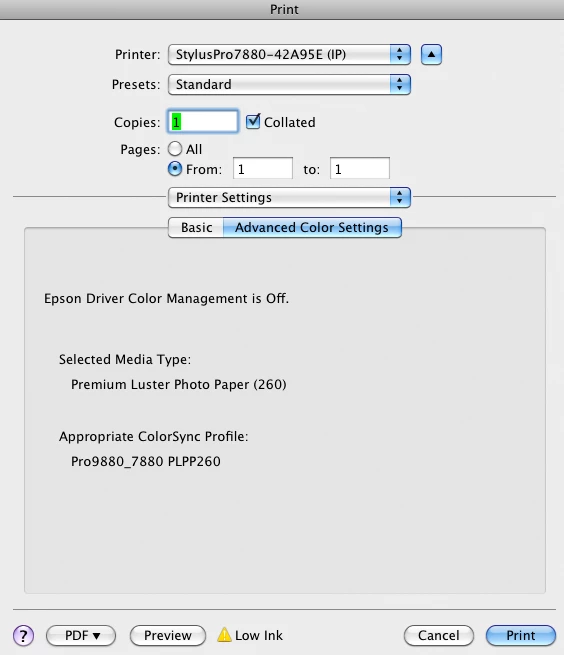
post these screenshots:

might also help if you note your OS

more troubleshooting Photoshop print problems

http://www.gballard.net/photoshop/epson/cs5/

2 replies

nflyc
Participant
April 12, 2015

Found the solution!

I was looking high and low for this answer and stumbled upon the solution in my printers color profile. I saw a ton of articles on monitor brightness calibration and I knew that just wasn't the case when other software was printing the colors correctly. After doing some digging, I found out that Adobe has it's own RGB color profile.  I looked up how to change the "color modes" with "custom color correction" on my printer and found a preset for Adobe RGB (which bumped up the gamma 2.2).  Set the printer properties to Adobe RGB and print from it and the brightness matched much better (red was a little off, but that was also adjustable in my printers driver's properties.  Found this article describing the difference between SRGB (the standard for displaying color on the web) and Adobe RGB [ Working Space Comparison: sRGB vs. Adobe RGB 1998, ] Apparently SRGB only uses like 35% of the colors, where Adobe uses 55% which led me to look up finding the Adobe RGB profile and luckily it was already an existing preset in my printer.

Good luck!

nflyc.com

D Fosse
Community Expert
Community Expert
April 12, 2015

I think you need to forget everything you think you know and take it all from the start.

If your prints are too dark, your monitor is too bright. Yes, it really is that simple.


All this provided you are using the correct printer profile for your printer/paper/ink. These are typically called things like <printer name> premium glossy photo and so on, depending on the paper used. Also remember to set the correct paper type in the printer driver. This controls the total amount of ink.

Adobe RGB is the document profile. That's something entirely different. There are two profiles involved here and both need to be right.

nflyc
Participant
April 12, 2015

D Fosse, either way,  it worked.  Maybe I'm not aware  of something, or you didn't fully read my last post.   When I print with other software on my computer, the brightness prints as it shows on the screen.  This issue only happens with photoshop.

Also, my printer actually has Adobe RGB profile in it's driver software preferences .  I have photoshop set to allow my printer to do the color management and the file I was printing was an SRGB file


gator soupCorrect answer
Inspiring
March 25, 2013

download Whacked RGB

http://www.gballard.net/photoshop/pdi_download/#downloads

delete printer

Download latest Epson driver and install

add printer back

post these screenshots:

might also help if you note your OS

more troubleshooting Photoshop print problems

http://www.gballard.net/photoshop/epson/cs5/

Inspiring
March 25, 2013

OSX has a DARK PRINTING bug using Epson if you check 16 Bit in the print settings (uncheck 16 bit to resolve it) see http://www.gballard.net/photoshop/epson/cs6/#dark for more detailed info...