
Inspiring
October 31, 2019
Question

Photoshop 20.0.7 - tools locking up while editing using Wacom on macOS 10.13.6

  • October 31, 2019
  • 1 reply
  • 313 views

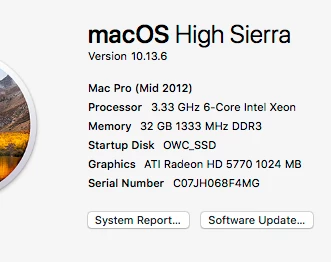
Running the latest version of photoshop on mac. specs below.

in the middle of doing editing on the image, toolbar will periodically lock up and default to the hand tool.  no other tools will activate. I've tried resetting preferences which sometimes works and sometimes not. I'll reboot system and most of the time that will fix it, but not always.  I have to say its a pain is the ars when this happens. Using an older wacom. Other than resetting pref. does anyone have a permanent fix for this?

thanks


{Thread title edited by moderator}

This topic has been closed for replies.

1 reply

nikunj.m
Legend
October 31, 2019

Hi there,


We are sorry about the issues you are facing with the tools in Photoshop.


Would you mind updating the drivers for your Wacom to the latest version or uninstall and re-install the drivers to check if that helps? You can also disconnect the Wacom for a while and test the application with a mouse to check if you face similar issues while working with the mouse as well. 


You can try to optimize the preferences of Photoshop to check if that helps.

https://helpx.adobe.com/in/photoshop/kb/optimize-photoshop-cc-performance.html


Regards,

Nikunj