joshatoodle
Participant
November 4, 2016
해결됨

Photoshop 2017 Fonts are Wickedly Stretched

  • November 4, 2016
  • 4 답변들
  • 4835 조회

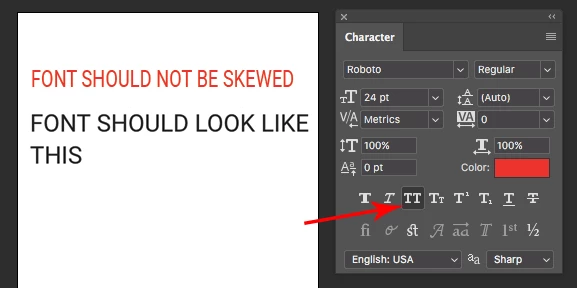
Anytime i add a new text layer in photoshop cc 2017 they are about 20% taller than they should be. and the character palette shows everything to be set properly (see below).

Anyone else running into this issue?
이 주제는 답변이 닫혔습니다.
최고의 답변: Jeff Arola

The only thing i see right off hand is the All Caps is enabled which could be the cause of the issue.

4 답변

Participant
March 23, 2023

I've had the same problem for ages. Now I discovered the reason why all my fonts got stretched.

Just check that the height and width of your characters are always set at 100%.


emilydove144
Participant
April 26, 2022

Hello, I've been having the same problem for a couple of years now. All of my fonts within both Photoshop and Illustrator are stretched. I have Photoshop version 21.2.3 on MacOS Monterey 12.2.1. Everything in the character panel looks normal to me, and I've tried reseting the character to no avail. 


Please help! It's driving me absolutely crazy.


Ged_Traynor
Community Expert
Community Expert
April 26, 2022

@emilydove144 

Have you tried updating your version of Photoshop from the Creative Cloud app, "Photoshop 22.x and earlier have not been tested for compatibility with macOS Monterey (version 12)" as per the below link

https://helpx.adobe.com/photoshop/kb/photoshop-and-macos-monterey.html

emilydove144
Participant
April 26, 2022

Thanks for the suggestion! I just updated and restarted but nothing has changed. Any other ideas?

Jeff Arola
Community Expert
Community Expert
April 8, 2020

What version of photoshop and operating system are you using?


What font has the issue?


Can you post a screenshot?

Jeff Arola
Community Expert
Community Expert
November 4, 2016

The only thing i see right off hand is the All Caps is enabled which could be the cause of the issue.

Inspiring
April 8, 2020

eeh not so fast, solvy mcsolverson.

I am having the same issue. Also notice the form of the "O" even if the font were all caps, there'd be no reason for it to be stretched like that.

I'll keep looking for another answer. 


Participant
July 30, 2020

Just try to reset the the character from Windows> Character> check the hamburger lines> Reset character.