Participant
November 3, 2016
Answered

Photoshop 2017 Stopped Working

  • November 3, 2016
  • 4 replies
  • 1918 views

I'm running Win 10 on both desktop and laptop. Ps 2017 downloaded OK on the laptop but not on the desktop. The download cleared 2015.5 so now I can't use any version of Ps. on my desktop which I use 95% of the time, 5% on laptop. It's clear there is a problem with the download and is in need of a rapid fix.  I'm paying for this service so come on Adobe it's time to pull your finger out and get this fixed. How about coming on here and acknowledge there is a problem and you are working on it.
    This topic has been closed for replies.
    Correct answer PSGreenie

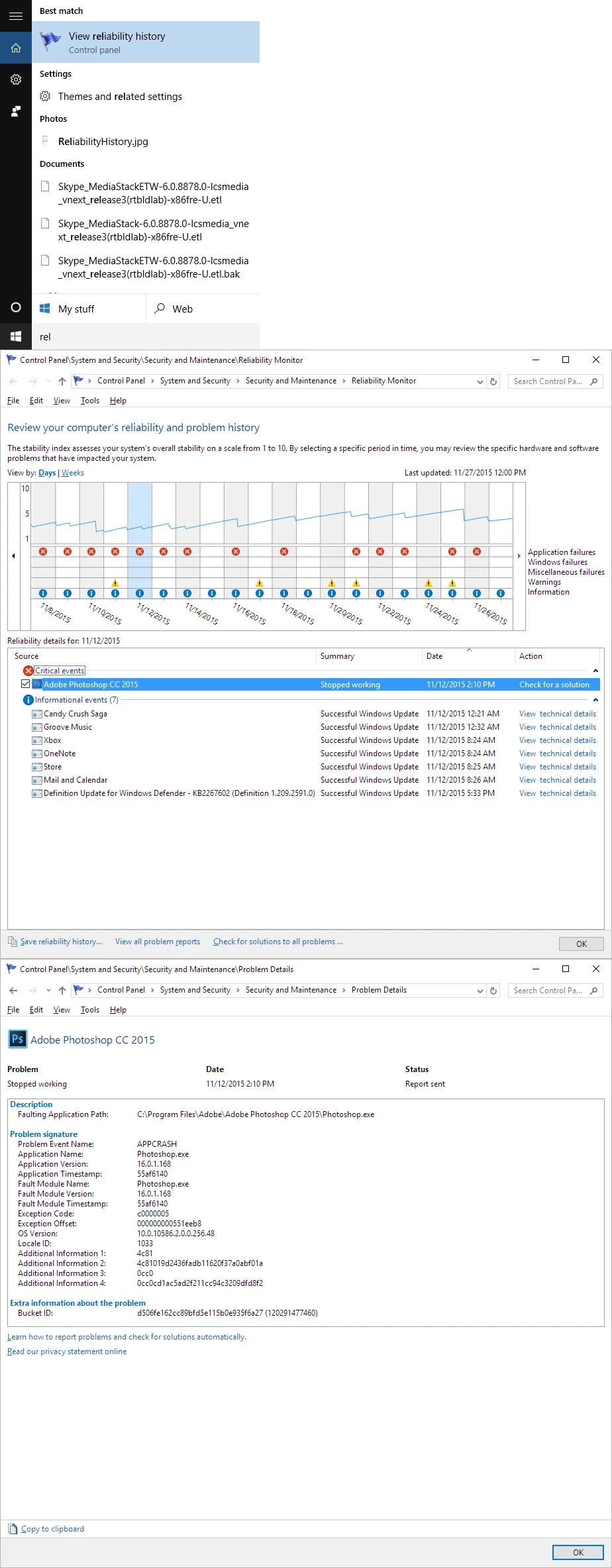
    Why not just use the Windows Reliability History Viewer.  Look at the Photoshop crashes details and post them here.  All you  are doing here is telling us you Photoshop don't run there is an error.   Please show us the error.


    Hi Thanks for your prompt replies. I located a post in German on an Adobe

    forum which referred to renaming a file LaversoftTcpService64dll to

    oldLaversoftTcpService64dll I did this and it appears to have worked. The

    file was located C:\window\system32\

    Thanks for replying promptly

    Paul Green

    4 replies

    Participating Frequently
    November 28, 2016

    I started having the same problems again WTF!!

    Studio Flip
    Known Participant
    November 14, 2016

    same problem here after clean reinstall for win 10

    Source

    Adobe Photoshop CC 2017

    Summary

    Stopped working

    Date

    ‎11/‎14/‎2016 5:42 AM

    Status

    Report sent

    Description

    Faulting Application Path:    C:\Program Files\Adobe\Adobe Photoshop CC 2017\Photoshop.exe

    Problem signature

    Problem Event Name:    APPCRASH

    Application Name:    Photoshop.exe

    Application Version:    18.0.0.53

    Application Timestamp:    57fde9fd

    Fault Module Name:    LavasoftTcpService64.dll

    Fault Module Version:    2.3.4.7

    Fault Module Timestamp:    555dc671

    Exception Code:    c0000095

    Exception Offset:    0000000000008902

    OS Version:    10.0.14393.2.0.0.256.48

    Locale ID:    1033

    Additional Information 1:    bfef

    Additional Information 2:    bfef348dfc3144f4211de2095b9089eb

    Additional Information 3:    aa5c

    Additional Information 4:    aa5cc194c9e535f8ba39d80cc627eacd

    Extra information about the problem

    Bucket ID:    5cdfd2650a8ee40cccb9415b7cc1c65f (120606218217)

    i'll go and try the mentioned dll fix now

    Studio Flip
    Known Participant
    November 14, 2016

    dll renaming fixed the error for me, photoshop is running now

    Studio Flip
    Known Participant
    November 14, 2016

    Forgot to mention, when renaming the dll file like this:

    enter in C://windows/system32 and rename

    the file " LavasoftTcpService64.dll"

    to " oldLavasoftTcpService64.dll "

    After Effects 2017 will not run

    after effects warning unknow exception

    No mention in the reliability overview

    Mohit Goyal
    Community Manager
    Community Manager
    November 4, 2016

    Hi PSGreenie,

    Open creative cloud desktop and open Photoshop CC 2017 from there and check if it still crash.

    Also, please help us with the crash log.

    How to find crash log on windows, refer: Photoshop Elements Editor Help | How to Find Crash Logs on Windows

    Thanks,

    Mohit

    PSGreenieAuthor
    Participant
    November 4, 2016

    Error

    04/11/2016 12:52:09Apps5973(5973)

    Copy of the Error line above

    Photoshop 2017 Still 'Stopped working'.

    I'm not sure what I need to do now. Please advise.

    JJMack
    Community Expert
    Community Expert
    November 4, 2016

    What module does the Windows reliability History viewer show is the failing module?

    google search the above error code it the error was for Photoshop.

    https://www.google.com/search?q=Apps+5973&oq=Apps+5973&aqs=chrome..69i57j0l5.2088j0j8&sourceid=chrome&ie=UTF-8

    JJMack
    JJMack
    Community Expert
    Community Expert
    November 4, 2016

    If you received a message Photoshop stopped working there should be a crash report for that Photoshop stopped working event. Post it.

    JJMack