
Johnny Sokko
Inspiring
October 17, 2018
Answered

Photoshop 2019: How to scale the UI?

  • October 17, 2018
  • 2 replies
  • 1817 views

Ok so I see the new feature list for the new Photoshop says you can scale the UI (tools, etc.). But not a word on HOW to do this. The new Illustrator has an easy slider in the preferences window. But Photoshop? I have no idea.

Anyone know how to scale the UI in Photoshop 2019? (I'm on a Mac)

Thanks-
    This topic has been closed for replies.
    Correct answer Muqqarib Hassan

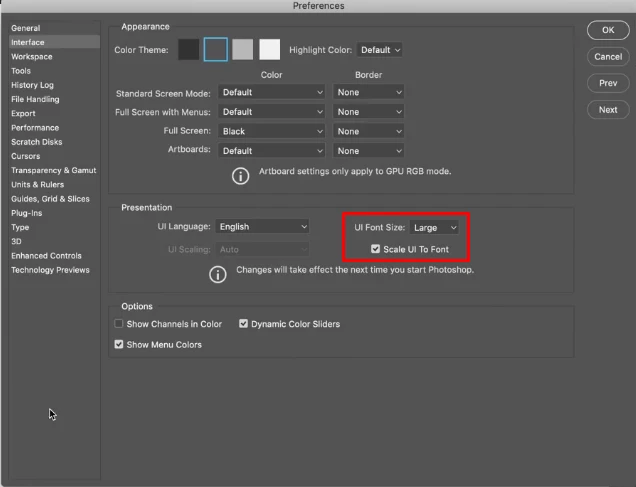
    Hi, Go to preferences>Interface> UI font size select the large. and check the Scale Ui and reboot your photoshop.

    Thanks.

    2 replies

    Johnny Sokko
    Inspiring
    October 17, 2018

    Thanks.

    Muqqarib Hassan
    Inspiring
    October 17, 2018

    You are welcome!

    Muqqarib Hassan
    Muqqarib HassanCorrect answer
    Inspiring
    October 17, 2018

    Hi, Go to preferences>Interface> UI font size select the large. and check the Scale Ui and reboot your photoshop.

    Thanks.