


Shenji
Participant
February 11, 2020
Answered

[Photoshop 2020] Cloud document not showing

  • February 11, 2020
  • 1 reply
  • 5828 views

Hello,


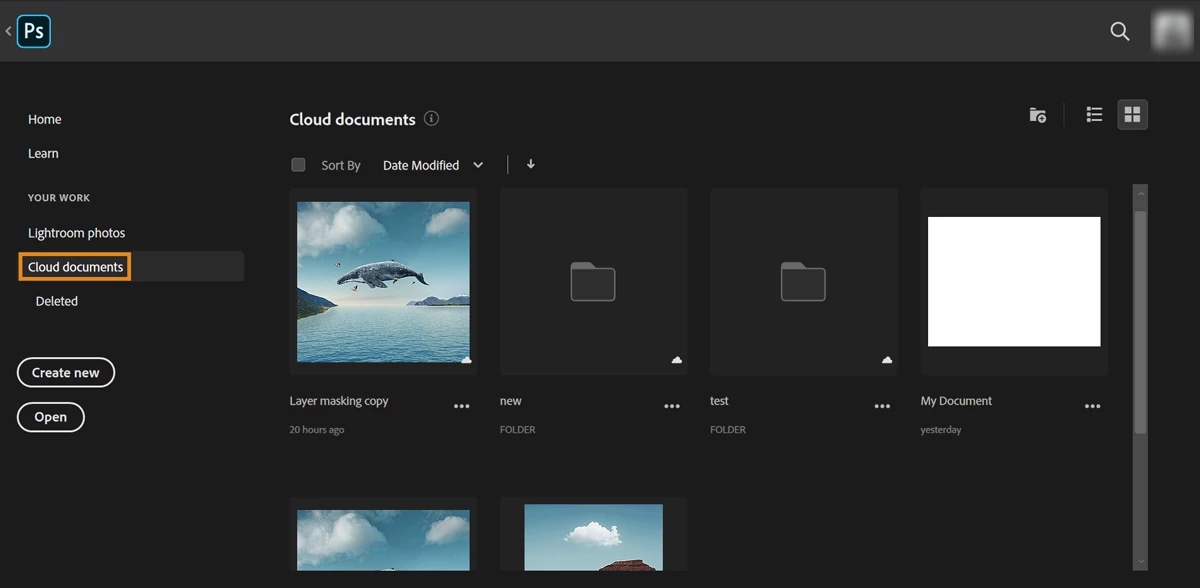
I use Photoshop 2020 for a few weeks and like it very much. Unfortunately, Cloud documents are not always available. On PC 1, I have an option when saving or opening a document : I can choose weither it's a local document, saved on my hard drive or a cloud document, saved in... (yes, the cloud).


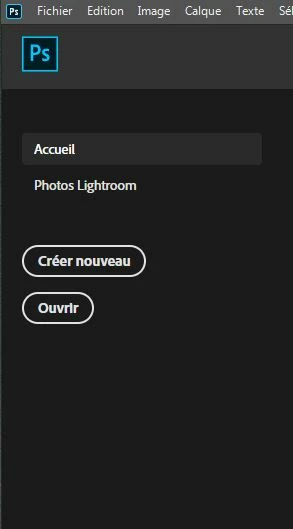
But on PC 2, with Photoshop 2020. I don't have any options to open cloud documents. The only way to use cloud documents is to go in my browser, download my file from Adobe cloud, then open it in photoshop (same when I want to save).


Here is the way PC 1 offers me to save to / open from cloud :
Here is the same screen (in french, sorry for that), on PC 2 :
Any help would be appreciated 🙂

Correct answer Shenji

Here are the versions I am using :


PC 1 (at home) : 21.0.3 - Cloud working in photoshop's interface

PC 2 (at work) : 21.0.3- Cloud options not displayed in photoshop's interface


I also use PC3 sometimes, which is a mac (Version Adobe Photoshop : 21.0.3) .

PC3 (at home) : 21.0.3 - Cloud working in photoshop's interface.


So, the only issue I can see is that my PC at work as a version of photoshop CC (2015) that is not up to date. For a reason I don't understand, I can't download it (the download is ok, but then when it's completed, the update of photoshop fails).


But from my point of view, it shouldn't be an issue since I'm using Photoshop 2020 and not 2015 ?


After trying for a few day, I guess I'll take a dropbox plan and use an old version of photoshop. This way I can stop my subscription and work with a cloud option.

1 reply

nikunj.m
Community Manager
Community Manager
February 11, 2020

Hi there, 


From the screenshot from the second computer, it appears that you are using an older version instead of Photoshop 2020 since the icon on the top left has squared edges. Would you mind going to the Creative Cloud desktop application on the second computer to check if there are any pending updates to Photoshop that you can install?


You can confirm the version of Photoshop by going to the "Help" menu in Photoshop, then selecting "About Photoshop".


Regards,

Nikunj

PECourtejoie
Community Expert
Community Expert
February 11, 2020

Good catch!