Participant
May 27, 2020
Answered

Photoshop 2020. Freeze when doing corrections.

  • May 27, 2020
  • 1 reply
  • 643 views

As soon as i start doing corrections, like changing the color balance or making a layer lighter or darker I get immediatly a freeze.
This topic has been closed for replies.
Correct answer nikunj.m
Hi there,
 
Apologies for the frustrating freeze with some Photoshop adjustments. Would you mind sharing your computers operating system? Since when are you facing this issue?
 
We have been able to reproduce the freeze on Mac and the engineering team is currently investigating a fix. If you are using a Mac, the current workarounds that we’re aware of are:
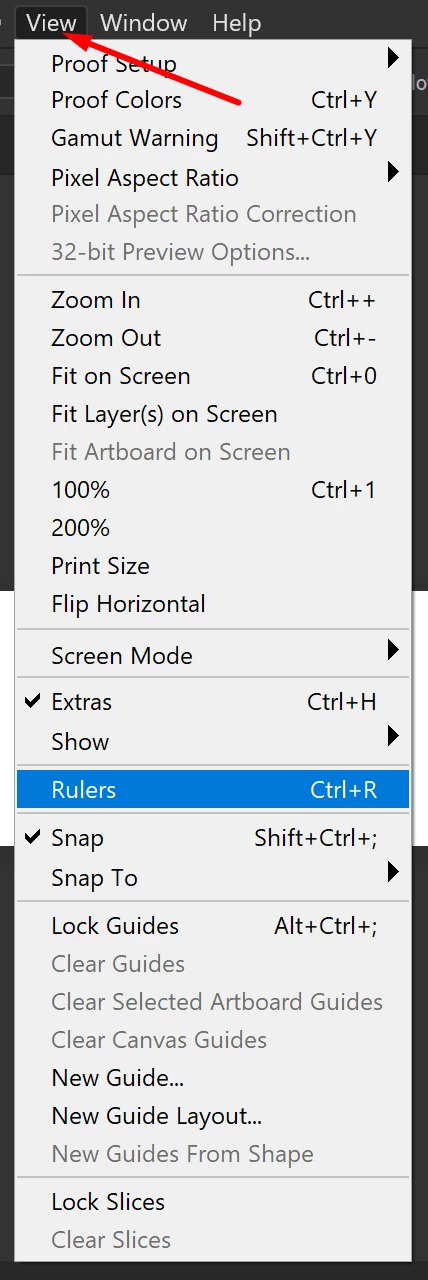
  • Disable Rulers (CMD+R on Mac, Ctrl+R on Win), or by going to the View menu.


  • Or move the Adjustment dialog outside of Photoshop’s workspace/interface before touching any sliders.
 
Let us know how this goes!
Regards,
Nikunj

1 reply

nikunj.m
nikunj.mCorrect answer
Legend
May 27, 2020
Hi there,
 
Apologies for the frustrating freeze with some Photoshop adjustments. Would you mind sharing your computers operating system? Since when are you facing this issue?
 
We have been able to reproduce the freeze on Mac and the engineering team is currently investigating a fix. If you are using a Mac, the current workarounds that we’re aware of are:
  • Disable Rulers (CMD+R on Mac, Ctrl+R on Win), or by going to the View menu.


  • Or move the Adjustment dialog outside of Photoshop’s workspace/interface before touching any sliders.
 
Let us know how this goes!
Regards,
Nikunj
Participant
June 4, 2020

This works for the moment. thank you.