itsaleehere
Participant
January 27, 2021
Question

Photoshop 2020 quit unexpectedly on macOS Catalina

  • January 27, 2021
  • 2 replies
  • 943 views

Hello ppl, I am using MacOS Catalina version 10.15.7

Whenever I try to install Photoshop, after installing on my mac, when i try to open it show me this error 
"Adobe photoshop 2020 quit unexpectedely" I am attaching screenshot too you can understand more better. I tried everything, by re-installing PS, re-starting my laptop. Please help if you know any solution.
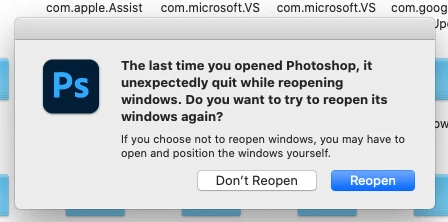


{Thread title edited by moderator}

This topic has been closed for replies.

2 replies

Participating Frequently
January 27, 2021

I'm having similar serious issues. I can't even open a jpeg file anymore without Photoshop instantly crashing. Makes my job impossible. 

nikunj.m
Community Manager
Community Manager
January 27, 2021

Hi,


We're sorry about the trouble with Photoshop. Please update Photoshop to the latest version (22.1.1) to check if the issue persists.


Since you're using macOS Catalina, please go to the System Preferences for your Mac, then Security and Privacy, then select the Privacy tab. Then select Accessibility from the list to the left & check if Photoshop is added to the list with a check mark in front of it. If Photoshop is not a part of the list, please add it by unlocking the window first using the lock at the bottom left, then clicking the + icon & navigating to the Applications folder. Also, grant permissions to Photoshop under Full disk access located in the same list as Accessibility. Once done, restart the Mac & check if it helps.


You can also try to reset the preferences of Photoshop using the steps mentioned here: https://adobe.ly/2Qzc0K3

Please backup your settings prior to resetting the preferences. You can check: https://adobe.ly/2vNz6FG


Let us know how it goes!

Regards,

Nikunj