Participant
February 2, 2020
Question

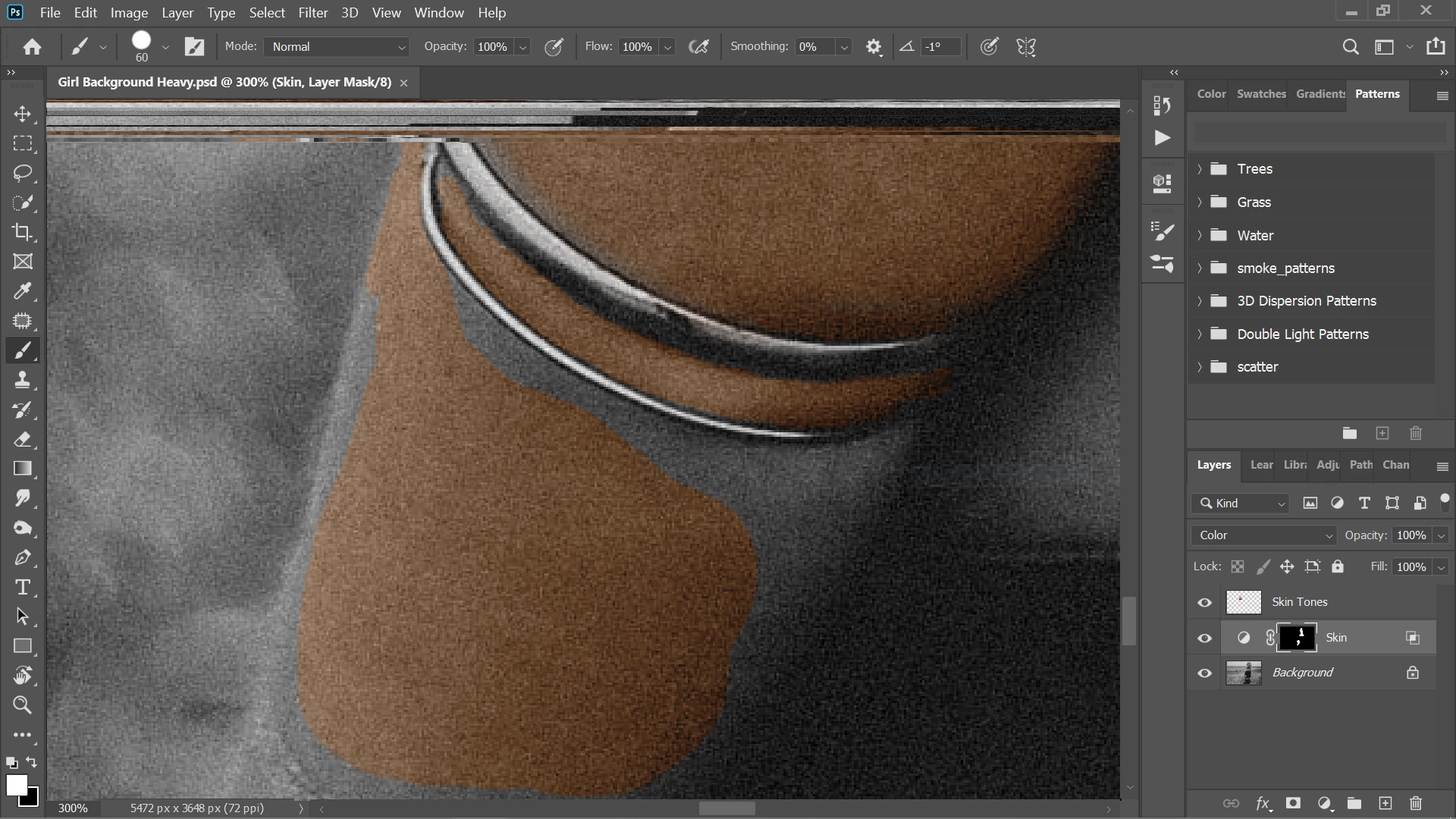
Photoshop 2020 top of screen broken

  • February 2, 2020
  • 2 replies
  • 264 views

At the top of the screen it is keeping a part of the screen that was previously there, after a while it fills too much of the screen to work however i can still paint over the area that is covered
 

This topic has been closed for replies.

2 replies

Just Shoot Me
Legend
February 2, 2020

I'm of the opinion that the image you have shown is corrupted. Post a screen shot of it at 100% and or Full image, FIT zoom.


On my system, Win 10, a Fuji RAF file, @ 300%, No problem at top of screen.

It is the image, corrupted, or your system, graphic card/driver.

JJMack
Community Expert
Community Expert
February 2, 2020

I do not edit in tabs your zoomed to 300%.  Looking at your image layers thumbnails and the scroll bars the image displayed look all messed up the top area is garbage. Is you display device driver up to date?

JJMack
Participant
February 7, 2020

I am able to fix the error by closing the application and deleing my temp files. So i dont think its a corrupt file. What do you mean by is your display device driver up to date as i am using a laptop; Acer Swift 3, Ryzen 5, Radeon vega graphics