
Participant
November 13, 2021
Question

Photoshop 2022 - Content Aware Crop not working

  • November 13, 2021
  • 2 replies
  • 1719 views

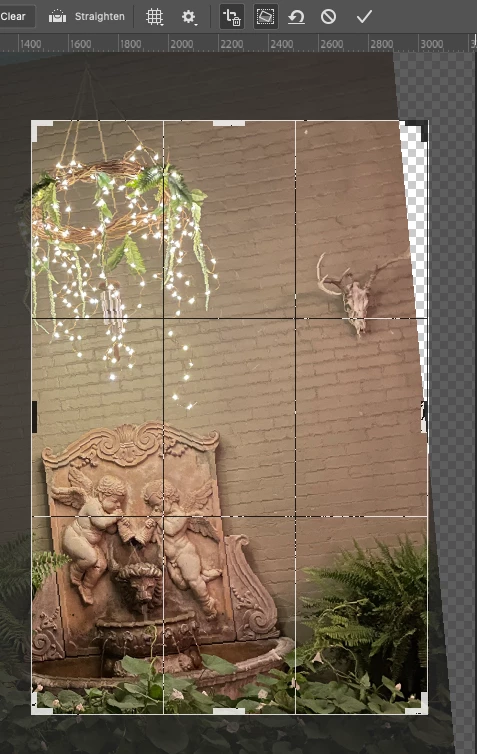
It did not work in my previous version of photoshop either.  I just got a new M1 mac and upgraded to 2022 and it still doesn't work. What's going on?


To be clear, I'm using it on a flattened image and the option is checked on in the toolbar, it just doesn't fill the pixels outside the crop as it used to.

 

This topic has been closed for replies.

2 replies

Earth Oliver
Legend
November 13, 2021

It's working fine here in Win10. I wonder if this is a GPU issue? 
Try Deactivate Native Canvas is Pref>Tech Previews

Myra Ferguson
Community Expert
Community Expert
November 13, 2021

Try using the Crop Tool to rotate the image so that there are edge pixels for it to sample. You can crop in a 2-step process if you want to add more pixels to the right side.

Or, you could select the empty section with the Polygonal Lasso and go to Edit > Content-Aware Fill to fill it in without cropping.

Earth Oliver
Legend
November 13, 2021

They're saying that Content Aware Crop is totally broken on their system...

Myra Ferguson
Community Expert
Community Expert
November 13, 2021

Since I tested his image this morning with 23.0.0 on Windows 10, I have updated to 23.0.1. With this version, if I try to use the Crop tool on his image without resizing or rotating but just having Content Aware selected, it still doesn't fill it in at all for me either.


If I expand the cropped area, it only partially fills it in.